Amezmo Review: Is it Secure & Trustworthy PHP Host?

With the growing popularity of PHP Hosting and all the misconceptions around it debunked, Amezmo has risen among hosting enthusiasts as the destination for quality PHP Hosting.

Amezmo is one such hosting service that makes php hosting super accessible and affordable for everyone. It supports all the mainstream technologies and platforms so you can make full use of its plan & features.

Let’s take a deep look into Amezmo to find out exactly what it has to offer and if you’re looking to get into the service yourself. Starting with…

Submit review

Submit a short but detailed review and get FREE link to your website.

Review Title

Ratings

Uptime

Performance

Value for money

Customer Service


Overall Rating

Upload image (Optional)


Free WordPress Hosting: Host WordPress Without Paying a Cent

Have you been looking around for free WordPress hosting services?

In that case, your search ends here.

Free services are always exciting. Even more exciting is the fact that you can avail WordPress hosting for free.

Whatever be your reason to choose a free WordPress hosting, I would like to mention that there are several free WordPress hosting providers available in the market.

Well, as a point of caution I would like to mention that free WordPress hosting comes with its own downsides.

So, take it with a pinch of salt.

Few of the limitations are-

  • Low Speed with no guaranteed uptime and performance
  • Low priority customer support
  • Issues with WordPress installation and plugins
  • Inbuilt Ads which are unavoidable
  • Low on security features
  • Less storage

Vimly Review: Is It Affordable, Fast, Eco-friendly?

The UK has a few facilitating associations, amongst which Vimly is one of the most trusted, and accepted names in providing shared hosting.

They have their administrative center situated in Portland House, Durham, United Kingdom. However, they were founded in North East England. Vimly was established in the summer of 2016, and the company was rebranded in 2021.

They started with a small community and evolved from the base to the top. A committed group with a creative outlook to keep themselves abreast of the most recent trends and market developments at a reasonable cost.

So, if you are confused and wish to know the exact insights on which shared hosting service to go for, you are looking on the right page. In this article, we will quickly take a tour of all the services offered by Vimly.

Uptime – Availability – Security

They have a remarkable uptime of 99.99%. They have their workers’ exceptionally intended forever accessibility, which utilizes green energy and runs on an eco-friendly server. This assists with observing the traffic and reserve content on your sites.

With almost 24×7 specialized help, you can get to their chatbot whenever and from wherever. Concerning accessibility, Vimly workers are well acquainted with it. You will consistently appreciate being in touch with Vimly workers.

You can make the most of their facilitating administrations through their well-tailored plans. Once a plan is purchased, no extra and unnecessary fees are charged. They work with zero tax or no other value-added service tax on plans.

Vimly plan

All their plans include SiteLock VPN, which comes with advanced security and high-speed network. They believe in providing military-based encryption protocols.

Vimly private access

All the plans offered by Vimly coordinate with the free 1-click-setup VPN for Mac, Windows, iOS, Android, and Linux. They provide security to every user at reasonable costs, across all devices.

Vimly features

Vimly uses a 256 bit AES encryption, which can provide security to 5 devices simultaneously. In addition to this, unlimited bandwidth and 1-click- apps for Desktop and Mobile are integrated with the plans.

Vimly protection

They have SSL security for all the accounts, which is worth more than what they are charging. The unlimited free encryption is free for all the users, across all plans of web hosting packages.

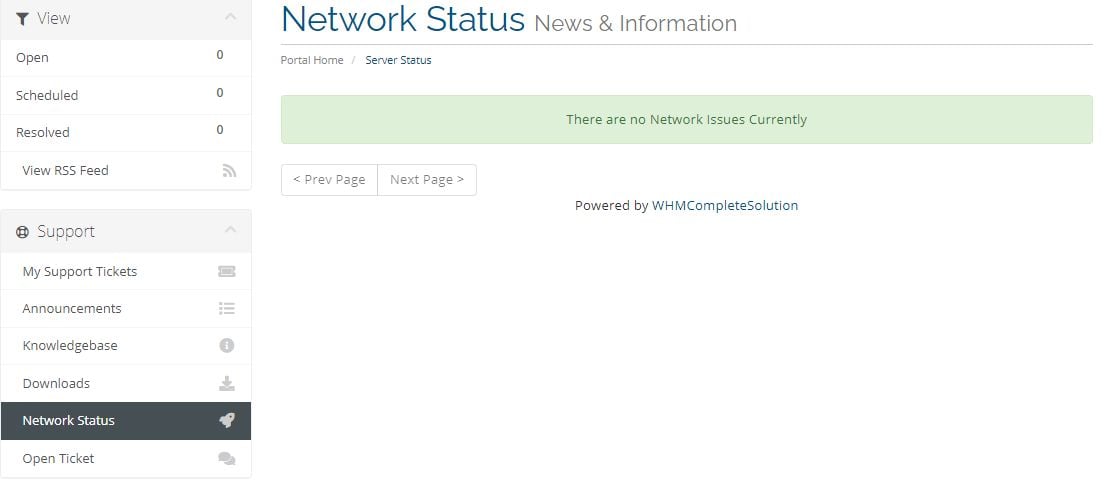
Vimly network status

Vimly: Pricing – Features – License

Vimly is one of the most affordable and reliable UK web hosting services. They provide Cpanel and NVMe SSD storage. They claim to be 100% British with their servers located in London.

Vimly pricing

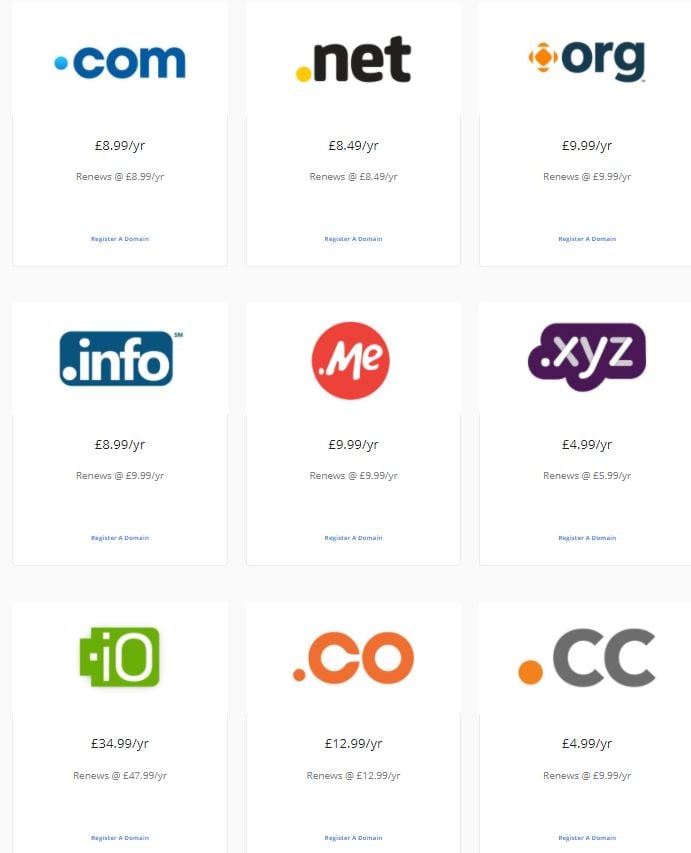
The domain comparison on their site will ease all your doubts and give you a one-stop solution for everything. They have correctly classified varied ranges of domains according to the locations and user’s needs.

Vimly domain Vimly domain

If you are worried about knowing your technical needs and will be needing technical support in the future, you no longer need to worry. Vimly believes in providing the best services by being 1000% transparent with its users.

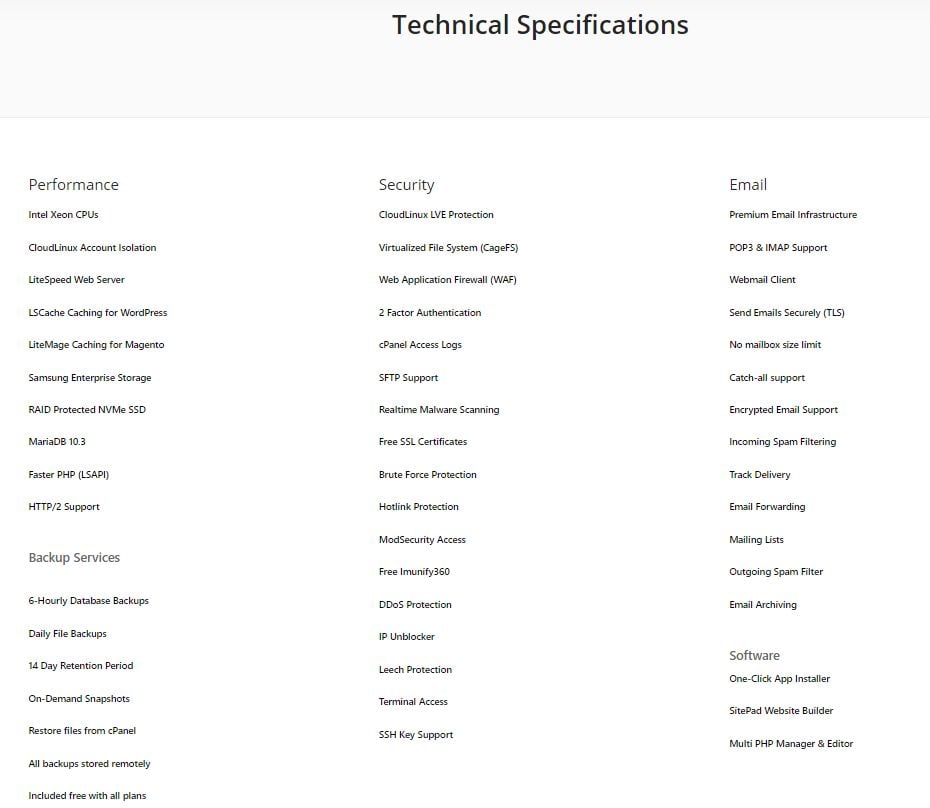
Have a glance over their technical specifications to get a broader insight into their customer support service. You will surely enjoy their professional assistant with so much to explore.

technical specification

If you plan to host a small business or a personal website, you will surely enjoy Vimly. They are the best in the UK with over 95% of happy feedbacks from their customers so far.

professional plan

With a minimal difference in their premium plans, they have already grabbed the attention of many customers from the UK. They are planning to expand their eco-friendly hosting services amongst their competitors.

Vimly: Knowledge Base

It has a blog for clients who wish to visit and read about the most recent market patterns. They lead online courses and occasions for their client on the most recently debated issues identified with facilitating administrations on the internet.

Along these lines, to conquer long procedural ways to solve problems via email, Vimly has planned a Knowledge Base that handles practically all the necessary and learner questions.

kb

Customer – Support – Ticket

Below is the screenshot that shows you how easily a doubt incurred is solved with Vimly. You just have to fill this short form and attach the necessary files and submit it to them. The company will get in touch with you shortly after the submission.

open ticket

Once it is submitted, you can also log in and check your ticket status. This is something exciting when it comes to problem-solving! They are amongst the best when it comes to customer feedback.

Here are some references that will provide a better idea over the problem-solving feature with Vimly!

Vimly ticket

Accessible – Clean – Easy to use

Vimly is anything but difficult to utilize and gives a perfect look to the clients. You can ride practically all the assets through them. You can make/sign in to your account and locate the most recent distinctions you have to think about your arrangements.

The site is convenient, and any beginner can rapidly get accustomed to it. Online journals make the website simpler by giving the most appropriate data for users.

Tickets tracking is another cherry on the cake. Network status shown online openly improves the trust and authenticity of the customers.

Vimly: Plan revocation – Reimbursement

They have an amazing and all-around recorded Refund Policy. In any case, the client’s deceitful and unsatisfactory circumstances may prompt the dropping of all future returns.

They have a 14-day money-back guarantee policy, which includes a 100% refund if the customer is not satisfied with their services and if the claimed services by them are incorrect.

Vimly services

Vimly: Conclusion

Vimly is overall the best deal if you are looking to buy a hosting service in the UK. Their online support is best so far, and network availability is another plus point to go for their services.

Another exciting part is the SSL security for all the users and unlimited bandwidth over the network. Finally, considering all the perks and cons, they have a good hold in the market and are trusted over years of service with positive replies from customers.

We recommend you try this service if you are from the UK and looking forward to a hosting service or a domain for your personal or small scale business. They are the most affordable, fast, and eco-friendly!

Jimdo Review (2024) – Things you always wanted to know

Jimdo is one of many website builders that have created a space for budding entrepreneurs and visionaries to create something special. Every idea needs a website and for every idea realized, there is a market.

It’s interesting to talk about website builders now because there has been a huge shift. Website builders not only create the perfect site. But a complete eCommerce solution now.

For example, Jimdo offers legal page documentation for your website. You can rely on them for GDPR-compliant-ready documents. This means you can lay some work off your back.

What exactly is Jimdo?

Jimdo is your one-stop shop for designing a website or online store. Jimdo was founded in Germany in 2007. The company claims that over 32 million websites have been built on its platform since then. Jimdo now employs 350 people and is headquartered in Hamburg.

You can use Jimdo to, depending on your plan—

  • Purchase a domain
  • Design & host a website
  • Create a blog
  • Sell products online

It is a ‘hosted’ solution, which means it runs in your browser. No messy software to deal with on your own computer and no external hosting is required.

Although Jimdo isn’t the biggest fish in the ocean, it is reasonably large. It is a well-established company with a sizable user base. So basically, your website will be in safe hands, you will get frequent quality updates for web design, and no possible prospect of shutting down, killing your website along with it.

So, while Jimdo is a reasonably safe bet, is it a good one? Can it really be used to create a professional website?

Let’s get into the Pros first shall we?

Pros of Jimdo

Jimdo Pricing

It’s always great to have a free plan when you’re looking to test a service. Jimdo definitely has one and it has all the basic features to get just enough out of it.

Jimdo Features

A great way to describe Jimdo is its bold design. Things might seem quite simple on the surface. But the website has a smart underlying design direction.

As for features, Jimdo is packed with eCommerce features that sell themselves. If starting an eCommerce business is what you’re into, Jimdo could be your best.

Jimdo Edit Website

First off the website builder is definitely the highlight. Jimdo has its website builder built right into its hosting service. You can access it from the sidebar.

Jimdo’s website builder uses a block system for adding an element. For example, if you have a sale going on your website and you’d like your visitors to know about it, you can add a block under your navbar and fill it with the right content.

Jimdo Website Builder

The Design section of the website builder lets you edit the core visuals of your website. The options are not too many but they get the job done. You can edit the color palette. Then change how the buttons look, change fonts, and edit your site’s animation gimmicks.

Jimdo Business Listings

The marketplace integration is another highlight from Jimdo. This feature automatically integrates with Google listings, Facebook Marketplace, Instagram, and many other platforms to start selling right away.

These tools come in handy when you do not want to deal with an entire branch of procedures. Procedures like signing up and uploading things could be time-crunching. This simple integration fills in all the blanks for you.

Jimdo Logo Maker

Jimdo also has a logo maker built into the hosting service. You can create logos for your website or export them for any external use.

The logo maker itself is easy to use and simple in function. There are 4 sections you can use to craft a logo that sits right with your vision. The choices are limited but allow you to nail down the best version instead of adding much confusion.

Jimdo Privacy Policy Generator

Lastly, Jimdo’s legal text generator can create an accurate privacy policy, imprint, and T&C pages that usually require a legally suave writer to understand and implement properly. However, their Trusted Shops Guarantee only avails for EU websites.

Jimdo is aptly feature-packed and could be rightly named as the marketing powerhouse. But loses a few points over its website builder’s template-dependent system.

Ease of Use

Jimdo

Jimdo is not short on resources. Therefore, you can test out their services with a free account.

A free account that comes with HTTPS security, free domain, 500 MB storage. You can add up to 5 websites you can run on a 2 GB bandwidth. Not too bad, considering this plan is called ‘Play’, you can play around enough with these features.

The website initially made me accept a simple privacy policy prompt (excluding the daily tips & updates option). I managed to sign in in about less than a minute.

As you can see in the screenshot above, Jimdo has a simple setup page to configure its CMS for you. You can skip this section entirely to get to work on your own but I decided to follow the procedure to the end.

Steps 2 & 3 were pretty basic, mostly involving what kind of website I’m making and the name of the project. I thought up the most generic name that came to my mind. But Jimdo found a local business with my website’s name in London.

This geolocation feature in the setup process is kinda cool.
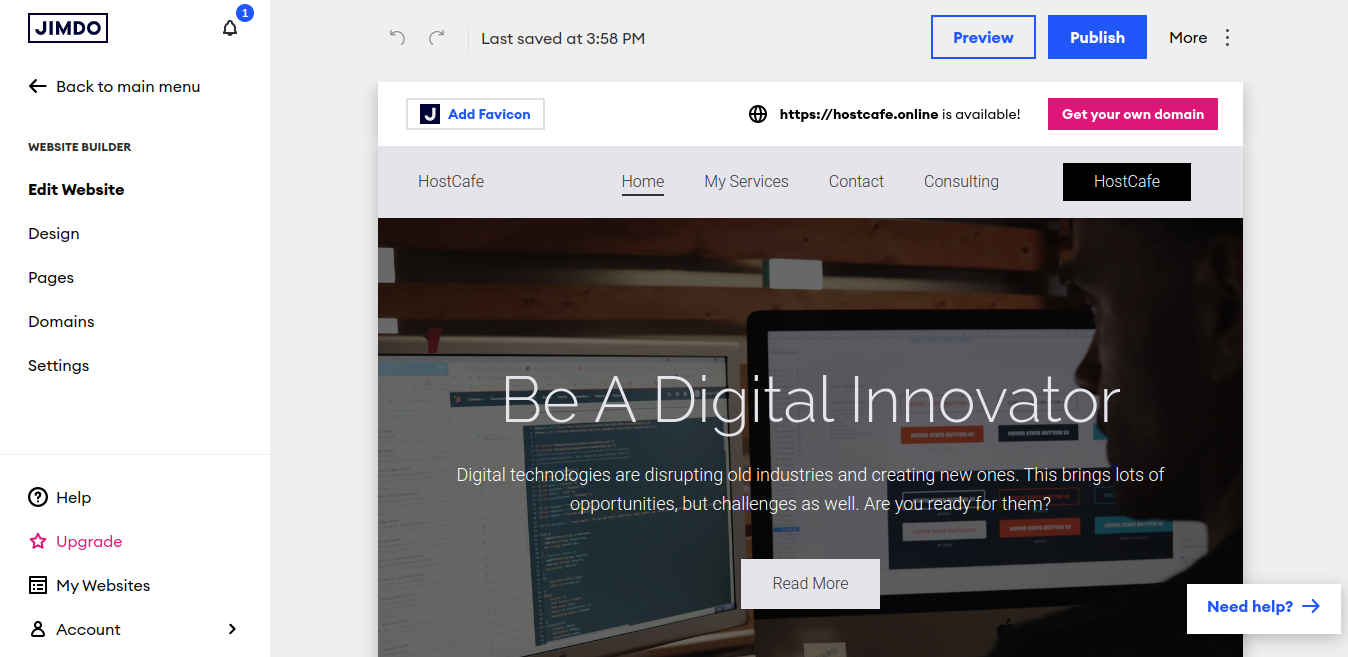
At last, the setup is done. The entire process has a total of 12 steps. Steps include selecting the theme and adding images from Instagram and Facebook. To be fair, the process is straightforward. It also feels great to have your entire website wrapped in a neat template.

What you see in the screenshot above is Jimdo’s Website Builder. Here you have plenty of options to edit your website as you see fit. However, the website cannot be made live as you will need a domain to do so (which Jimdo has options for).

Jimdo Website Builder

This is Jimdo’s dashboard. Compared to some other versions I’ve seen, it is visually simplistic.

No graphs or detailed stats to look at on the front page. You can, however, go to Statistics from the sidebar. You can activate this feature and get access to your sales and visitor numbers once you make your site live.
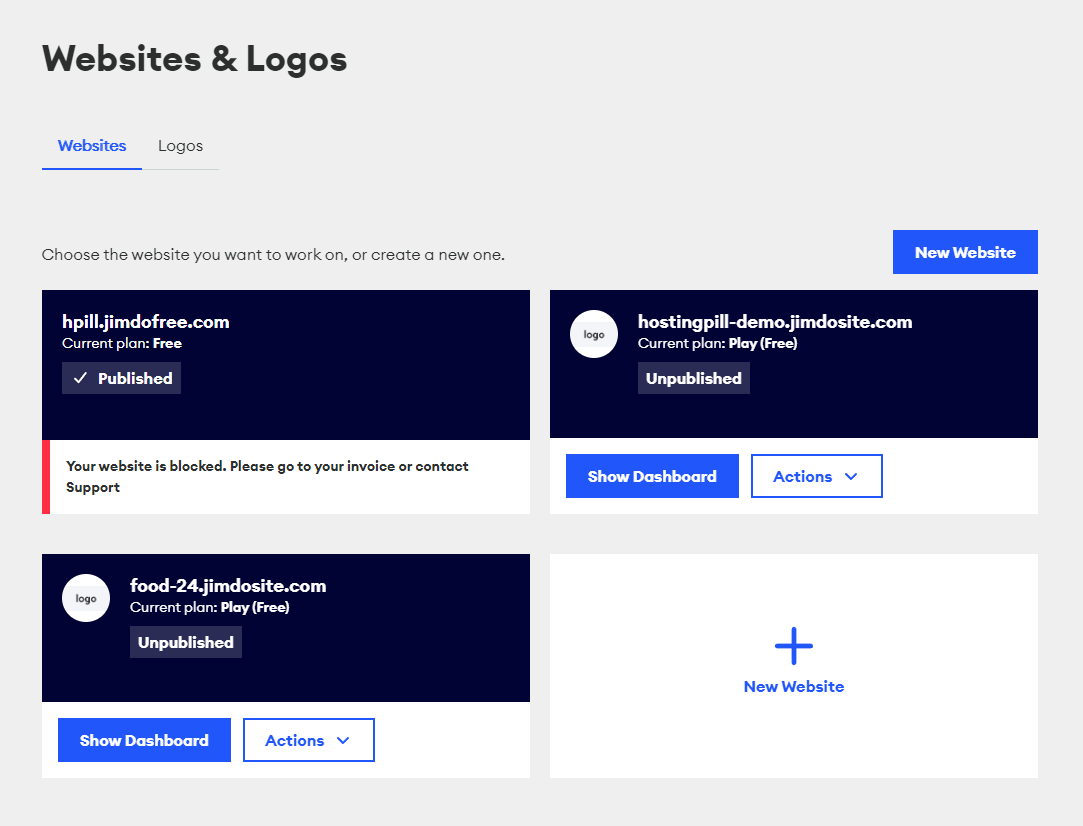
Upon logging in, there are 2 options— Websites and Logos. The Logo Maker is also present here. Maybe you can use this feature as a separate service for any internal or external priorities.
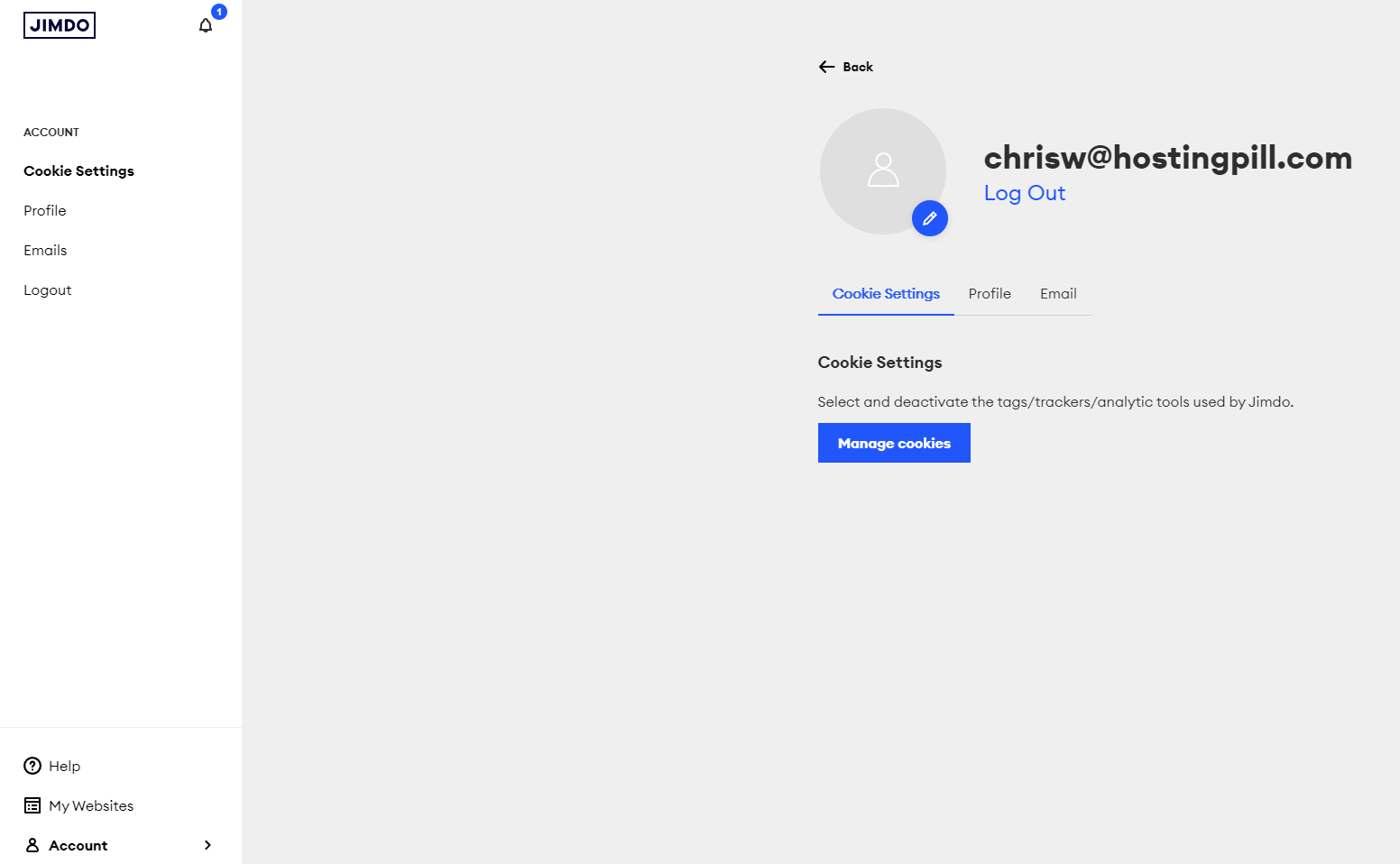
Finally, the logout screen is nothing special. More core settings can be configured here. Your cookies registered email, and profile can be updated or left as is. Jimdo does pry on having a fleshed-out bio in this section of your account.

You can simply log out from the sidebar.

As a simple assessment, Jimdo is easy to use. But that does not tell much. You can navigate fairly easily with the sidebar alone. But some settings can be seen being doubled over right in their sidebar section. This works both for & against Jimdo’s favor.

Response & Uptime

So Jimdo has decent features. Newcomers can create their website with no issues period.

But the main fight always comes down to performance. Their website lacks any performance details. I had to do some digging by myself. However, Jimdo is no small player and has some mid-large businesses in its portfolio. So there is some merit there.
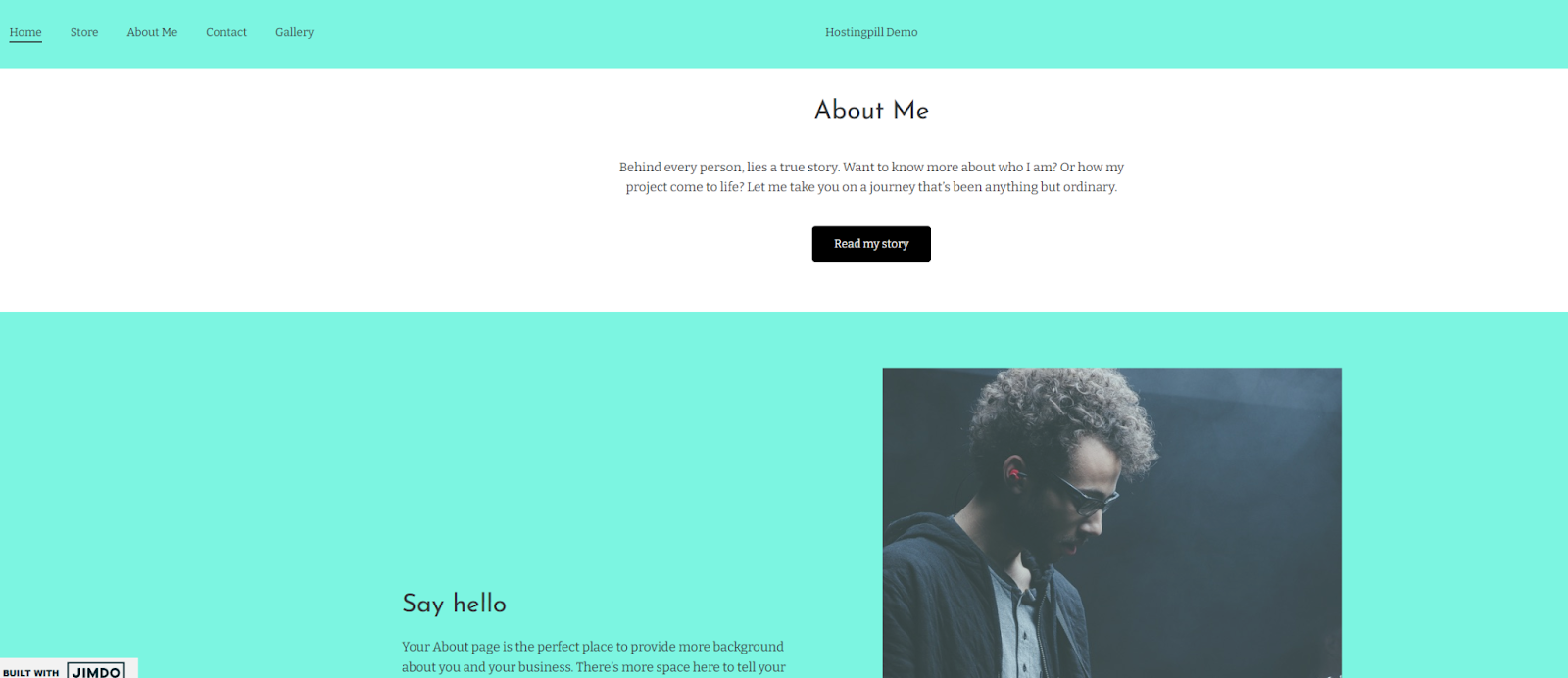
The above is the published demo website. Made completely with and running on Jimdo. I did not edit too many details and left the website as barebones as possible to get the best result possible. Even if you decide to add more content, the results couldn’t be too far off.

Jimdo Test Website Uptime Stats

I have used pingdom to test my demo website’s performance before and Jimdo is no different.

The site scores a staggering A grade with 92 considering the additional content. The page is a bit on the heftier size but the performance seems to hold up. Load time could be better but with some extra tweaking, it could reach a favorable spot.
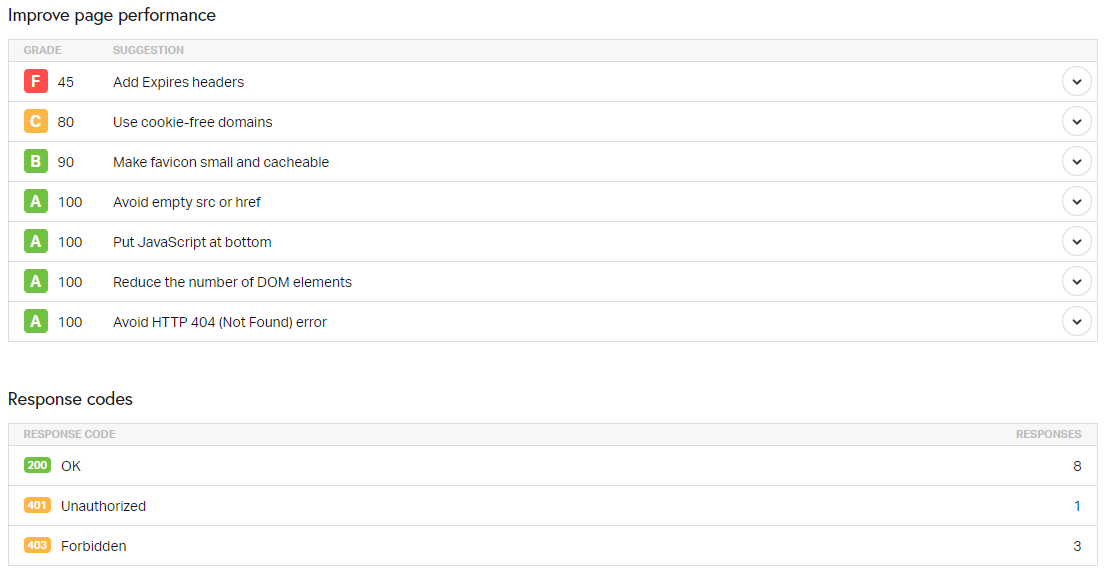
Some additional details reveal a better story.

The website builder seems to take care of a lot of mishaps in the back like no empty image tags, javascript being at the bottom of the script, DOM elements being kept minimum, and no HTTP errors.

But a lack of expired headers is increasing the number of HTTP requests the browser needs to deal with. This increases loading times. Again, nothing some minor tweaking couldn’t fix.

All in all, Jimdo has a decent performance. Not all perfect but the scope is better. Especially when it comes with so many features, there is bound to be some weight on performance.

Customer Support

Okay, so full disclosure: it took a while to find their contact page.

Turns out it was in the corner of the screen the whole time. This isn’t a con by any means but the way the sidebar is integrated into everything is. It makes sense to add the contact page right there but anyways.

Jimdo Customer Support

So it’s not a page so much as a widget. But a widget is probably more flexible.

There are 2 ways you can reach for help—-

  • Contact Us – An email-ish service that will send messages back & forth
  • Help Center – Your typical FAQ section filled with introductory content

Yes, there is no Live Chat. Live Chat is something that is very popular among hosting services. It works with the nature of the hosting business. Things go wrong all the time and the need for assistance right away could be crucial.

Is it a deal breaker that Jimdo does not have Live Chat?

Not entirely. Live Chat is popular but not essential for a great service.
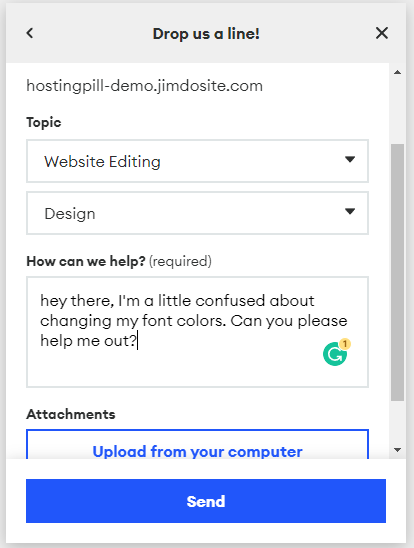
So it turns out it is an email service. You can select your topic heading and then a subheading. Then add any attachments if you want to be more specific, and simply send your query. Easy enough but seen before a dozen times.

Turns out they were away for the holidays. Who knew that I was working on a holiday!
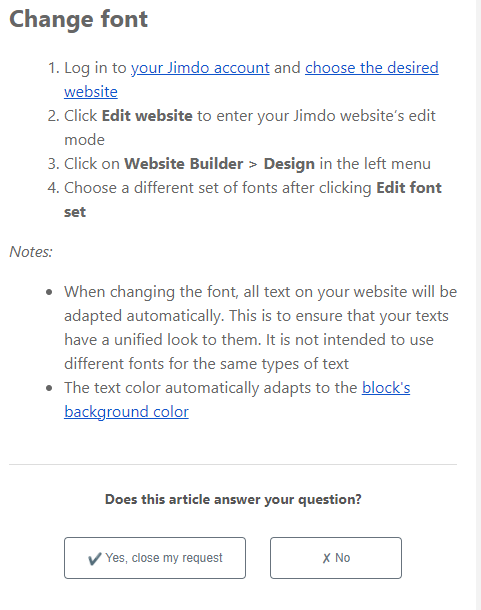
However, their email system picked up on some keyword queries and delivered an answer. I followed the given steps, and it worked but partially.

I couldn’t find the right way to change the font color manually. The block color change automatically gives the right matching color to the fonts. This is convenient but probably not optimal for someone who wants to try something new.
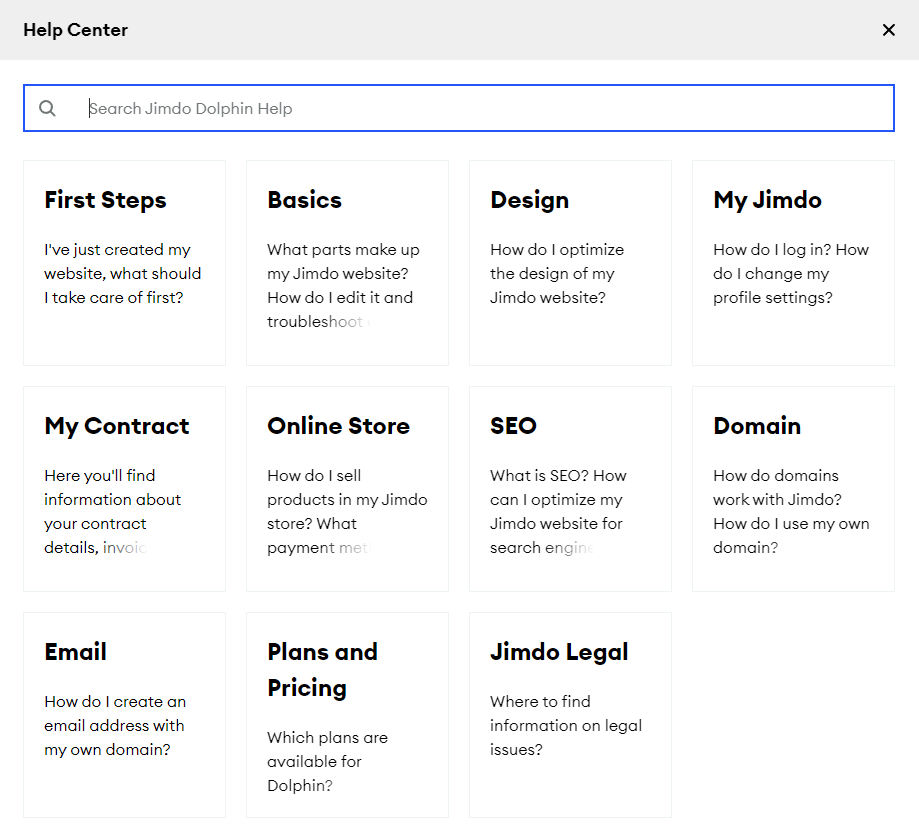
Next up is the Jimdo Help Center. It is available right in the Need Help? pop-up at the bottom right corner.

This is your FAQ page for queries that can be read and learned without assistance. With a search bar, you can look at a certain topic or simply go through the topics. Topics are arranged in an introductory sequence which is quite intuitive.
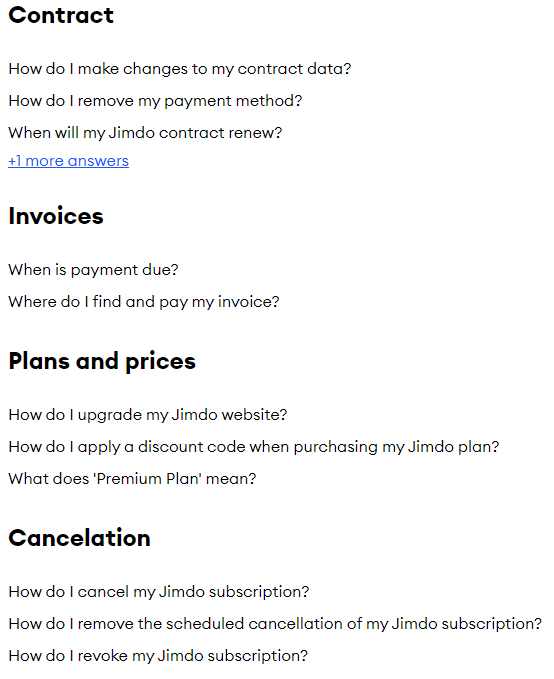
Inside a query, there seem to be separate sub-queries within separate sections. For a newcomer, it could look like more work and uninviting but you can get used to it with enough time. I’ve seen many tacky-looking UIs but they barely get the job done.
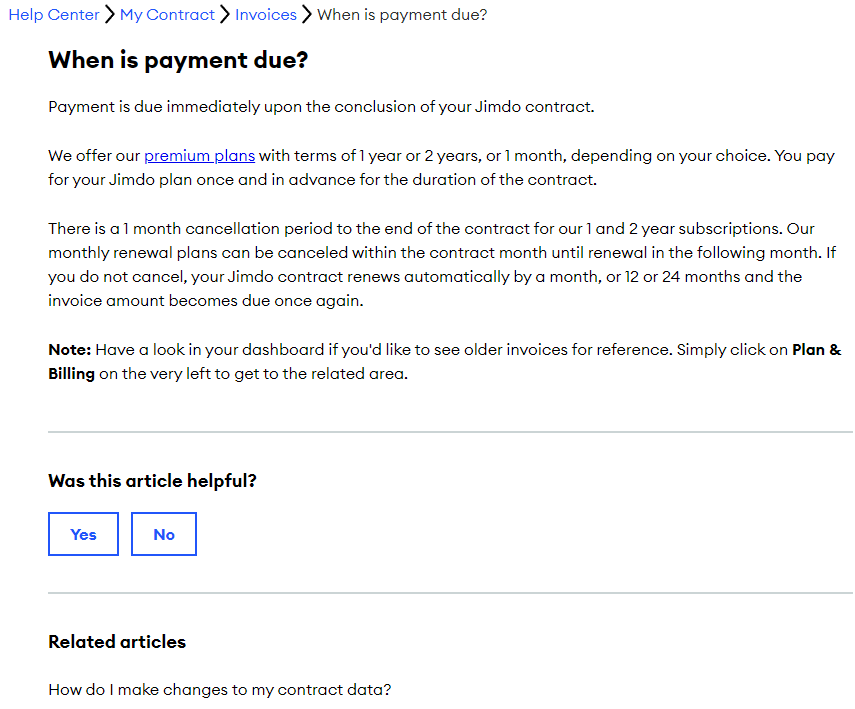
A good FAQ section only needs to do one thing: answer your question as clearly as possible.

Jimdo definitely has its Help Center figured out. It is filled with questions that you might run into on a daily basis. The answer is written in simple language. It has important points mentioned at the end and a related articles section. It is functional but functional is what it all needs to be.

The customer support section is full of insights into Jimdo as a service. Even though they were away, I felt like I was not left on my own with a keyword-targeted query and a precise FAQ section.

Cons of Jimdo

It can’t be all sunshine and rainbows. Bad news needs to be dealt with and Jimdo is not an exception.

Let’s start with the big one: The website builder feels barebones.

Yes, the setup does end up doing most of the heavy lifting for you but leaves out so much as well. For example, the aforementioned font color issue. You cannot change it. Period.

It adjusts automatically from a given selection of block background colors but no other way to do so. Secondly, it works off of a heavy template system. This makes it feel like a template editor rather than a website builder. A template editor could be your thing but you lose features.

The second one is Performance.

My website test yielded good results for sure. But coming back to that page size issue, it could benefit from optimization. The website scores an outright F for expires headers. Again, nothing you couldn’t fix yourself but you could end up looking into it for a while.

The third issue is the website pre-setup.

I don’t know how much hand holding you might like but there is an issue with making things too simple sometimes. The setup goes over so many things that by the time you get to the dashboard, things feel a little too alien.

The setup goes over 12 steps in total with as little input as possible from you.

Conclusion

Jimdo’s theory is to make website creation more accessible or to put “the power of website creation in the hands of ordinary people,” allowing them to share their passions online.

The free plan offered by the Jimdo website builder arguably meets this goal – it’s a pretty fair offer that allows anyone to quickly start building their own website.

When it comes to paid plans, the main reason to use them is cost. The platform allows you to create a fully functional website for $9 per month. This is significantly cheaper than using some competing building solutions, such as GoDaddy or Squarespace.

Finally, if your budget is limited and your requirements are straightforward. Jimdo is well worth a look despite its shortcomings which are a bit hefty but in a fair comparison, don’t overwhelm the pros that make Jimdo an eCommerce powerhouse.

It’s ideal for small businesses that need a basic online presence. If you need an online shop but lack the budget, expertise, or time to deal with more complex systems, Jimdo is adequate.

So are you interested to look into Jimdo? What do you think of its market integration tools? Have you used Jimdo in the past and couldn’t comprehend it?

Whatever your thoughts may be, please let me know in the comments below.

SIS Argentina Review: Is It the Right Provider for You?

What’s the use of making incredible websites if one can’t showcase them to their audiences! Well, bless the web hosting companies for making it easy for you to showcase your work. SIS Argentina offers not only the full support and guidelines for hosting websites but also helps in maintaining them on a global platform.

But to choose the appropriate one from the lot, a tedious task, right? Well, no more. Here we bring to you handpicked websites that we scrutinize for you inside out, and share reviews.

The suggestions and reviews provided by us can help you in successfully choosing a suitable web host for your website.

Today, we have brought to your attention, this web hosting service from Argentina- SIS Argentina. Founded in 2003, it has data centers in Argentina, the United States, Chile, Columbia, and Mexico.

The website has a multilingual feature, and one can switch between Spanish, English, French, Portuguese, Dutch, and Russian languages.

With as good as 2500+ customers, hosted on a variety of 200 servers, backed up by 30 professionals across the globe, this has undoubtedly attained a place amongst the crowd.

SIS Argentina: Uptime

With the servers located in Argentina, their remote desktop facility is accessible from anywhere across the globe. The server rooted in Argentina is scalable and backed by high-quality hardware features. The hardware or software access will be solely for you, no sharing amongst the users.

Be it Linux or Windows, holistic support is provided for these operating systems. Technologies like ASP, ASP.net, AJAX, PHP, MySQL, Python, and Perl provide support to the functioning of the operating systems.

Keeping in mind the need to legalize the software, the server’s operating system and the control panels are licensed. Also, the cost is inclusive, thus the extra payment burden is eased off.

Within 24 hours after the payment is made, the server activation and data access are provided to the user. Monitoring is done 24*7, and hence there is no hassle or worry regarding hardware or software problems.

Regarding the uptime of Sis Argentina, they offer a guaranteed 99.98% real uptime. To stand away from the competition, they provide the backup copies of the client’s sites. Additionally, other features include advanced anti-spam for threats and viruses, full access to the visitors’ statistics, etc.SIS Argentina uptime

Guaranteed uptime of 99.98% indicates the downtime of almost 17 seconds daily. One can check out the uptime calculator to get a better insight of the same and about the downfall of the website on a daily or weekly or yearly basis.

Pricing and features

pricingIrrespective of the plan that one chooses, some basic features are included in all of them. For instance, get access to unlimited databases, access to unlimited email accounts, PHP support, and compatibility with google apps.

Depending on the web hosting plan you choose, you’ll have access to 500Mb-10 GB Disk space, 10 GB to 1000GB bandwidth. Their direct admin based control panel is also available, which can be accessed in either Spanish or English.

Also, there’s a 30-day money-back policy wherein you can opt back from the purchase you made if you’re not satisfied for the same in a span of 30 days.

Step 1: Choosing the domain.

Once you select the plan, you’re prompted to the next page wherein you’re supposed to choose and register your domain or choose an existing one or transfer of the domain.

If you wish to register into a new domain, it is expected that the domain is available, or else you might have to come up with some other name or option, whatever is applicable.choose domain

Step 2: This is just a summary of the product details and billing of the items you’ve purchased. You can review them and make the changes as and when required.

Finally, there’ll be a review page to check if everything is appropriate. If everything is as it should be, the next page will be prompted.configure

Step 3: The account creation or logging in to an existing one, and the payment process is consolidated in this step. One can pay via PayPal, credit/debit cards, bank transfer, or via Mercado Pago application. The availability of plans is either on a monthly, semi-annual, or annual basis. The billing may be done according to the three plans they have to offer.SIS Argentina account security

Contact information and support

In case of any queries or information, the customer may reach out to them via the options they have in store for the customers to reach out to them.

One can raise a ticket stating the problem, or attaching the snapshot of the problem faced, and they will reach out to you with the solution.

Second, one can contact the team via the helpline number provided on the website or ask a query in the chat section.

If you feel the question is a general one and you don’t want to dig into the process of involving the company’s customer service team, you can simply look for the answer in the frequently asked questions section.

Their technical support is available24*7, but the sales support is available only on weekdays,  during working hours. Later on, it is not possible to contact them from a sales perspective.

Also, there is a knowledge base available for the users wherein one can obtain questions and solutions based on different sorted categories.

SIS Argentina open ticketSIS Argentina customer support

SIS Argentina Review: Cancellation Policy

Once paid, they expect a commitment, and a move back is not acceptable. There’s no guarantee of money back, once the payment is made.

SIS Argentina Review: Bottom Line

Here are the pros that we have listed down for you, to make it easy for you to make up your mind regarding SIS Argentina:

Pros

  • A good industry experience
  • Prices are moderate
  • Excellent Support

Cons

  • Pricing is based entirely on US$

After a good dig at SIS Argentina, we discovered it is worth a thumbs up from us. So if you are someone looking for affordable hosting service with a good support system, and services that are up to industry standards then this is the one for you. However, think carefully before you leap, once you invest, there’s no money-back guarantee.

Exabytes WordPress Hosting Review: In-Depth Look & Speed Test

hostingpill

Why Trust Us

“We have been a paying customer for Exabytes WordPress Hosting since August 2021.

We are monitoring Exabytes WordPress Hosting servers for Uptime and Performance through our Test Website.

This review of Exabytes WordPress Hosting is based on actual testing done on their servers.”

Business owners now know the importance of having a well-designed website. It helps in boosting online presence, which is most needed. But what is also important is to have a host and the right service to make the website work well.

Many companies offer WordPress hosting, but very few provide a complete package.

One such provider is Exabytes.

Exabytes is an All-in-on Business, Cloud, Digital and Ecommerce solutions provider. It has more than 21 years of experience and services for up to 160,000 businesses worldwide. It is the leading and the most popular SEA provider that does more than only hosting your website.

The company believes in providing the most affordable, reliable, and simplified service. All that is using the latest technology to help you and your business grow. Here are some reasons the company has a huge customer base and a great customer satisfaction rating.

Exabytes Uptime

As stressed earlier, a website is an integral part of any business in the present day as it is the face of the brand. Hence directly or indirectly, it influences the bottom line, i.e. profits. It is also the place where potential clients come to know about the business.

Therefore, it has to be online or available whenever anyone has the need for it, which is 24×7. For this to be possible, the uptime of the web host has to be good. It is a measure of how long the site is functioning without any interruptions.

So when considering buying a hosting service, a strong uptime is one of the important things to check for.

While most hosts promise an uptime of 99.9%, very few provide it. Exabytes is unlike other providers and not only promises but also delivers it. The results of the Exabytes uptime as seen on the Hostingpill Test Site are as below.

SS 2

Exabytes uses the latest hardware and software to ensure 99.9% uptime. Furthermore, their confidence in this aspect is such that you can actually find it in the Exabytes legal information.

SS 3

Load Speed

Apart from providing a great uptime, Exabytes hosting is on pure SSD and uses the LiteSpeed Cache. The use of these helps in increasing the page load speed. The average response time is also increased by 5 times that of the other hosting service.

Another advantage of using LiteSpeed Cache is it helps improve the Google PageSpeed values.

Ease of Use

WordPress is the leading Content Management system in the world. A large percentage of the websites across the globe use it to run websites. That is because it is not only free but also easy to use. Due to its popularity as the best CMS, Exabytes provides special WordPress hosting packages.

So it is easy to build websites and host websites using them.

Like all other product offerings, the WordPress website builder is simple and easy to use. In addition, a quick drag and drop option is available to build the website.

Additionally, there are pre-built templates. New sites can use this to build it based on the business and create your online presence.

Those with no or little technical expertise can refer to tips and tutorials on WordPress. In addition, an online community is available that can help with issues while building the site.

knowledge base

The WordPress hosting also includes the cPanel and Plesk control panels. These are the industry standard and hence on par with the rest. The server management console is also very friendly, which is an added perk for the users.

Follow the standard procedure to sign up for a new plan. The domain registration and duration of the hosting plan are set during the signup process. Once done, you can log in to the website and see the package you have chosen, the due date for renewal, and the status.

SS 4

exabyte new1

exabyte new2

To help you manage your hosting using the Plesk panel, you can just click on the Manage Product button.

exabyte new3

Migrating a website that is on another hosting is also possible. Again, the support team will assist with website migration.

Also, anytime there is an update of WordPress, the installation happens automatically. So the user need not worry about running an update or work on an older version.

Exabytes Pricing

After considering the uptime, load time, and ease of use, an important feature to consider is the pricing. The company, keeping in view its core value, offers affordable services. Overall it charges either below industry standards or on par with its competition.

Exabytes WordPress Hosting Plan

There are 4 pricing plans to choose from.

WP 13 Ultimate: It is ideal for growing business and is priced at as low as S$43.19/ month. An unlimited number of websites can be hosted using this package, and it supports WordPress.

A 300 GB Fast SSD storage is provided along with a free lifetime domain. Along with many other features, a 100-day money-back guarantee is offered with this package.

WP 13 Ecommerce: This is a package that has all the necessary features for growing your online business. It starts at a low price of S$ 18.35/month. A 100-day money-back guarantee is part of this package.

This plan and provide 180 GB SSD storage. Like the WP 12 Ultimate package, a free lifetime domain is offered with this plan. Support for basic WordPress is available.

WP 13 Business: It is for business owners that need high-performance and reliable hosting services. The price starts at S$8.63/month. In addition, it offers a 100-day money-back guarantee if you are not satisfied with the services provided.

In this package, the storage capacity is 110GB SSD, and an unlimited number of websites can be hosted.

A free lifetime domain can be availed in this plan, along with enhanced security features.

WP 13 Beginner: It is recommended for WordPress beginners and starts at a price of S$4.31/month. This package offers up to 30 websites and 35GB of SSD storage. It offers basic features as it is intended for beginners.

Looking for an affordable and cost-effective WordPress hosting service? Exabytes pricing plan is in line with the other major providers. It is ideal for SMEs who are on a tight budget but want a full-service plan.

The plans can be purchased or renewed using payment methods like PayPal, and Credit Card. So the purchase of the products is quick and easy.

Exabytes Customer Support

Many companies offer WordPress hosting services ranging from startups to established brands. For a beginner, it can be quite confusing to choose the right option for their business. Having a good customer support service can help in answering questions.

When all things are equal, the major differentiator when choosing is customer support. Reliable and adept customer support who fixes issues patiently while answering queries is a big advantage.

Exabytes recognizes this aspect and has a dedicated technical customer support team available 24/7. In addition, the technical staff is available on Chat, Whatsapp, Phone support, and Email.

The billing and the sales team are only available on Weekdays during office working hours. Therefore, chat is the most effective option. But the drawback is that the customer has to fill a pre-chat form to get the query answered.

SS 9

Exabytes: Winnie Chat1

The customer support team answers queries quickly and based on the questions asked will answer or transfer them to the concerned department. All in all, they are quite helpful in resolving queries. There is good coordination between the teams as seen below.

Exabytes: Chat 1

Exabytes: Chat_2

Exabytes: Chat 3

The Exabytes website includes a comprehensive knowledge base. Many topics related to WordPress hosting and the use of cPanel and Plesk are covered.

Security

Exabytes: Enchanced Security

When searching for a hosting service, businesses generally look at the uptime, bandwidth, disk space, and ease of use. But, security is not considered, but it is one of the most important factors in the hosting platform.

A service host should provide utmost security. Any slip here can result in not only the loss of money but also reputation. So enhanced security features are the need of the hour.

Exabytes ensures that they provide optimal security to the websites they host. All the WebHost plans offer free SSL. That means your websites have a seal of security. The customers are confident that their transactions are secure.

Apart from Free SSL, the company provides Website Security360 protection. It does real-time detection of RansomWare, intelligent blocking, and secure online transitions.

Automatic Malware Scan and Website Fix is available free on all packages. It locates any malicious threats and removes them.

Then there is the 1 Click Hardening. During the installation, it fixes any security vulnerabilities before going online. It also scans sites for any security settings issues and fixes them with the click of a button.

The WordPress security Scan and Security Patch runs security scans. It often checks for any security issues and fixes them.

All in all, Exabytes provides various advanced security features. All that helps to keep your site and transactions safe and secure.

Always available

The data center of a hosting service plays an important role as it ensures any time availability. It is also the place where the critical customer data is stored, processed, and shared. So it has to be secure, reliable, and always available no matter what.

To ensure that the customers get reliable, secure, and great uptime, Exabytes has data centers in the USA, Malaysia, Indonesia, and Singapore so that global customers get continuous uptime. Websites that are hosted from the USA have the option of using the data center in the USA or Malaysia/ Indonesia.

The facilities are equipped with state-of-the-art technology and advanced security features. So you are assured that your website will work optimally and securely. To ensure that your data is closer to your website visitors and you. Exabytes gives you the choice to pick from any of the 4 Exabytes data centers closer to your location.

The options are:

Exabytes.SG for Singapore

Exabytes.COID for Indonesia

Exabytes.COM for the USA

Exabytes.MY for Malaysia

Conclusion

Exabytes WordPress hosting is an all-service provider. It is best recommended for small businesses and ideal for beginners who want to start their online journey. The service provides the necessary infrastructure and support for growing a business.

The host offers a good uptime, service time, and response time. That means your website is always available, loads fast, and provides optimal performance.

Additionally, getting the website up and running is easy due to the easy-to-use cPanel. Any issues that arise, the support team fixes them. The hosting service addresses the security concerns by providing advanced security features.

It is a pretty good WordPress host for those on a budget looking for an all-in-one service provider.

Want to promote your blog? 151 Tried and Tested ways

Want to know how to promote your blog? How to get traffic to your blog? How to get your blog to the people who want to see it?

These are questions that everyone running or marketing a blog asks. And it’s easy to get discouraged—there are already so many blogs out there!

Luckily, it’s absolutely possible to promote your blog to increase traffic or readership or customers. Below, I’ve got 151 tried and tested ways to promote your blog.

They cover all sorts of methods and venues. Some are big, some are small. You don’t have to do all of them—but they’re certainly worth a look.

hostingpillBest way promote your blog
  1. Share your content across many social networks
  2. Share blog posts on social media right when you publish them
  3. Share not just one post, but multiple in a single instance!
  4. Use optimal posting time to share posts.
  5. Use optimal posting time to publish blog posts.
  6. Use optimal posting days.
  7. Mention influencers in your posts.
  8. Tell influencers about how you mentioned them.
  9. Use Facebook groups.
  10. Use forums!
  11. Use Quora’s “feed” to find popular and pressing questions
  12. Find and use subreddits that are involved with your niche.
  13. Pin posts to the top of your social media profiles
  14. Use hashtags.
  15. Use certain tools to find out which hashtags are the best.
  16. Tweet frequently
  17. …But don’t have the exact same posting schedule for other social media networks.
  18. Similarly, when certain posts aren’t doing well…cut your losses.
  19. Share your new posts more than once.
  20. Re-promote older content that’s done well.
  21. Use visuals in your tweets and be cautious of how many characters you use.
  22. Place links early into tweets
  23. Use Twitter cards
  24. Call on readers to share (for a good reason).
  25. Share using emotion (tactfully, of course).
  26. Set daily/weekly goals for growing social media contacts and follows.
  27. Clean/modify open graph data.
  28. Include links to your blog posts in your social media profiles.
  29. Host and/or participate in Twitter chats to share what you know (and recommend blog posts!)
  30. Do the same thing, but on subreddits and forums!
  31. If it comes down to it, consider starting a subreddit on a topic or niche.
  32. If you’re really feeling confident, consider starting a subreddit for your blog.
  33. Don’t neglect Instagram.
  34. On LinkedIn, try focusing on skill building and business.
  35. Use longer descriptions on Pinterest.
  36. Use Pinterest group boards.
  37. Use Promoted Tweets.
  38. Pay to promote on Facebook.
  39. Use LinkedIn sponsored content.
  40. Use LinkedIn Groups.
  41. And of course, Reddit ads.
  42. Thank readers for sharing!
  43. In general, contribute to aggregate sites and up-vote communities.
  44. Focus on practicality and utility in your shared posts.
  45. Place social media sharing buttons in prominent places.
  46. Use Sumo to double down on the sharing buttons.
  47. Share with people who have already shared your content.
  48. Share with people who share similar content.
  49. Share with people who write similar content.
  50. In forums, answer questions using your blog posts.
  51. Use social bookmarking sites.
  52. Use reciprocal sharing sites.
  53. Have an email campaign/use email marketing.
  54. Build your email list.
  55. Have something to offer in exchange for an email address (aka, a lead magnet).
  56. Send those emails at good times.
  57. Send emails as you launch new posts.
  58. Email newsletters.
  59. Try plain text emails.
  60. Use software for automated email marketing!
  61. Enable social shares in emails.
  62. Include links to your blog or certain posts in your email signature.
  63. Resend emails…using the words that worked for the emails that got read the most.
  64. A/B test emails.
  65. Create subgroups in your email lists.
  66. Get featured on round-up emails.
  67. Get featured on round-up posts/articles.
  68. Set up an RSS feed (if you don’t have one) and share it with your audience.
  69. Ask your partners and/or affiliates to share your stuff.
  70. Write a guest post!
  71. Heck, have a guest-post campaign!
  72. Try co-marketing!
  73. Help readers email your blog posts to their circles.
  74. Syndicate your content.
  75. Have employees promote your posts.
  76. Have customers link to your blog.
  77. Prioritize promoters when you link to people.
  78. Interview influential bloggers.
  79. Invite said influencers and bloggers to contribute to your blog
  80. Try to build real relationships with people in the blogosphere and social media.
  81. On that note…DON’T SPAM.
  82. In general, try to build a loyal audience.
  83. A major takeaway: collaborate, and share each other’s content!
  84. Work on your linking game: make sure people are linking to your blog!
  85. On that note, work on content that’s ready to go viral.
  86. Regularly include external links.
  87. But be careful about your external links.
  88. Do internal links too, of course!
  89. Do keyword research.
  90. Target one keyword per blog post (if you’re just starting out).
  91. Optimize posts for keywords.
  92. Use Google Ads and Bing Ads.
  93. Buy ad space in the “related content” sections of top sites.
  94. Use web analytics tools.
  95. Use tools that are specifically geared for social media monitoring.
  96. Submit to search engines.
  97. Put links to related articles/a “related articles” section at the end of your blog posts.
  98. In your new posts, link to your best and most popular posts.
  99. Visa versa: update your best posts to have links to your new posts.
  100. Make sure to fill out your meta descriptions, etc.
  101. Don’t only change headlines as you post—also change up meta descriptions, subheadings, etc.
  102. Use pop-ups to promote your blog.
  103. Use pop-ins to promote your blog.
  104. Retargeting/remarketing!
  105. Use push notifications through the browser, instead of email.
  106. Have mobile-friendly push notifications to promote your blog.
  107. Test out different headlines, especially with A/B testing.
  108. Choose from a few main, reliable types of headlines.
  109. Include numbers in your headlines.
  110. Use emotional language in headlines.
  111. Create long-form pieces to promote your blog.
  112. When you have short pieces, make sure they’re useful.
  113. Have a powerful introduction.
  114. Put the conclusion first.
  115. Embed infographics to promote your blog.
  116. Does it need to be said? Yes, it does. Use IMAGES.
  117. Even better: create original images and content.
  118. Have text overlaying the images.
  119. Optimize your blog’s images for sharing.
  120. Use image sharing buttons to promote your blog.
  121. Make sure you’ve worked on your content’s overall visual appeal.
  122. Publish content consistently.
  123. Quote experts.
  124. Be unique.
  125. Tell stories.
  126. Respond quickly to trends.
  127. Be helpful!
  128. Know your target audience.
  129. And once you know your target audience, get your tone down!
  130. Make listicles!
  131. Make presentations/slide decks.
  132. Don’t let SEO ruin your content!!!
  133. Update old blog posts.
  134. Turn your blog into a vlog.
  135. Turn your blog/vlog into a podcast!
  136. Turn your blog posts into an ebook!!
  137. Add content upgrades: give your best for free, in exchange for emails!
  138. Build a resource library.
  139. Turn your posts into PDFs, and then share them.
  140. Overall: get the basics of site health right!
  141. Pick a good host.
  142. Make sure your blog has good uptime.
  143. Make sure your blog is fast.
  144. Use SSL.
  145. Take extra steps with security.
  146. Be wary of WordPress plugins!
  147. Pick your WordPress theme carefully.
  148. Be ready to scale up your site
  149. Plan your content.
  150. That being said, don’t restrict your creative outbursts either.
  151. SLEEP.

Let’s get started!

9 Domain Name Generators [Hand tested with screenshots]

There are many Domain name generators in the market.

I have shortlisted the Best Domain Name Generators here.

And I have tried all to show which worked best for me (and will hopefully for you).

My Testing Approach:

I judged each tool based on following criteria:

  1. No. of combinations it generated for a given word
  2. No. of options they give for domain registration
  3. Ease of registering a domain

If you haven’t got a domain name yet, check below options to get one:

  1. Namecheap.com (domain cost: $8.88 – use this link to get 20% off)
  2. Check out other domain registrars here.

I start with the one having coolest interface of all:

1. Namecheap.com

Namecheap offers a domain name generator when you try on the “Beast Mode” in Domain search. You can enter upto 5000 domains or keywords and it will generate domain names along with domain availability. It also does some really cool things like:

Domain Hack – Hireme.com → Hire.me
Drop Last Vowel – flicker.com → flickr.com
Pluralize Nouns – Cooltoy.com → Cooltoys.com

You can even append suffix and prefix to come up with new domain names.
namecheap blog name generator
Once you are done getting domain from namecheap, you can also get web hosting from them.

What’s more, if you happen to register a .website domain, you can get it FREE for the first year.

2. BrandSnap.ai

Brandsnap.ai search interface

Brandsnap is unique as it takes domain name generation to a whole new level, beyond just permutations and combinations of your input keywords. It takes into consideration the nuances of brand appeal, relevance, and sound, ensuring the domain names generated are distinctive and captivating.

BrandSnap.ai search results
But what truly sets Brandsnap apart is its ability to perform multi-layered checks. To prevent potential disputes and offer users a seamless branding experience, Brandsnap also verifies the availability of the suggested domain names on popular social media platforms and cross-references them with existing trademarks.

This feature mitigates the risk of username squatting, providing a comprehensive solution to individuals, start-ups, and corporations in their brand naming process.

3. Panabee.com

Panabee works best if you give two words to come up with suggestions. And sure enough, I gave my favorite two words:  “Hosting Pill” to see the combinations.
Panabee

It creates some of the most interesting combinations by “dropping first letter”,  “merging vowels”, “spell backwards”, etc. This is usually what those costly brand consultants do when they try to come up with a name.

Brand Consultant Approach

It searched more than 500 Top Level Domains (TLD) to check availability. And that included Country Extension search (.us, .in, .uk, etc.) & Topic Extension Search (.bike, .church, etc.)

Complete list of TLDs it searched is here

Probably the most unique feature of all the domain generators I have seen – the ability to search App stores (Apple, Google) for apps with similar names.

BUT, the feature was not working when I checked it (4th May 2018) – twice.
Panabee2

4. DomainWheel.com

DomainWheel is created by developers of Themeisle.com
Domain Name Generators: DomainWheel
With DomainWheel I searched for the term “blogger” and it showed me around 16 domain ideas

While the results were not that impressive, what I really liked was something which was below this table
DomainWheel-search2
It helped me find words which sounded like “blogger” or which rhymed like “blogger”. This can help in creating some unique brand names.

5. FlameDomain.com

FlameDomain searches for domain name from around 300+ TLDs.
Domain Name Generators: FlameDomain
It has these categories on the left side based on which you can sort the generated domain names.

6. InstantDomainSearch.com

I was really impressed by the time it took to search domains on InstantDomainSearch.

It was INSTANT just like their name – “InstantDomainSearch”.

I searched for the term “Blogger” but it was not available. So I changed it to “blogger666” and it showed available. What I really like was the options you get when you are searching for any domain.

See below popup. It appears when you click on the Green circle.

You have the option to visit the site, appraise the domain name, search in google, find out how that site looked using archive.org. It also showed me if there are FB, Twitter and Pinterest names available for this word. I like it.
Domain Name Generators: InstantDomainSearch
InstantDomainSearch2

7. Domain Name Generators:

Iwantmyname.com

Iwantmyname’s interface is quite simple and straightforward.

I tried to search for the words “Blogger Design” as shown below:
Domain Name Generators: Iwantmyname
And it did throw some interesting options. The search results came fast.
Iwantmyname2
It also searched in Internationalized Domain Names (IDN), which is something I have not seen in any other domain name generators.
Iwantmyname2
Once you select a domain and add it to the cart, it checks out from their site. They don’t seem to direct to popular domain registrars.
Iwantmyname4

8. Domain Name Generators:

Namestall.com

Namestall have different types of domain name generator tools, including:

  1. Domain Name Generator Tool
  2. Domain name Suggestion Tool
  3. 3 & 4 letter domain search tool
  4. High Paying Keywords Search

Domain Name Generators: Namestall
For the scope of this article, I will just review the Domain Name Generator Tool.

I searched for the word “blogger” in it and it showed me the results as given below:
Namestall2
Good thing about Namestall is – not only did it offer me options to register domain, it also gave me the option to register domain + hosting – that was really nice and convenient.
Namestall3

9. Domain Name Generators: Nameboy.com

Hover to preview

domain name generators: Nameboy

Even with such a cool name, Nameboy still has a primitive web interface.

I did my search by entering “Blogger” and “design” on the home page with “Rhyme” checkbox done.

And this is what it showed me:
nameboy 2
I did like the grid that was presented. It neatly showed what was available in a simple, yet effective way.

However, I could not see any effect on the  “Rhyme” check box on my result.

And clicking on any of the “Buy” links took me directly to Godaddy.

Apart from these, I did check out following domain name generators:

But I did not feel any of the above were worth writing for.

But if you are just starting, then instead of spending money, you can brainstorm it at

Panabee or InstantDomainSearch.

And if you happen to discover some good domain name generators, which I didn’t cover, please mention them below.

To learn more about Domain Names, read The Story of Domain Names.

Good luck and find the best domain name you can!

A2 Hosting Review: Give Us 5 Min, We’ll Give You The Facts

hostingpill
Why Trust Us

“We have been a paying customer for A2 Hosting since July 2017.

We are monitoring A2 Hosting’s shared hosting servers for Uptime and Performance through our Test Website.

This review of A2 Hosting is based on actual testing done on their servers”.

Every now and then I review a company that is simultaneously unknown to most of the public (even on the internet public), and very well-regarded among those who follow hosting.

A2 Hosting is one such company that I have recommended in my list of the best web hosting providers.

Founded in 2001, A2 has gone from hosting a few websites to a few thousand.

That’s great growth, but is a few thousand really something to brag about?

Even the quality hosting providers on the smaller side service hundreds of thousands of sites.

And yet, A2 has managed to stay in the game for 17 years without losing its competitive edge.

As they like to show, A2 has won quite a few hosting awards from popular sites.

It’s natural for you to wonder if A2 is as capable as its reputation suggests.

Are you looking at a hidden gem or a mediocre service that’s fooled a few people into going along with it?

Does its small size mean it lacks features, or that it focuses more on quality—or both?

All these questions and more, I will address in this review.


Jul 04, 2022

Uptime

Performance

Value for money

Customer Service

Overall Rating

Hello i used this hosting and it worked perfectly fine i was using it for multiple things. This hosting worked for all the things that i needed it for i highly recommend it will help you with all your needs and wants so if you want a hosting that is great make sure to get A2 Hosting it's very cheap and works very good I never had a problem with it and you won't either. If you don't want hosting problems and a very affordable hosting you chose the correct hosting A2 Hosting they have everything you need just to make you happy.


Sep 08, 2020

Uptime

Performance

Value for money

Customer Service

Overall Rating

I am a web developer and creating websites for clients. Recently, I bought a shared hosting plan on A2 Hosting (Turbo Boost) for a client who is running a small scale business. It comes with all essential features like unlimited hosting, emails, turbo servers, daily backups, etc. It is more than 6-7 months now. My client is very happy with A2 Hosting and told me that they never faced any server outage or performance issues on the site. Based on the experiences, I can say that A2 Hosting is one of the best places to host your websites. They also offer anytime money-back guarantee in all hosting plans. So you can try their service with confidence and peace of mind.
MEXICO
Rubén Barajas Zamora
http://www.binarsys.com


Apr 30, 2019

Uptime

Performance

Value for money

Customer Service

Overall Rating

I was on A2 hosting for 3 weeks and the last one they have been offline. I just request to cancel and a refund.


Mar 31, 2019

Uptime

Performance

Value for money

Customer Service

Overall Rating

do not trust in any way what they say about 99.9% Uptime the server go down all the time 1 time a week.... we was whit them for 2 years and we always had problems and they dont care at all of what you are loosing..... trust me and avoid this provider
ALGERIA
Omar BEN SALAH
https://www.cph-hydro.com


Feb 19, 2019

Uptime

Performance

Value for money

Customer Service

Overall Rating

I recently change my old hosting to A2hosting and it was the best choice ever , the support is great and so professional with my problems even most the problems was miss understanding of hosting field , and it's so fast too i was suffering from server delay but now i'm so satisfied , Include the prices are so cheap with good features and unlimited space , I really see the difference between this hosting and others , i really recommend this one but my experience and for your knowledge i have multiple websites and they are working so great .


Feb 06, 2019

Uptime

Performance

Value for money

Customer Service

Overall Rating

I've been using A2 Hosting for the last 2 years. The yearly pricing for the Turbo package on shared hosting is a bit high. Customer service is little slow too. Overall, I'm satisfied and I can easily recommend A2 Hosting!


Dec 20, 2018

Uptime

Performance

Value for money

Customer Service

Overall Rating

I had a technical issue when I transferred a site to A2 Hosting so I contacted them. They diagnosed the problem and resolved my issues quickly. Great service.

M-hoster.com Review: Is it Right Hosting Provider for You?

In this article we will talk about M-hoster.com.

But first, think about this:

Smart business management needs to look for a quick and effective platform through which its potential could be expanded to the online market. While there are many options available in the widespread competition, few seem to stand out in their unique way.

M-HOSTER.COM is a hosting provider company that functions from its server towers located in Germany. They try to focus on securing the data of their clients. Storage of information in the modern world is an essential aspect of any project, and they prioritize the customer’s need for space.

M-HOSTER.COM believes in providing maximum returns to the businesses and individuals that invest in them. They offer a full range of hosting services along with feature-packed control panels and up-to-date performance-oriented hardware. They aim at providing a smooth experience to the customers.

M-HOSTER.COM also provides individual support to each client regarding their online hosting services. They try to improve the productivity of the client’s web base and provide assistance regarding any technical difficulties that the customer might face.

Uptime and Security

M-HOSTER.COM offers round-the-clock monitoring of clients’ hosting servers. They are equipped with a highly reliable and performance fueled equipment setup.

They claim to provide fantastic uptime facilities. The servers are based in highly secured data centers that are controlled and monitored by qualified personnel.

m-hoster features

The security support provides the privilege of an anti-hacking system that protects the servers from cyberattacks and burglary. The trustable and secured data centers allow the clients’ data to be guarded by various security thresholds.

The data centers assigned for the job are technically advanced setups to provide the best experience.

M-HOSTER.COM improves the protection from ransomware by initiating regular backups of the data on the servers. They respond quickly enough to back up essential files and storage.

In case of breakdown of servers, the client remains unaffected and can proceed with regular operations while the data is being restored.

Shared Hosting Plans

M-HOSTER.COM aims to provide a wide range of hosting experiences to the customers. They offer inexpensive shared hosting plans for small projects and businesses. High-speed internet services help in quick accessibility of the webpages.

The shared hosting plans are divided into four categories: Budget, Lite, Standard, and Mega. All these plans are equipped with varying facilities to fulfill the requirements of different clients. The pricing details are listed below.

m-hoster shared hosting plan

The details regarding other features and software included in these plans can be obtained from the shared hosting plans page.

They provide reliable software and featureful cPanel to ensure productivity and smooth experience for the clients’ web presence. The cPanels offer essential databases such as MySQL and phpMyAdmin. Free SSL certificates are provided to ensure the security of clients’ data.

E-mail forwarding services also help in improving the functioning of hosting services. The cPanel is also equipped with a Softaculous script installer. It installs 448 useful scripting services with just a single click.

The shared hosting plans also include an additional feature for Dedicated IP Address, which can help to maintain a secret identity.

dedicated ip

The CDP data backup system facilitates the backup of stored data to offshore data centers. This protects the clients’ files from manipulation by any rival company. This smart backup system allows the client to restore all the lost files in the case of a server breakdown.

M-HOSTER.COM also helps in free migration of the customer’s website from any other hosting service. They allow the secure and reliable transfer of all the required data files from another hosting service to their cPanel.

M-hoster.com: VPS/VDS PLANS

M-HOSTER.COM offers Virtual Dedicated Servers (or Virtual Private Servers) for customers that require all the administrative responsibilities of their website. These plans provide complete access to the servers and allow the clients to handle the software and security themselves.

vps plan

VPS plans also allow the personalized installation of the libraries and offer access to a private IP address and ports. They also provide the benefit of hosting primary or secondary servers based on their domain names. Thus, VPS plans offer full access to the servers’ customizations.

The renewal rates for the hosting services are the same as the initial charges. They may also offer seasonal discounts for long-term customers.

Knowledge Base and Customer Support

M-HOSTER.COM showcases a full package of knowledge when it comes to supporting customer queries. They present a wide range of essential topics that allow the consumer the luxury of a quick and easy solution.

kb

Moreover, the further categorization and classification of the queries allow a convenient approach for the customers. The knowledge base covers almost all the required material regarding the technical difficulties faced by the clients during the usage of their web hosting services.

M-HOSTER.COM supports the customers through e-mail services, and they also provide Whatsapp support for quick and convenient clarification of any technical or service related doubts.

m-hoster email service

The customer support provides short and to the point answers to the customer queries. They allow technical assistance over the call as well.

Although their website operates in Russian, the clients do not face any difficulty while using a translator. The site has a traditional layout that allows convenient usage of resources and helpful content.

M-HOSTER.COM presents a 7-day money-back guarantee on hosting services and accepts various popular payment methods.

Do we recommend M-Hoster.com?

M-HOSTER.COM is a great platform that could help a business rise to its undiscovered potential. They provide low cost and feature-packed hosting services along with reliable servers. They maintain the performance of their data centers with the help of highly advanced next-gen technologies.

They offer shared hosting as well as VPS hosting to suit the distinct needs of different businesses and projects. Incredible knowledge base and excellent customer support help the clients to resolve any issues regarding their hosting services.

M-HOSTER.COM can surely help you to build an online image.