13 Best Real Estate Agent Websites (Handpicked Collection)

Thinking to start your own real estate agency website? Here are the best real estate agent websites for inspiration.

We actually do not have an idea of whether we would survive in this race of agencies or not. Still, if you’ve made up your mind, go ahead with that.

But,

you need to know why you need a website as a real estate agent.

And, you also need to keep in mind some tips for marketing that might help you as a real estate agent.

Our team has enlisted a few of the best real estate agent websites that could inspire you.

Have a look:

12 Best Web Hosting in India [The Most Affordable Hosts]

Today we will talk about the best web hosting in India.

But first, listen to this:

If you’ve read a few articles about the best web hosts, you probably noticed something:

They’re very U.S.-centric. Or Eurocentric. And while people in the United States and Europe certainly need good hosting providers, they’re only one part of the world’s internet users.

India represents an enormous chunk of the world’s population. In fact, let’s do some quick math:

The U.S. and Europe have a bit more than 1 billion people COMBINED. India alone has 1.3 billion people. And of those, over half a billion are internet users.

With so many Indians online, it’s never been more essential for the businesses and website owners of India to know about the best web hosts for them.

So let’s take a look at the best web hosting companies for India.

I’ll start us off with…

Item #1: Bluehost

bluehost web hosting

Bluehost is one of the biggest names on this list, aside from GoDaddy. It’s been around since 2003, and since then has grown to power over 2 million sites.

Bluehost is overall a pretty good web host that’s great for beginners, but prices are a bit high compared to some other options here, and some may find features lacking.

Features:

  • 1 to unlimited sites
  • 50GB to unlimited SSD storage
  • Unmetered bandwidth at all tiers
  • Free SSL certificate included
  • Site backup (third and fourth tiers only)
  • Spam service (second tier onwards)

Pros:

  • Generous storage
  • Free domain included
  • One of the best hosts for WordPress; recommended by WordPress.org
  • Very simple and easy to use
  • Additional features available as add-ons

Cons:

  • Pricey compared to other options here: ₹199 to ₹859 across 4 tiers is the range for the first term of use. Upon renewal, it’s even higher
  • Mailbox only included for second tier onwards
  • Aside from mail, several other features are not available for the first or second tier that would be included on other platforms
  • Price quickly gets higher if one buys add-ons

Item #2: GreenGeeks

greengeeks web hosting

GreenGeeks is one of the more unique options here for its eco-friendliness, but it also is an overall great web host.

In fact, GreenGeeks is one of our favorite web hosts in general. But Indian site owners may find GreenGeeks can be pricey, and that the host caters less to them specifically.

Features:

  • 1 to unlimited sites
  • Unlimited storage
  • Unmetered bandwidth
  • Wildcard SSL included for all tiers
  • LSCache, or LightSpeed Cache, included to speed up site
  • Dedicated IP for last tier
  • Free website builder

Pros:

greengeeks performance

Cons:

  • Expensive compared to other options here, ESPECIALLY upon renewal. Even the discounted prices are on the higher end: ₹225 to ₹911.99 a month
  • Though it takes customers worldwide, GreenGeeks is less optimized for Indian customers specifically

Item #3: Hostinger.in

hostinger web hosting

Hostinger may not seem super famous, but it’s got over 29 MILLION customers (though, many of them use its free subsidiary service, 000webhost).

Hostinger focuses on ease of use and caters to a range of experience. It’s friendly towards developers, but also has a native control panel that looks very modern (see picture above).

It’s also got some decent features for low cost. However, mixed performance, and inconsistent pricing and site info hold it back.

Features:

  • 1 to unlimited websites
  • 10GB, 20GB, and 100GB of SSD storage across 3 tiers.
  • 100GB to unlimited bandwidth
  • 1 to unlimited email accounts
  • Caching and WordPress acceleration
  • SSH access (a protocol that lets you manage your site securely), though only for the latter 2 tiers
  • GitHub integration

Pros:

  • Decent prices, with a range of ₹59 a month to ₹219 a month at the time of this writing Keep in mind this is the current sale price, and does not include renewal price
  • “LiteSpeed Cache” and “WordPress Acceleration,” which help speed up your site
  • Very user-friendly
  • The GitHub integration is very unique, and is great for collaboration or even just storing project files

Cons:

  • Performance hasn’t been the best in our testing. Despite keeping its 99.9% uptime guarantee, 99.9% isn’t that high.
  • First tier is very limited in databases, subdomains, email, and FTP accounts. Additionally, it has no free domain or backups.
  • Hostinger always has some kind of sale going on (like in the screenshot above). It gets frustrating if you try to budget in advance, and the renewal prices are less impressive.
  • Site information can be inconsistent. For example, it says that the first tier has weekly backups and also says that it doesn’t.

Item #4: HostGator.in

hostgator web hosting

HostGator is a major name in hosting, up there with Bluehost and GoDaddy. Founded in a dorm room in 2002, it’s grown to service hundreds of thousands of customers and win several awards.

It’s now a subsidiary of Endurance International Group, or EIG, a hosting conglomerate that also owns Bluehost.

It brings some nice options to the table, but ultimately doesn’t provide the same value for your money as the other options higher up on this list.

Features:

  • 1 to unlimited domains
  • Linux, Windows, and application hosting
  • 10GB to unlimited storage
  • 100GB to unmetered bandwidth
  • 5 to unlimited email accounts
  • Unlimited databases at all tiers
  • SSL certificate included for all tiers. Higher tiers have better SSL.

Pros:

  • Choice of Windows or Linux
  • Additionally, the application shared hosting lets you get hosting for not just WordPress, but competitors like Joomla and Drupal. This is a bit more unique
  • Pricing is good for longer time commitments (5 years of the first tier is ₹89 a month)
  • Among the most flexible pricing I’ve seen: you can pay up-front for one month, several months, one year, or several years
  • After first tier, solid resources allocated
  • Ability to select server location

Cons:

  • More expensive if you want to commit for a shorter period of time up-front, compared to other options here
  • More expensive to choose Indian servers over American ones
  • Free domain not included
  • Differentiation between tiers is a bit small in terms of features

Item #5: A2 hosting

A2 hosting

A2 Hosting has been around since 2001, as long as some of the big names here. Despite its smaller size, A2 has done well for itself and has built a reputation and loyal base of customers.

Well, in the United States at least. How about India?

It’s got solid features, but is a tad pricey and has an outdated looking interface. It’s basically still a good option—just not AS good as the other options.

Features:

  • 1 to unlimited websites
  • 100GB to unlimited SSD storage
  • Unlimited bandwidth (all tiers)
  • Unlimited email (all tiers)
  • CloudFlare CDN (all tiers)
  • Website builder (all tiers)
  • Website staging (all tiers)
  • Backups for higher tiers
  • Other performance boosters for high tiers

Pros:

  • Tons of storage
  • Website builder
  • Website staging, a rarer feature, is included for all tiers. It lets users create test clones of their site for experimenting
  • A lot of features in general, even from the entry level
  • Several performance booster features, like CDN, traffic spike protection, etc
  • Choice of data center location

Cons:

  • Prices are higher than some others here, ranging from roughly ₹228 to ₹1,145 a month
  • In general, still U.S.-centric and Eurocentric
  • Outdated looking site can sometimes be frustrating
  • Doesn’t focus as much on ease of use

Item #6: Best Web hosting in India: GoDaddy

in.godaddy web hosting

GoDaddy has been around for a while, and it’s probably the most famous web hosting company around.

Its popularity eclipses most other brands here, servicing over 19 MILLION customers.

What mostly holds GoDaddy back here is the stuff it’s infamous for: withholding features or keeping them free only for the first year, after which they renew.

GoDaddy is a good option for affordable hosting, but the caveat is you have to keep a close eye on what you’re paying for.

Features:

  • 30GB, 100GB, and unlimited storage.
  • Email for second tier onwards
  • Unmetered bandwidth for all tiers
  • 1-click purchases for additional resources (CPU, RAM, storage, etc)
  • 24/7 security monitoring and DDoS protection
  • Option of Linux or Windows

Pros:

  • India-friendly website and pricing units
  • Affordable prices, especially for the first term, ranging from ₹99.00 to ₹399.60 a month across four tiers
  • Generous storage for price
  • Easy to purchase additional resources as needed
  • Performance is good, in our testing

Cons:

  • Free domain only for second tier onwards
  • Email included free only for second tier onwards, and renews at cost
  • SSL certificate only included for free in the fourth tier, and renews at cost

Item #7: Best Web Hosting in India: Milesweb.in

milesweb hosting

Milesweb is a bit unique, because although it’s not an enormous hosting provider, it still has data centers around the world, including India, and accordingly has an India-friendly site.

It offers a pretty decent range of features at overall good prices. So what holds it back?

Basically, a lack of options. The first tier is cheap, but very limited.

It’s good for people who just want the bare minimum needed to keep a site up.

But if you want any other features, you’ll need to upgrade. For many features, you either get little of it, or all of it.

Features:

  • Free domain for higher tiers
  • 1GB to unlimited SSD storage
  • Unlimited bandwidth (all tiers)
  • Website builder (all tiers)
  • Email (all tiers, but first is limited)
  • 3 to unlimited MySQL databases
  • Range of security features (firewalls, malware scans and reports, account isolation, and more)

Pros:

  • India-friendly website, interface
  • Options of paying monthly, yearly, or per 3 years
  • Prices are good if you commit to a year or three years. Assuming three years, the range is ₹40 a month to ₹170 a month for three tiers
  • Website builder
  • Solid security measures included for all tiers
  • Uptime guarantee is higher than most hosts, at 99.95% (click here to see what that means)

Cons:

  • It’s either one website or unlimited sites, with no in-between
  • No free domain for the first tier
  • First tier has very limited storage, at 1GB. The second tier has unlimited storage, so there is also little in-between
  • Only the third tier allows add-on domains

Item #8: Best Web Hosting in India: HostingRaja

hostingraja

HostingRaja describes itself as the best Indian hosting company.

HostingRaja earns a spot on this list partially for being a wholly Indian company that mainly services Indian customers, rather than a massive company with an Indian branch (like GoDaddy).

The benefits of this are that it offers better performance for Indian sites, and has a more India-friendly customer support than international hosts.

But it also has a wide range of prices, some of which start very affordably, with solid features.

However, there’s something important to understand about HostingRaja:

There are basically two types of shared hosting offered. The first is three tiers of “affordable” hosting. The latter is “premium and unlimited” hosting.

As you’d expect, the latter is more advanced but a bit pricier, while the first type is the opposite.

With that clarified, let’s take a look at those key points:

Features:

  • 40GB, 100GB, 120GB, and unlimited SSD storage
  • 5GB, 20GB, 100GB, and unlimited bandwidth
  • Email, FTP (file transfer protocol), and subdomains included. Quantity varies among tiers.
  • Drag-and-drop site builder from the third tier onwards
  • Malware and virus clean, though only for the top three tiers

Pros:

  • Wide range of pricing plans, ranging from ₹65 a month to ₹287 a month across six tiers. Note that these are the prices assuming 5-year commitments, and they get higher for shorter commitments.
  • Paying for the first three tiers has great value for money
  • If you pay for the 3 pricier tiers, you also get pretty good features
  • Customer support better equipped for Indian customers

Cons:

  • The cheapest plans require 5 year commitments
  • No free domains for the three cheaper tiers. The latter 3 have only .in or .com domains included for free
  • SSL only included for the three higher tiers
  • Website builder not included free for cheaper tiers

Item #9: Best Web Hosting in India: BigRock

bigrock

BigRock is a smaller hosting company that aims its solutions towards small businesses. It’s part of Endurance International Group (EIG), the hosting conglomerate that owns other popular providers, like Bluehost.

BigRock offers a range of shared web hosting plans: there are four tiers, roughly parallel, for both Linux and Windows hosting.

In an American hosting context, it’s not too bad. But in an Indian hosting context, this is on the pricier side—it’s more expensive than quite a few of the options here.

Nonetheless, it’s made it to the higher end of this list for having a range of options and solid features and performance to go with them.

Features:

  • 10GB to unmetered storage
  • Unmetered bandwidth (all tiers)
  • Unmetered email for all tiers except first
  • Security is FTPS, which is essentially File Transfer Protocol (FTP) over SSL
  • Performance boosting feature called “Varnish Web Acceleration,” which makes sites faster and more responsive
  • Linux and Windows plans

Pros:

  • Generous resources—only the first tier has a metered storage limit, or limited email
  • The differences in price between time commitments is not so extreme. E.g., if you pay for one year instead of three, it’s not that much more expensive. This is more flexible for people with less cash on hand
  • The aforementioned performance booster, which is equipped for all pricing plans
  • FTPS is a bit more unique than regular SSL and means a lot more is encrypted
  • Google Adwords credit upon first purchase

Cons:

  • Only U.S.-based servers are available
  • The Varnish Web Acceleration feature is only available for Linux plans
  • Mostly low-cost if committing for a long time—like 10 years. An ordinary amount of time results in a more ordinary price

Item #10: Best Web Hosting in India: Hostdime.in

hostdime

HostDime isn’t an enormous hosting company, but it’s grown successfully enough since its founding in 2003 to expand its services globally—including India.

HostDime technically doesn’t have a shared web hosting option.

However, it does have some good virtual private servers. Also known as VPS, these are in-between regular web hosting and premium dedicated hosting.

You can read more about what VPS is here.

So keep in mind you can’t FULLY compare the features and pros/cons here to the other options.

Note: HostDime also has cloud services, but does not yet have them for Indian customers.

Features:

  • 2GB, 4GB, 6GB, and 8GB of RAM across 4 tiers
  • 40GB, 60GB, 80GB, and 100GB of SSD across 4 tiers
  • 1, 2, 3, and 4 CPU cores across 4 tiers
  • 1-2 TB of bandwidth
  • 2 dedicated IPs included for all tiers
  • Varying levels of management for hosting plans available

Pros:

  • Virtual server storage and resources are totally guaranteed and private
  • Great for businesses and sites that need to consume more resources
  • VPS is inherently more scalable and growth-oriented than regular web hosting
  • Choice in levels of management allows customers to prioritize price or ease of use as needed
  • Including 2 dedicated IP addresses for all tiers is unusual and generous
  • Much more customizable than other options here

Cons:

  • OS (operating system) is preset to Cent OS, whereas other companies allow customers to choose which OS will be pre-installed in their virtual server.
  • No control panel
  • Pricey compared to the other options here: ₹1,499 to ₹5,499 a month. However, it’s a GOOD price for VPS hosting itself

Item #11: Best Web Hosting in India: Fastwebhost.in

fastwebhost

Like BigRock, FastWebHost also claims to be India’s best web host. Personally, I think it’s got a stronger claim to the title.

It’s near the top because of its great variety, prices, and features.

FastWebHost has several types of web hosting available, each with their own tiers. The features are overall similar but there are differences.

Technically speaking, FastWebHost’s cloud hosting plans are not the same thing as shared web hosting. However, FastWebHost categorizes it along with its other web hosting products, and the price range and features are closer, so I have included it.

Features:

  • Options of Linux, WordPress, managed WordPress, and cloud hosting (which is still in the price range of shared hosting)
  • Linux, Windows, and cloud hosting offer 1, 5, and unlimited sites across three tiers
  • Linux and Windows offer 1GB, 50GB, and unlimited storage
  • Free website builder included for Linux, Windows, and cloud hosting
  • Free SSL certificates also included for above packages
  • Site backup and restore, plus anti-virus scans for email

Pros:

  • Variety of web hosting packages
  • With Linux and Windows hosting ranging from ₹75 a month to ₹275 a month, the prices are pretty good
  • Although the cloud packages are more expensive than the other shared web hosting packages, at a range of ₹150 to ₹600 a month, it’s low for cloud hosting
  • Free website builder and SSL certificates are included for all packages
  • Basic security tools for all packages

Cons:

  • First tiers of Linux, Windows, and cloud web hosting come with only 1GB of storage
  • First tier of cloud hosting has only 10GB of bandwidth and the second tier has only 20GB. However, this is because cloud resources are more dedicated
  • Free domains not included

Item #12: Best Web Hosting in India: Globehost.com

globehost

And here at the top of our list is a company based in India, that has been growing for a while and now provides hosting to customers everywhere.

The reason it’s made in the first place? Because it offers a solid set of features, performs well, and has good prices to boot.

Features:

  • Choice of Linux of Windows
  • 250MB, 2GB, 5GB, and unlimited storage
  • 10GB, 50GB, 100GB, and unlimited bandwidth
  • 1, 3, 5, and 10 hosted domains
  • Email for all tiers—limited to 5 accounts at the first tier and unlimited onwards.
  • Choice of hard drive disk (HDD, traditional) storage or solid state disk (SSD, newer) storage.
  • SSL certificates (all tiers)

Pros:

  • Low prices. For example: if you get Linux shared hosting for only one year, with SSD storage, it STARTS at ₹349 a year, or ₹29 a month. And that’s not even the lowest you can go.
  • Being able to choose between HDD and SSD storage is very unique, and gives customers more flexibility. It also lets them save money
  • Also nice to have a choice between Windows or Linux
  • You can backup and restore databases on all tiers
  • Site statistics also included at all tiers

Cons:

  • Poor resources for the first three tiers
  • Free domain included only for the fourth tiers

Conclusion

Well, there you have it—the 12 best web hosting companies for India.

Admittedly, the ranking won’t be exact for each of you. Some of you may find that option #3 or #4 or 5, etc, is actually the best of you because it does this or that particular thing best.

But the 12 here, and especially the ones at the top of the list, stand above the competition in what they offer to Indian customers and business owners.

In particular, I’ve got to say that Globehost and FastWebHost are excellent value options, whereas HostDime is better for premium-quality hosting.

Of course, if you’ve used some of these companies before, and you disagree—or agree!—I’d love to hear what you think. You can leave a comment below.

Until then, happy hosting!

8 Best Freenom Alternatives: Which Is Best for You? Let’s find out…

Today I will show you 8 Best Freenom alternatives.

But first, listen to this:

Although it’s only been around for about a decade, Freenom has quickly become a popular domain name registrar.

And it’s no surprise why. Freenom has a simple, effective, pitch:

Freenom alts freenom1

Now of course, things are a bit more complicated:

Freenom DOES offer some free domains, but only for a few top-level domains (TLD) that most people would not use—like .tk, .ml, .ga, and a few others.

Meanwhile, it still offers the mainstream TLDs that you’re familiar with, like .com or .org, but those are not free.

Having said that, even the paid domains ARE affordable. Plus, they don’t renew at higher prices once your first term ends, something many larger competitors do.

So if Freenom is such a good deal after all, why should anyone seek an alternative?

I’ve covered the details thoroughly in my review of the company, but the gist is that it’s come under fire for poor customer service and arbitrary suspensions of free domains.

Worryingly, Freenom’s contract for free domains actually keeps customers as “users” rather than license holders, so Freenom has ultimate rights over those domains.

Plus, there are some concerns about how secure the service is and some inconsistencies with pricing for paid domains.

So if you’re running a small business, or just need your website to look more professional, it’s best to go with a higher quality domain name registrar.

And I’ve got 8 of those higher quality providers right here. Let’s take a look:

Freenom Alternative No.1: Namecheap

freenom alts namecheap

Namecheap is one of the most popular domain name registrars around. It’s been around since 2000, and currently manages over 10 MILLION domains.

It’s popular for good reason:

As its name implies, it offers affordable domain names. But what sets it apart from Freenom, then?

Namecheap is a much more expansive domain name registrar. As such, it offers a wider range of domain-related services, and in general it offers a higher quality of domain management.

You can check out my full review Namecheap for a deeper look. Otherwise:

Advantages over Freenom:

  • More transparent and reliable domain registration policy
  • Prices for the big TLDs (.com, .org, and .net) are not significantly higher than Freenom’s prices overall
  • Plus, Namecheap regularly offers $0.99 domains for various TLDs—despite being nearly free, these still give you ownership rights, unlike Freenom’s free domains
  • Better for bulk domain purchases (easier to manage multiple domains as well as purchase them)
  • Better for package deals if you want to get hosting or email along with your domain name

Freenom Alternative No.2: Bluehost Domains

Freenom alts bluehost

As with Namecheap, Bluehost is a much larger competitor to Freenom (powering over 2 million sites), and like Namecheap, it offers both hosting and domain registration.

Although Bluehost does focus more on hosting, its domain name business is well-established and competitive.

At first glance, you might think Bluehost Domains isn’t a great alternative to Freenom, because its prices are notably higher. But price alone isn’t everything, and its advantages have made the prices worth it for millions.

If you’re interested in Bluehost as an alternative because you want to buy hosting along with your domain name, you can check out my in-depth review of the company.

Meanwhile, here are its superior points.

Advantages over Freenom:

  • Very simple interface for easy checkout and domain management
  • Great customer support, including a robust knowledge base and very responsive customer service agents
  • Bluehost’s (optional) domain privacy feature also scans your website for malware
  • Better for packaging with high quality web hosting or email with the domain name
  • Transparent about price, terms, etc

Freenom Alternative No.3: Namesilo

freenom alts namesilo

NameSilo is a bit like the preceding options in that it’s a large provider. Currently, it boasts the management of over 3 million active domains.

Also like the preceding options, it offers better optional add-ons, higher quality overall, and better domain-related services.

However, NameSilo has a unique advantage in being particularly great for people who trade and sell domains.

While not limited to those people only, NameSilo is one of the best options for those who want to buy in bulk, purchase or sell domains at the right time, etc.

That’s why I’ve named NameSilo as one of the best alternatives to Namecheap. But anyway, let’s get to its specific advantages over Freenom.

Advantages over Freenom:

  • Similar prices for the big 3 TLDs (.com, .org., and .net) as Freenom, and like Freenom, there are not higher renewal prices for those
  • Great for bulk purchases, not only because of bulk domain management features, but also because of large discounts
  • Robust domain marketplace for those who want to buy or sell existing domains
  • Also offers optional hosting and email services that can be packaged with domains
  • Discount program for entrepreneurs looking to stay on top of the latest deals

Freenom Alternative No.4: Uniregistry

freenom alts uniregistry

Uniregistry is a bit similar to other alternatives here. It’s more expansive in what’s offered and higher quality. And it’s quite popular too, managing over a million domains.

What sets Uniregistry apart is its focus on being modern, sleek, and easy to use. That ease of use aspect is partly because Uniregistry is especially focused on people buying domains in bulk.

Admittedly, Uniregistry is a tad on the pricier side (though not much), and it doesn’t offer add-on services. You can hear more about the pros and cons in my full review of the company.

However, take a look at the list below, and you’ll see that its weaknesses are far outweighed by its strengths, making it a great alternative to Freenom.

Advantages over Freenom:

  • Very intuitive interface for checkout and management
  • Instant forwarding lets you easily forward your domain to a LinkedIn, Yelp, Facebook, etc, page if your website isn’t set up
  • Offers a special app for managing, selling, and buying domains on phones/tablets
  • Uni Market offers a robust marketplace for domain entrepreneurs and investors
  • Good security: each account gets free two-step verification and free WHOIS database privacy, plus staff are on guard for would-be thieves impersonating you

Freenom Alternative No.5: Hover

freenom alts hover

Hover is a tad similar to Uniregistry in that it focuses on simplicity and has just one focus: domains only.

So while some may prefer to add web hosting to their domain purchase, Hover is a great alternative for people who just need a good domain registrar.

Hover is a bit on the pricey side, as far as domains go, but it’s not an enormous difference. Many have found Hover to be worth it, given its easy-to-use interface and reliability.

That’s also why I’ve listed it as one of the best domain registrars. But here’s the short version of how it stacks up against Freenom.

Advantages over Freenom:

  • Robust email service available for very affordable prices
  • Good security included for free (two-factor authentication and WHOIS privacy)
  • Lets users easily point domains to any link, including social media profiles or portfolio websites, and makes connecting to web hosts very easy
  • Very accessible customer support
  • many nonprofits in support of social justice and internet freedom

Freenom Alternatives No.6: Epik

freenom alts epik

Epik has a lot in common with the other alternatives here, but it’s also one of the more unique domain registrars:

Epik highly emphasizes security and privacy. In fact, it’s probably the most secure mainstream registrar around, even earning the nickname “the Swiss Bank of Domains.”

Aside from its focus on performance and privacy, Epik is similar to other options here in offering many services, like a marketplace and hosting add-ons.

You can check out my full review of how Epik measures up as both a domain registrar and hosting provider for more info. For now though, here’s the gist of its high points.

Advantages over Freenom:

  • Generally affordable pricing
  • Great domain investing features: a marketplace (which itself has some unique tools), a pre-order feature, an expired domains watch,
  • Web hosting, email, and a site builder are all available as add-ons
  • Powerful DDOS protection, content delivery network, and free WHOIS privacy ensure both security and performance
  • Offers “resilient domains,” which packages highly secure hosting and domain registration together for those interested in securing high-value domains/projects

Freenom Alternatives No.7: Domain.com

freenom alts domain

Domain.com is a popular registrar that focuses on ease of use. It’s been around since 1998, making it an industry veteran, and it powers over 1.2 million sites.

Domain.com doesn’t have a ton of super unique features—it’s just a good overall domain name provider for beginners, or really anyone who wants an easy time.

Is it better than other alternatives here? Not in my personal opinion. However, it still might be that perfect fit for people looking to leave Freenom, thanks to its simplicity and bargain add-ons.

Advantages over Freenom:

  • Generally affordable prices for popular TLDs aside from the ‘Big 3’
  • Although domain privacy isn’t included for free, once paid for, it includes malware scans
  • Affordable web hosting, email, and website builder services add-ons, which provide good resources and features relative to their prices
  • Good customer support: helpful video tutorials and accessible customer service representatives

Freenom Alternatives No.8: Register.com

freenom alts register

Register.com is a bit similar to Domain.com in this list:

It doesn’t stand out as much from the rest of the Freenom alternatives. But its combination of simplicity and package deals make it a good route away from Freenom.

The main detraction is that it often has high renewal prices, and a couple of its services are paid add-ons despite similar services being free with other providers.

However, Register.com also offers great value for packaged solutions (like hosting and website building), and also keeps things very easy to use.

And hey, it powers over 3 million sites—so it’s doing something right!

Advantages over Freenom:

  • Great introductory pricing
  • Website builder package comes with a free domain and personalized email, and has good pricing; the email add-on is also well-priced
  • WordPress hosting add-on available in addition to a regular web hosting add-on
  • Marketing, SEO, and IT services available
  • Good domain entrepreneur tools: bulk registration, resale inventory, and expired domain bidding tools (among others)

Conclusion

And there you have it: 8 great Freenom alternatives.

These alternatives have a lot in common, at least insofar as their advantages over Freenom are concerned. They often offer a broader range of domain-related services, and let you easily package other services (like hosting) with your domain.

And, they all offer more transparent and straightforward terms of ownership—and if your domain is being used for anything even remotely important, that’s worth paying for.

But there are 8 Freenom alternatives here, and that’s still a lot of options…so who wins?

OVERALL, the best Freenom alternatives is Namecheap. That’s because Namecheap is generally the best at offering an expanded range of services for affordable pricing (including limited renewals).

It has similar strengths as Freenom—value pricing—but none of its weaknesses, plus more strengths of its own.

However, these all have their respective strengths. So if you really are prioritizing security, Epik is the best alternative for you.

And if you’re hustling in the domain business, Namesilo, Uniregistry, and Epik are all great options to look into for their great marketplace tools.

The bottom line here:

The future is bright! There are plenty of good domain registrars that can give you good value for your money, aside from Freenom.

Have a good domain registration!

5 Best SiteGround Alternatives (Number #1 is Just Awesome)

If you are looking for SiteGround alternatives, then this article is just for you.

I have used SiteGround to host several websites, and yes, it’s frustrating when you don’t get the expected outcome.

With SiteGround you start at a high-ish price and gradually end up paying more than 3 times the initial pricing for subsequent renewal. Isn’t that a little unfair?

That’s not all. SiteGround claims to provide unmetered traffic, however, every plan has a restricted monthly visit. Isn’t this throttling? This is certainly dreadful if you have plans to scale up your traffic.

This is exactly what I will cover here and provide you with 5 SiteGround alternatives.

hostingpill5 Best SiteGround Alternatives
  1. GreenGeeks (My Favourite)
  2. Bluehost
  3. Interserver
  4. Dreamhost
  5. A2 Hosting

No.1: GreenGeeks

GreenGeeks Banner
GreenGeeks is the only eco-friendly hosting platform that I recommend as a good SiteGround alternative.

GreenGeeks has been around for almost 10 years. Though not the most well-known hosting platform, GreenGeeks certainly seems promising in several ways.

Reason 1 – Uptime Guarantee:

greengeeks uptime
GreenGeeks gives a good and consistent uptime. In most cases, it maintains a constant 100% uptime.

GreenGeeks gives a 99.9% uptime guarantee for its shared hosting. This in a way reassures the uptime. Sadly, SiteGround does not provide such a guarantee for shared hosting.

Reason 2 – Pricing:

GreenGeeks gives you 3 plans for shared hosting. The most basic plan contains a host of useful features and still costs only $2.95/month in case you choose a 3-year plan.

Notably, GreenGeeks provides flexibility when it comes to plans and pricing. You can choose a bare minimum 1-month plan or a maximum 3-year plan.

GreenGeeks Plans
GreenGeeks includes setup fee and domain registration fee in the plan. In reality, you don’t have to pay additionally for most of the services.

Contrary, to this SiteGround, as you are aware does not have such pricing flexibility and is more expensive.

Reason 3 – Security Features:

Security is primarily important when it comes to website hosting.

GreenGeeks best understands your security concerns. All plans cover a bare minimum Let’s Encrypt Wildcard SSL.

Additionally, you can choose a Premium SSL. The infrastructure of GreenGeeks uses container-based technology which gives maximum security along with scalability.

It provides hosting account isolation, proactive round the clock server monitoring, real-time security scanning for virus and malware, automatic updates for security patches, enhanced SPAM protection with scheduled nightly backups.

GreenGeeks provides some advanced security features which are completely missing in SiteGround.

Reason 4 – Add-Ons:

GreenGeeks includes backups and restoration as part of every plan. You get a free domain name along with free website migration.

All plans include 24/7 technical support. GreenGeeks is developer friendly and supports a wide range of technologies. In case you select e-commerce hosting, then you get a free shopping cart installation.

The plans include free drag and drop builder, free email accounts, unlimited database, cPanel and softaculous.

Reason 5 – No Throttling:

GreenGeeks provides scalable computing resources. It has multiple data centers and contains SSD-RAID 10 storage.

The databases and servers are optimized and include a free CDN integration which provides good speed via caching.

GreenGeeks PerformanceYou can also alternatively choose their power cacher. The redundant infrastructure provides you unlimited bandwidth with least throttling.


SiteGround Alternatives No.2: Bluehost

BlueHost Banner

First, I would suggest Bluehost as a good SiteGround alternative. This is a popular hosting platform and is officially recommended for WordPress.

Bluehost powers over 2 million websites worldwide. It comes with versatile services and distinct features making it easier to host websites.

Reason 1 – No Throttling:

This is my first reason, for Bluehost being a good SiteGround alternatives. All plans have standard performance. The basic plan provides a 50 GB SSD storage.

All plans support unmetered bandwidth. While the plans might have resource limitation which can be scaled at any point in time, however, this in no way restricts your growth.

It is supported with SSD storage along with CloudFlare CDN to provide considerable performance.

Reason 2 – Pricing:

Bluehost provides 4 plans with the basic plans starting at $2.95/month. This is sufficient for a single website. The plan renews at $7.99/month which is still budget friendly as compared to SiteGround.

BlueHost Plans
All plans include domains, backups, basic security features, customer support, SSL certificates, and enable resource scale up on the fly.

Reason 3 – Features:

Bluehost supports shared, dedicated, VPS, WordPress hosting. Domain registration is included for 1 year when you sign up for Bluehost.

Bluehost provides website building capabilities with built-in website builder using Weebly. Alternatively, you can use WordPress or other available third-party options.

As an add-on, you can get additional features such as SiteLock, Unique IP, CodeGuard, Domain Privacy, Spam protection, access control, Spam Expert.

Reason 4 – Customer Support:

You can reach Bluehost customer support via tickets, chats, emails, phone. Using chat and phone would give you an instant response.

It has WordPress expertise and provides 24/7 customer support for tech as well as sales queries. Bluehost provides free consultations with web experts.

The web experts help users with blogs, websites, traffic generation, SEO, web security, speed, designing. Also included is their marketing service which works over web design, SEO and content creation.

Reason 5 – WordPress Hosting:

Bluehost is the recommended hosting partner for WordPress websites. This host over 8,50,000 WordPress websites.

With this, Bluehost supports WordPress hosting with plans starting at $2.95/month. This includes WordPress installation, updates, and provides a staging environment.

It is built with multiple themes and in case you want more advanced features then you can choose the WP Pro plan. Bluehost also supports e-commerce with its WooCommerce plans which starts at $6.95/month.


SiteGround Alternatives No.3: Interserver

siteground alts april interserver

Having been around since 1999, InterServer is no slouch in the hosting world. Yet it’s not nearly as famous as SiteGround and its big competitors.

It’s one of the more unique web hosting companies, which could make it a great option for many seeking alternatives to SiteGround.

The main reason why InterServer is one of the good SiteGround alternatives: a strong product offering, with better value for the money. In particular, it’s a great host for those on a budget.

You can read more about how good InterServer really is here. But in the meantime:

Reason 1 – Price:

InterServer is a great budget host because its web hosting pricing is very low, and very simple:

After all, InterServer offers just one web hosting plan. This single plan is a one-size-fits-all plan, but it costs just $2.50 a month.

And despite costing such a low amount, it packs in the features you’d expect of higher-tiered web hosting packages offered by leading companies (including SiteGround).

Now in fairness, InterServer does offer a higher quality version of web hosting with amped up technology at higher cost.

However, there’s no denying that the standard web hosting plan costs a lot less than comparable plans at SiteGround.

Part of that is because of the features, of course, which leads me to the next point:

Reason 2 – Features:

These are the basics of InterServer’s standard web hosting plan:

SiteGround alts april interserver-features

Right off the bat, we can see that it’s competitive with SiteGround is more expensive web hosting plans.

SiteGround also offers a free website builder with its first tier, as well as email, SSL, and caching—but at much higher cost.

Additionally, InterServer doesn’t limit storage or bandwidth.

That might make you suspicious, as shared servers don’t REALLY have unlimited resources, but InterServer keeps all shared servers at 50% capacity, so customers can grow without fear of hitting resource limits.

This plan also includes Inter-Insurance, which guarantees that InterServer will clean up hacked accounts and sites for FREE.

Inter-Proxy caching and CloudFlare CDN (content delivery network) also put the plan on par with SiteGround’s caching features.

Reason 3 – Performance:

If we’re being honest, according to our test site, InterServer’s uptime isn’t the best.

However, there is something InterServer EXCELS at:

SiteGround alts april interserver-performance

Speed. InterServer’s response times are consistently around the 300ms mark—often below, and rarely over 400ms.

This makes InterServer one of the fastest web hosts we’ve measured, and we’ve measured a lot of companies. So while the uptime isn’t perfect, the speeds are certainly a strong advantage.

Reason 4 – Better for niche hosting needs:

SiteGround offers just a few standard hosting services—shared web hosting, WordPress plans (that are basically shared web hosting), and cloud hosting.

In contrast, InterServer offers the following:

  • Standard web hosting
  • Boost web hosting
  • CMS hosting (not just WordPress, but also Joomla, Magento, and Prestashop)
  • VPS hosting (including VPS for Windows, WordPress, and various Linux distributions)
  • Dedicated servers (including variations like storage servers, rapid-deploy servers, etc)

InterServer also offers hosting for those who specifically need ASP.NET for hosting or developing their projects:

siteground alts april interserver-unique offering

Reason 5 – Better for non-profits and students:

InterServer offers unique hosting plans for non-profits and students. These are essentially the standard web hosting plans, but…

siteground alts april interserver-nonprofits

Yep. InterServer offers free hosting to non-profits. For students, InterServer also offers free hosting, but just for the first year.

In both cases, however, these are great deals and are unique in the hosting world—and SiteGround doesn’t offer anything close to these.


SiteGround Alternatives No.4: Dreamhost

siteground alts april dreamhost

DreamHost is like SiteGround in that it powers millions of websites, and is one of just three web hosting providers recommended by WordPress.org.

However, most of the similarities end there. DreamHost offers a lot of great advantages over SiteGround, including better value for the money and a wider range of products, among others.

You can check out my full review of DreamHost here. Otherwise, here’s the gist:

Reason 1 – Price:

If there’s one advantage DreamHost CLEARLY has over SiteGround, it’s price.

Remember that SiteGround’s web hosting plans range from $6.99 to $14.99 a month, and renew at $14.99 to $39.99 a month (at the time of this writing).

Meanwhile, this is what DreamHost offers:

SiteGround alts april dreamhost prices

As you can see, these two tiers come at far lower cost. Additionally, their renewal prices are significantly lower than SiteGround’s renewal prices.

Moreover, DreamHost makes paying much more flexible. Customers can easily pay for one-year terms without significantly raising the cost, and even the month-to-month plans aren’t as expensive as other providers’ monthly payment plans.

Plus, it’s not just web hosting. DreamHost’s other hosting products are significantly more affordable:

DreamHost’s cloud hosting starts from $4.50 a month and prices are highly customizable, and the VPS hosting ranges from $10 to $80 a month over four tiers.

In contrast, SiteGround’s cloud hosting plans start from $100 a month and extend to $400 a month over four tiers.

Now in fairness, those are managed plans, and managed hosting always costs a lot more. But even so, it’s pretty clear DreamHost has far lower prices for similar products.

Reason 2 – Features:

DreamHost’s two shared web hosting plans come with the following features:

siteground alts april dreamhost-features

Generally speaking, these are similar to SiteGround’s web hosting plans in what’s offered.

However, some distinct things are superior in DreamHost’s offering:

DreamHost’s first tier starts users off with 50GB of SSD storage, whereas SiteGround starts users off with 10GB, then 20GB, and finally 40GB—and that’s for significantly higher prices.

Secondly, DreamHost doesn’t limit websites outside of its entry-level plan, whereas SiteGround does (5 sites max using its third tier).

Both hosts offer useful WordPress-related features in their web hosting plans, but even there, DreamHost stands out for offering a website builder plugin free—a great help to beginners.

A similar trend holds for other types of hosting offered by these respective companies (e.g., WordPress hosting, VPS/cloud hosting, etc).

So while there are definitely good features offered by SiteGround, DreamHost is a lot better at offering more of the basics, and at lower cost.

Reason 3 – Performance:

According to our test site, DreamHost has pretty solid performance:

siteground alts april dreamhost uptime

99.988% has also been the uptime score for the last month alone, which means there was only 5 minutes of downtime over the course of the whole month—very close to a score of 99.99%, which would translate to 4 minutes of downtime.

Admittedly, the speeds are closer to average than fast—but they’re not on even on the worse side of average.

Anyway, DreamHost sites clearly enjoy consistently solid performance.

Reason 4 – Better range of hosting services:

If shared web hosting isn’t your thing, SiteGround only offers you a few other options: WordPress hosting (which is basically its shared web hosting plans but tweaked) and pricey cloud hosting.

In contrast, DreamHost offers:

  • Shared web hosting
  • WordPress shared web hosting
  • Managed WordPress hosting
  • VPS Hosting
  • Cloud hosting
  • Dedicated server hosting

Plus, DreamHost offers WordPress-oriented versions of VPS, cloud, and dedicated plans for those who want them specially set up.

In fairness, SiteGround’s cloud plans are managed, and that’s not something DreamHost offers. Nonetheless, at least DreamHost gives you the option of unmanaged plans, and for a variety of hosting products.

Reason 5 – Better for WordPress beginners:

Both SiteGround and DreamHost are good for WordPress. But DreamHost leans a lot more heavily into supporting WordPress sites.

One example is the product offering I talked about above:

DreamHost not only offers WordPress features with web hosting, a WordPress-specific version of web hosting, and WooCommerce hosting—all things that SiteGround does too—it also offers managed WordPress hosting.

Plus, like I said, DreamHost offers WordPress-friendly versions of its VPS, cloud, and dedicated plans. These are basically the same as their regular VPS/cloud/dedicated plans, but with extra support for setting up WordPress.

Also, DreamHost has a lot more customer support dedicated to setting up and managing WordPress sites, and a very solid customer support team of WordPress experts.


SiteGround Alternatives No.5: A2 Hosting

A2 hosting Banner
My fourth alternative to SiteGround is A2 Hosting. A2 hosting has a range of hosting options and supports Windows as well as Linux hosting.

With a good uptime commitment and loads of features, A2 Hosting does have a lot to offer. A2 Hosting is a budget-friendly option and works as a good SiteGround alternative.

Reason 1 – Uptime and Performance:

When it’s about shared hosting, most hosting platforms do not provide an uptime guarantee. Contrary to this, A2 hosting provides a 99.9% uptime guarantee.

A2 hosting uses SSD storage and provides unlimited space and unlimited bandwidth. The higher end plans provide Turbo servers which provide 20 times the speed.

A2 Hosting Uptime

Having monitored A2 hosting speed and uptime, I can clearly state that A2 hosting provides an average of 99.98% uptime. For shared hosting, this is a substantial uptime.

a2 hosting uptime

So here is the difference, SiteGround upright does not provide any uptime guarantee with its shared hosting.

Reason 2 – Plans and Pricing:

A2 hosting at a higher level support multiple types of hosting. This includes Shared hosting, WordPress hosting, VPS hosting, and Dedicated hosting.

A2 Hosting Plans

Speaking about their most popular Shared hosting plans, this starts at $3.92/month. This provides 3 different plans.

A2 Hosting Shared plans

With a lot of versatile plans, A2 hosting provides a better choice of plans and is equally affordable. The plans have any time money back guarantee.

So, the plans are almost equally priced to SiteGround. However, in case you have a closer look, you would realize renewals are cheaper with A2 hosting as compared to SiteGround.

Reason 3 – Security and Reliability:

A2 hosting offers good inbuilt security features. To start with A2 hosting provides Let’s Encrypt SSL certificates.

In case you have a particular SSL requirement, then you certainly will find a good choice while using A2 hosting. You can have SSL for a single site or have a wildcard SSL for multiple sites. Also supported is premium and advance SSL.

To protect your website, A2 hosting provides HackScan protection which is included in the plan.

A2 hosting Hack scan

Added on to the security are their dual firewall, Brute Force defense, KernelCare kernel updates, and other intuitive security features.

A2 hosting provides DDoS protection as well. While this has tons of security features, it’s reliable as well. Constant backup and infrastructure ensure consistent uptime.

Reason 4 – Additional Features:

I have spoken about A2 hosting plans, uptime, performance, speed, security, and reliability. However, A2 hosting is not restricted to just these parameters.

A2 hosting offers anytime money guarantee. The plans include free website transfer and are supported by A2 hosting customer support.
cPanel is included in the plan. A2 Hosting is a platform that is purely developer friendly. It does provide several developer specific features.

Few of these included are PHP support for all versions, MariaDB, MySQL, PERL, Python, PostgreSQL, FTP/SFTP, Node.js, SSH, Apache 2.4. This works perfectly well for Java, PHP, Asp.net, Node.js hosting.

Reason 5 – Customer Support:

It’s easy to find information while you are using A2 hosting. You have dedicated round the clock support available.

You can reach customer support over tickets or live chat. In case you are looking for technical help for SSL setup or website transfer, you would get enough help over here.

There is a lucid knowledge base available and includes FAQs, blogs and similar help tutorials. Beginners, as well as advanced users, would find enough help while using A2 hosting.

Final Thoughts

With this, I have provided you a good set of SiteGround alternatives. While all of these are good, one of these stands out.

If I were to choose a single alternative then I would go ahead with GreenGeeks. This is a platform which gives you value for money with its set of inclusive features.

The well-blended latest technology-driven architecture gives you good speed and performance along with guaranteed uptime.

While you can try any of these, GreenGeeks is one such option that can be explored.

11 Awesome Free Business Name Generators (No. 2 is Our Favorite)

“What is in a name?” – Let’s tell Juliet that names and titles are really important. You may have good content or the best ideas to share but without an effective title, people might not consider looking at it.Do you own a business or are you a startup but still are struggling with bringing customers to your website? Do you want to create a Brand?

To help you with this problem, we have jotted down a few amazing FREE business name generators. Yes, you don’t need to pay them for helping you.

Let’s take a look at each one of them and check how beneficial they are for your business…

HostGator Review: Why I Love/Hate HostGator (Solid Uptime)

hostingpill
Why Trust Us

“We have been a paying customer for HostGator since August 2017.

We are monitoring HostGator’s shared hosting servers for Uptime and Performance through our Test Website.

This review of HostGator is based on actual testing done on their servers.”

If you’ve looked around a few lists of top hosting providers, you may have come across a certain name: HostGator.

HostGator is not the largest hosting platform, but it is on the larger side.

What is HostGator?

It’s been in business since 2002—which, for the hosting world, means it’s pretty well established—and it’s gotten big enough to have international offices in addition to its HQ in Austin and Houston.

In 2012, HostGator was acquired by Endurance International Group (EIG), which also owns another major hosting provider—Bluehost.

We don’t know the final number of subscribers HostGator has, but it surpassed 200,000 customers way back in 2009.

Submit review

Submit a short but detailed review and get FREE link to your website.

Review Title

Ratings

Uptime

Performance

Value for money

Customer Service


Overall Rating

Upload image (Optional)


UNITED STATES
Marc
https://travelerspress.com


Sep 11, 2020

Uptime

Performance

Value for money

Customer Service

Overall Rating

I used HostGator for a few years before moving my sites to Bluehost. HostGator offers low prices for shared hosting and the reliability is pretty good for the price. Because of that, they're a pretty good entry-level option. I wound up moving my sites to Bluehost because I find their customer service to be a little better than HostGator. There were a couple of times where I had to wait 45 minutes to get connected to HostGator support via online chat. Other than that, they're pretty good for a cheap host if you are looking to keep hosting costs to a minimum.
INDIA
Red Spider
http://www.redspiderweb.com


Feb 14, 2019

Uptime

Performance

Value for money

Customer Service

Overall Rating

I have used Hostgator (India) for last 6 years. Overall service is good but they should work on the server response time.


Feb 06, 2019

Uptime

Performance

Value for money

Customer Service

Overall Rating

We are an IT & Digital Marketing Company in India. Based on our experience on the shared hosting plan of HostGator we want to share below feedback with that. Uptime: 5/5 Performance: We faced speed issue many times. We found issue with servicer response time (TTFB). It's more than 1 second many times. Our website is well optimized. Still, the server is taking too much time to send the first Byte? Value of Money: Pricing is good. It is cheap hosting services. Customer Service: We have a very bad experience with their Customer Support. They are very unresponsive many times. For their SSL service we have paid the amount through UPI but due to some server issue payment got deducted from our account and did not get the service we have purchased. And after that, It took more than 2 months of daily follow-ups to get our money back. Their customer service centre had not provided services up to the mark. Thanks


Dec 20, 2018

Uptime

Performance

Value for money

Customer Service

Overall Rating

Excellent support and polite customer service. I signed up for 2 years and look forward to receiving consistent great support!

Duda Review – Are their Paid Plans worth it?

Introduction

Duda was founded in 2009 as a web design platform for companies that offer web design services to small businesses. Today, they operate out of 5 offices across the globe. And, they offer a suite of tools focused on streamlining website development workflows in a self-branded, white-label environment.

To date, over 450,000 businesses have used Duda to build over 14 million sites. And, sites on Duda generate over 100 million visits a month. It’s n

What are the Pros & Cons of Duda?

Pros

  • Fantastic, pixel-perfect live page editor
  • Powerful shipping and tax tools
  • Extend website features with widgets, APIs, and professional business apps
  • High-quality, attractive, and modern business website templates.
  • No bandwidth, storage, or page restrictions on any plans.
  • Website creators can self-brand the white-label dashboard for clients.
Cons

  • E-commerce capabilities cost extra
  • No free plan and higher-than-average pricing
  • Lackluster blogging and CMS capabilities

Features

In many respects, Duda is not your average website builder platform. It’s aimed at freelancers and web design teams that build websites for clients on a regular basis.

It offers all the basics, like domains, unlimited storage & bandwidth, SSL encryption, templates, apps, and a highly reliable hosting environment. However, it also offers tools to work in teams or with clients effectively.

Collaboration

Duda allows you to create up to 5 user accounts and assign each unique permissions. This is great for web design or development teams to allocate work and ensure cooperation. You can even share access to marketing materials or templates with other users. And, even hire certified professionals to help you through the Duda platform.

Marketing and Memberships

Duda offers a wide range of ready-made marketing material templates that you add custom branding to. The white label dashboard feature lets you fully brand it according to your company’s style, including colors, logos, and favicons. Other marketing tools include membership registration, built-in multi-language support, and custom email (for Agency users).

Web Developer Tools

Duda is an extremely web developer-friendly platform. First of all, you can completely white label the Duda dashboard and assign accounts to your customers. This gives you the opportunity to showcase your work, demo your client sites, get feedback, and handover sites to clients.

It also offers various tools to help you quickly generate new pages (or entire sites) based on existing data.

Widgets, API, and Integrations

Duda gives you plenty of freedom to extend your site’s capabilities or integrate with third-party apps. You can create custom widgets using the dedicated visual builder, integrate Duda with your existing business services using the API, or connect the Zapier App for nearly limitless possibilities. There is also an official App Store with a huge number of high-quality business, marketing, social, and SEO apps.

apps

Ease of Use

Duda is a no-code website builder platform that aims at making building a professional online presence as easy as 1, 2, 3. It’s certainly very quick to get started. All you need to do is register an account, choose a template, and you can already start building your site.

Unfortunately, Duda just provides a welcome video instead of an interactive in-editor tour. However, the editor itself is extremely intuitive and easy to use while still being pretty powerful:

editor

The main dashboard area is also kept really clean and minimal so it’s not overwhelming:

duda

Some of Duda’s ease of use features are aimed at streamlining workflows for professional website creators or teams. For example, you can feed all your customer data from an existing site to a new one with just a few clicks. And, manage your team members’ accounts with role-based access.

Pricing

As a professional website builder aimed at entrepreneurs and online businesses, Duda, unfortunately, doesn’t offer a free plan. Instead, you can try out any of their paid plans for free with a 14-day trial.

For the same reason, Duda’s pricing starts slightly higher than the average website builder. Its cheapest plan is $14/month (billed annually) while most others start at less than $10/month. That being said, Duda’s higher-tier plans are still pretty much on par with its competitors.

However, the good news is that none of Duda’s plans have any storage or bandwidth restrictions.

plans

As the name suggests, Basic is a simple plan for individuals with a single website. You’ll still have access to most of the tools to build and design your site. However, you’ll miss out on advanced widgets, design elements, client management, collaboration, and account management features.

You unlock more of these features with the Team and Agency plans. There is also a custom plan designed for enterprises or customers with specific needs.

However, if you want e-commerce, you’ll need to buy it separately at an additional $7.25 – $39/month. If you take that into account, Duda is definitely significantly pricier than average.

How fast is the website created on Duda?

Duda certainly talks a big game when it comes to the performance of its platform. It is pretty impressive that they host their services on Amazon Cloud, one of the largest cloud providers in the world. And, websites are served to users across the globe via Amazon’s Cloudfront CDN. What’s more, Duda provides built-in DDoS protection.

So, it’s no surprise that Duda offers an outstanding 99.99% uptime SLA.

That also means websites hosted with Duda should load really fast. So, we tested it for ourselves:

performance

As you can see, Duda performs really well across the board. Not only is there almost no server latency, but the pages are clearly well designed with a stable structure. Duda have clearly done their job when it comes to performance optimization.

How good are Duda Templates?

Duda gives you access to over 120 full website templates to base your site. Most of their templates are aimed at professionals and businesses across nearly all industries. You’ll find templates for blog, restaurant & food, portfolio & resume, event, and many other types of sites.

There are even blank templates for those that want to start with a clean slate.

Duda is also in the process of launching a new generation of “Flex” templates that are even more customizable.

Duda: templates

Generally, we were impressed with the quality of the templates. They all felt really polished and well-thought-out for what they are meant for. While they are mostly for professional use, some have exceptionally creative designs:

duda

All templates are also fully responsive out of the box.

E-commerce: Selling Online with Duda

With Duda, e-commerce is not a standard feature but a paid add-on. The cost depends on how many products you want in your store catalog and the features:

  • Standard: 100 products at $7.25/month
    • 100 MB digital downloads
  • Advanced: 2,500 products at $19.25/month
    • 1 GB digital downloads
    • Product variations
    • Scheduled pickup
    • Sell on marketplaces
    • Email marketing and remarketing ads
    • Abandoned cart recovery
  • Unlimited: Unlimited products at $39/month
    • 10 GB digital downloads
    • Volume discounts

Advanced is probably the best value-for-money plan with the most complete features at the lowest price. You can also fully manage your online store, including orders, from the mobile app.

Adding a New Store

You can add a store to your site from right within the live editor with a click of a button. Once you’ve done that, Duda will guide you through setting up a store with a step-by-step wizard:

Duda: store-setup

Adding New Products or Services

Duda will pre populate your store with sample products. This will help you understand how inventory management and product creation work:

Duda: inventory management

The bulk edit, import, and export tools are quite useful for streamlining inventory management.

Creating products is a really straightforward process. Duda guides you were possible, for example, by providing example product gallery images:

Duda: create product

Unfortunately, though, you need an Advanced store plan to create and manage product variants.

Audience

Duda doesn’t really offer proper market segmentation tools. However, you can manage and create customer profiles. However, they do offer other useful marketing tools, such as:

  • Social selling
  • Automated emails
  • Facebook and Google ads
  • Abandoned cart recovery
  • Discounts and coupons

Duda: marketing

Payments

Duda makes it possible to sell with an extensive variety of over 40 payment options. Some are supported in over 200 countries, like PayPal, BitPay, and 2Checkout. There are even options for crypto payments, such as BitPay.

There are some competitors that offer over 100 payment options. However, Duda’s selection is better than most and should allow you to safely and conveniently sell in every country.

Shipping and Taxes

Duda’s shipping and tax tools are pretty exceptional. They offer:

  • Real-time shipping quotes for leading carriers (UPS, USPS, FedEx, etc.)
  • Custom third-party order tracking
  • Location-based delivery charges
  • Configurable shipping and tax zones, rules, and rates
  • Automatic tax calculations for US, Canada, UK, EU & Australia

Duda shipping

Help & Support

All Duda customers get free 24/7 support from their in-house support team. Basic plan members only get email support while Team and Agency members also have access to phone and chat support. Agency and Custom users get priority and 24/7 dedicated support, respectively.

Unfortunately, website migration is offered as a paid, custom service only.

Duda has a huge amount of support resources. There’s documentation, video tutorials, online courses, a community forum, and Duda Experts.

To contact support you’ll need to go through a Chatbot first. I tried out the email support, and they initially said a response will take 1-2 days. However, I got one within less than an hour, from a courteous and helpful support rep named Jem:

support

Support

Inspiration

inspiration

inspiration

Summary

If you’re a professional website creator or agency, Duda is worth your attention. It will help streamline your workflow by offering simple, yet effective, tools to collaborate and create sites for clients while building your own brand.

It’s also a high-quality and intuitive tool for building attractive, modern business websites. It’s just unfortunate that it doesn’t offer a free plan and that e-commerce capabilities cost extra. You can find many other totally free website builders that may be more suited to those on a budget.

Still, with its powerful shipping and tax tools, it makes managing an online business a breeze. So, it may be well worth the extra cost.

FAQs

What does Duda do?

Duda offers a website builder and hosting service for those that want to build websites with no design or coding experience. Websites are hosted on Amazon Cloud infrastructure and delivered worldwide through AWS CloudFront.

Is Duda free?

Unfortunately, Duda does not offer any free plans during this time. However, they offer a 14-day free trial of all their paid plans.

Is Duda a WordPress website builder?

No, Duda has created its own unique website builder platform. It features a no-code, live page editor with built-in e-commerce and marketing tools. It’s a simpler alternative for those looking to create a no-code website.

How do you use Duda?

Duda is extremely easy to use. You can launch a website in less than 5 minutes by signing up, choosing a template, and publishing your site. Duda also provides tools for professional web designers to collaborate or hand over websites to clients with a white-label experience.

Da-Manager Review: Is this UK Web Host Any Good?

Da-Manager Review: Everything you should know before buying it

Finding a good web hosting service can take a lot of time and if not selected properly, can waste your money.

At HostingPill, we are passionate about studying every minute detail about the hosting service provider and it is always our effort to give an honest, impartial opinion to all.

Here is our review process in detail.

UNITED KINGDOM
Benjamin
http://www.dashikiwears.com


Apr 19, 2020

Uptime

Performance

Value for money

Customer Service

Overall Rating

Best hosting so far with best customer support so far. Good thing is its UK based and can literally help 24/7. Isaiah was particular good in resolving issues

HostZealot VPS Review: Affordable VPS with Global Servers

In this unbiased review, we’ll look at HostZealot VPS service in terms of:

  • Pricing
  • Features
  • Server Locations
  • Security
  • Performance
  • Customer support

At the end of this review, you should be able to decide for yourself whether HostZealot is the right choice for you.

If you’ve been looking for VPS hosting, you’ve probably come across HostZealot as a relatively popular option. But, is HostZealot really that zealous about providing excellent VPS hosting services? Let’s find out.

Overview of HostZealot

hostzealot

HostZealot was launched in 2009 in Bulgaria. They offer a variety of web hosting solutions, from shared hosting to VPS to dedicated servers. Not to mention a variety of related products and services.

They have since expanded enormously to offer their services around the globe. They host servers in 14 different global locations and offer support in English and Russian.

HostZealot has built a reputation as a simple and cost-effective hosting solution.

Plans and Pricing

HostZealot offers highly flexible and scalable VPS plans. With prices starting at €4.24, they are also super affordable.

You can choose from 6 basic setups for your VPS plan:

CPU Memory Storage Bandwidth Starting Price
2 Xeon Cores 512 MB 10 GB Unlimited €4.24/month
3 Xeon Cores 1 GB 20 GB Unlimited €6.95/mo
4 Xeon Cores 2 GB 30 GB Unlimited €11.46/mo
4 Xeon Cores 4 GB 50 GB Unlimited €22.29/month
4 Xeon Cores 8 GB 100 GB Unlimited €43.3/month
6 Xeon Cores 16 GB 150 GB Unlimited €72.18/month

The prices listed above are for annual billing. You can also opt for semi-annual, quarterly, or monthly billing. However, annual billing is about 20% cheaper and you get a free domain for the first year ($10-15 value).

vps-plans

You can also choose NVMe hard drives with AMD EPYC CPU cores. However, these setups cost almost double and are only available in Amsterdam and Warsaw.

The price for Windows VPS hosting ranges from €11.46/mo to €75.79/mo.

Other paid add-ons includes:

  • IP addresses: €43.31/address.
  • Remote backup space: 1 GB free (on request) or between €21.66 for 10 GB and €216.56 for 200 GB.
  • Managed services: €270.70/year for basic management or €530.56/year for advanced.
  • LAMP (Linux/Apache/MySQL/PHP) setup: €13.53 setup fee.
  • LNMP (Linux/Nginx/MySQL/PHP) setup: €18.05 setup fee.

Unfortunately, there are no refunds or money-back guarantees for VPS hosting, although this is standard practice.

All in all, HostZealot’s pricing is very reasonable. Because many services and features are add-ons, you only pay for exactly what you need. That’s why HostZealot can offer cheaper VPS hosting than most.

It’s also possible to contact HostZealot customer support reps for a custom VPS setup using geo-diversified infrastructure or more computing resources. In this case, you’ll be charged on quote-by-quote basis.

Features

The good news is that HostZealot’s VPS hosting comes with a huge number of standard features. So, everyone from entry-level to high-end customers can enjoy the same features and capabilities.

Hostzealot: Features

The infrastructure that their VPS servers are built on is pretty impressive:

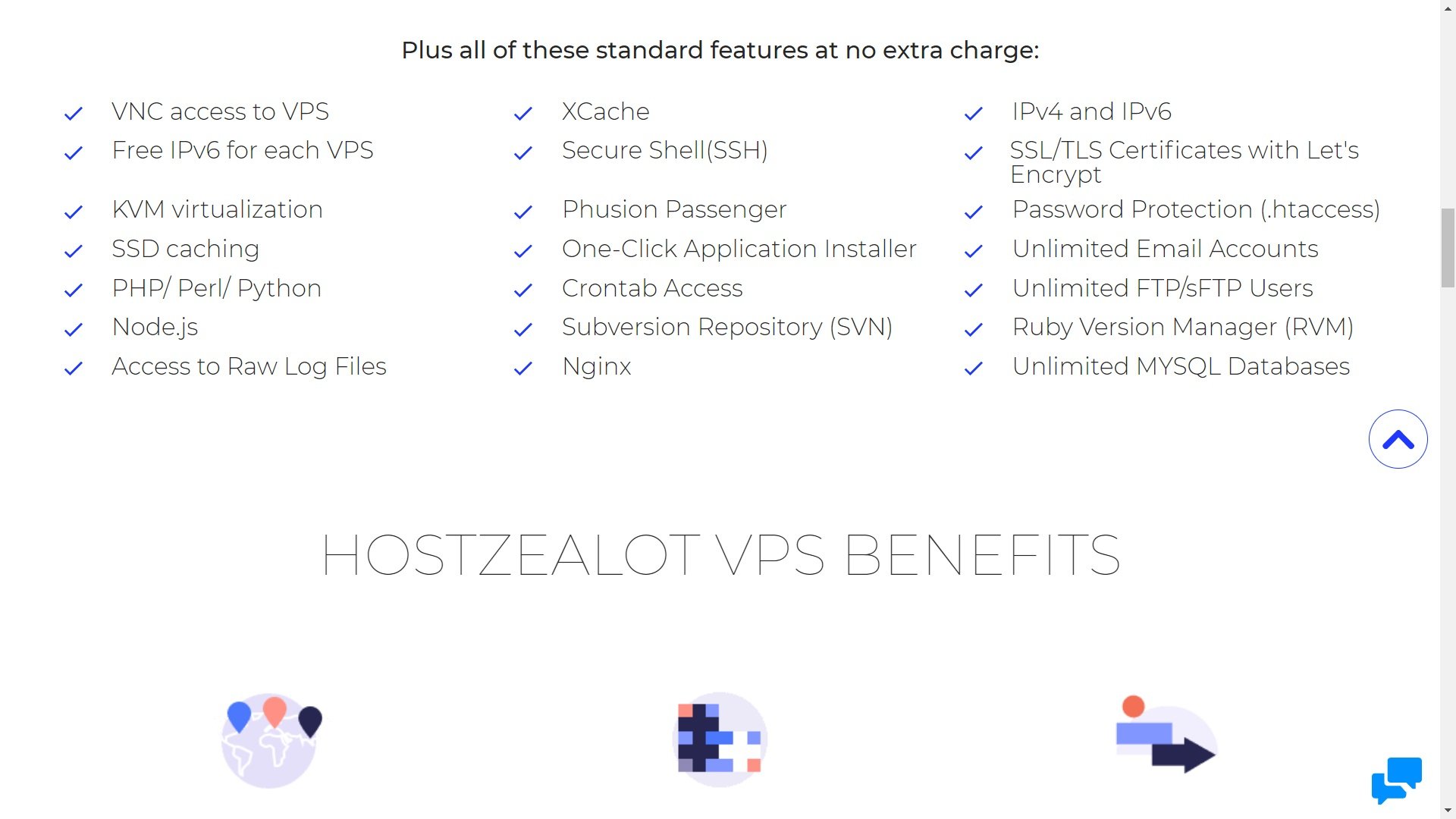
  • KVM virtualization
  • SSD Caching with XCache
  • PHP, Perl, Python, Node.js
  • Nginx and Apache server
  • High-performance hardware with either Intel Xeon CPU + SSD hard drives or AMD EPYC Core CPUs with NVMe hard drives

They also provide a number of features that make accessing and managing your VPS easier:

  • Your choice of control panel: cPanel, DirectAdmin, ISPmanager, VirtualMin, etc.
  • Secure Shell (SSH) access
  • .htaccess with password protection
  • Phusion Passenger web app server
  • One-click app installer
  • Crontab access
  • Raw log files access
  • Subversion repository (SVN)
  • Ruby Version Manager (RVM)

And, other notable features include:

  • Unlimited bandwidth usage on all plans
  • Unlimited email accounts
  • Unlimited FTP/sFTP users
  • Unlimited MySQL databases
  • IPv4 and IPv6

The fact that many features come with unlimited usage means you don’t have to worry much about scaling. If you do run into caps, however, it’s easy to either upgrade or request more resources.  You can contact the HostZealot support team to upgrade your package to 8TB of storage, or more.

As a firsthand infrastructure provider, you can also request specialized setups like server clusters, colocated servers, or geo-diversified infrastructure. This can help you deliver faster and more reliable performance around the globe as well as make your systems more fault-resistant.

And, you can also always choose to upgrade to dedicated servers if you really experience significant growth.

Server Locations

HostZealot offers an excellent selection of server locations spread all over the world. In fact, there are more than 14 options spread across North America, Europe, and Asia.

The only major region not covered in Africa and South America.

The 14 server locations available to VPS customers are:

  • Amsterdam, NL
  • London, UK
  • Moscow, RU
  • Stockholm, SE
  • Warsaw, PL
  • Limassol, CY
  • Tallinn, EE
  • Ashburn, Chicago, Dallas, and Seattle, US
  • Toronto, CA
  • Hong Kong, HK
  • Tel Aviv, IL

Hostzealot: VPS Plans

It costs the same to host in any server location. However, VPS servers with NVMe hard drives are only available in Amsterdam and Warsaw.

Security

Many customers use VPS because it’s more secure than standard shared hosting. That’s because VPS hosting offers better isolation from others sharing your server.

It’s also worth noting that HostZealot uses KVM virtualization for their VPS. KVM is highly secure thanks to using security-enhanced Linux (SELinux) and secure virtualization (sVirt). This is also why they can promise 99.9% uptime.

Unfortunately, HostZealot doesn’t offer too many added security features out of the gate for VPS users. That being said, they seem to be a secure host as they haven’t experienced a noticeable hacking incident.

What’s more, HostZealot actually provides you with a free SSL certificate. This is notable because most VPS hosts don’t provide this for free. You can also purchase premium SSL certificates from HostZealot with 128/256bit encryption strength.

You can also securely access your server using .htaccess with password protection or SSH (Secure Shell).

However, other than that, you’ll mostly be responsible for the security of your own VPS server.

The exception is if you add a managed VPS service to your package. In this case, HostZealot’s security team will take responsibility for parts of your VPS.

In this case, they will handle proactive monitoring as well as OS/Kernel Security updates.

Performance

Speed and reliability are key to the success of your website.

If either suffers, you’ll be left with dissatisfied users, bad search engine rankings, or lost business opportunities.

Also, VPS hosting should be faster and more reliable than typical shared hosting. After all, that’s what you pay extra for.

First of all, HostZealot’s speed is really good. Using BetterUptime, we found that the average server response time was only around 200ms. That’s really fast.

Secondly, HostZealot is also very reliable. You often get days, or even an entire week, with 100% uptime. Over a span of 12 days, we registered an uptime of 99.9487%. The average uptime for hosting today is around 99.5%.

HostZealot actually provides a 99.9% uptime guarantee. So, it looks like they are true to their word.

So, while it’s not the best, it’s better than the majority of hosts.

In the screenshot below, you’ll see we experienced 11 days and 8 hours of uninterrupted uptime:

image3

With 14 servers to choose from across the globe, you can pick one that’s closest to your audience. The servers also run on ultra-fast SSD or NVMe hard drives.

Customer Support

HostZealot provides 24/7 support to all their customers, regardless of their hosting plan. They can be reached via live chat, email, Skype, a ticketing system, and even via call-back.

This is a huge range of options that not all hosting providers have.

Also, HostZealot is usually very highly rated by its customers. It has a 4.7 rating on Trustpilot with many reviewers praising their customer support.

You can also use the enormous knowledge base if you’re more into self-help. The articles are broken down into logical categories so it’s easy to find what you’re looking for. Most of the articles are step-by-step guides or tutorials with helpful images to guide you.

Hostzealot: knowledgebase

The quality of HostZealot’s support services is guaranteed by their SLA. Customers even get “Response Time Credits” for each hour that they do not get a response over the maximum response time limit.

Depending on your Remote Hands/Service Level, this limit varies from 30 minutes to 24 hours. So, it’s safe to say that you should get a response within one day max, regardless of your hosting plan.

Wrap Up: Who is HostZealot VPS Hosting Best for?

HostZealot is best for those who are new to VPS hosting or who have basic requirements. They don’t offer the most advanced features or plans with huge resources.

However, they cover all the basics at a very affordable price and have a superb reputation. You can also choose from a number of operating systems, control panels, and add-on services. All-in-all, it’s a solid VPS hosting option that anyone can consider.

Hence, they seem to be ideal for individual projects and small-to-medium businesses.

Pros

  • Free SSL certificate
  • Unlimited bandwidth
  • Affordable pricing
  • Choose from 14 global server locations

Cons

  • No refunds/money-back guarantee
  • Not the most scalable out-of-the-box plans

Visual Web Technologies review: How good is this Indian web host?

Visual Web Technologies was founded in 2014 and based in Punjab, India.

They provide hosting services and claim it to be the leader in cloud SSD hosting.

So, we at HostingPill decided to review them and give our frank opinion.


Oct 29, 2021

Uptime

Performance

Value for money

Customer Service

Overall Rating

VisualWebTechnologies is a fully equipped reseller hosting platform. Fast and secure! Amazing reseller hosting company update server fast speed and seo optimized so i recommended to everyone. If you need help with whatever issue you may have, the support will be there for you without making you wait.