7 Best Blog Name Generators of 2025 (Personally Tested)

Something we can all agree on is that blog names are difficult to come by and affect nearly every aspect of your website, which is why tools like Blog Name Generators are great to have in your toolset.

Though blogs have taken a lot in the market and what a person is looking for a blog name must have been the type of the same category that is present from before, finding a functional and attractive blog name for your blog becomes difficult.

Constant Contact Review: Read this before you go for it (2025)

The delusion regarding email and email services such as Constant Contact is ridiculous.

“It’s all about Instagram and WhatsApp,” they might say.

Well, not so fast. Email is still ENORMOUSLY popular, and in fact, stands as one of the best ways of contacting people.

Use Email

To be specific, it stands as one of the best ways of contacting large amounts of people to tell them about your site, cause, or organization.

You might have guessed, or already know that promoting through email can quickly become hard work.

7 Best Landing Page Generators of 2025

You can attract visitors in many ways. And Best Landing Page Generators can help you quickly set up a landing page.

A landing page is still one of the best ways to get viewers’ attention quickly and get them ready to buy your service or product.

So we made a list of the 7 best landing page generators.

hostingpillBest Landing Page Generators
  1. SITE123
  2. Wix
  3. Ucraft
  4. ConvertKit
  5. Unbounce
  6. SendPulse
  7. Zyro

1. SITE123

best landing page generators

SITE123 is a great landing page generator for both personal and business use. Its ready-made layouts, styles, and innovative wizard assists in building an excellent landing page.

Features

  • Add forms on your landing page to gather information.
  • Add your conversion code to track your conversions.
  • Track metrics that show how well a landing page works.

Pricing

It’s free forever. But you can get more value if you pay for a comprehensive plan upfront.

Pros

  • Add amazing pictures using SITE123’s royalty-free photo gallery.
  • Add a promotion module with an e-mail list.
  • Add administrators to a bunch of landing pages or participants to each landing page.
  • Quickly integrate Promotional tools, like Google Ads, Facebook Pixel, Optimizely and Hotjar.
  • Use free SEO services to get people to visit your mobile-friendly web page.

Cons

  • An official mobile app is unavailable on the Play Store and Apple Store.
  • It caters to small and medium-sized online stores rather than massive ones.

2. Wix

best landing page generators

Wix landing page suits themes like “Coming Shortly,” “Under Development,” and “Capture Leads.” But, several generators on this list are for growth marketers who manage paid traffic.

Features

  • Add your code and link to APIs from 3rd-party for more advanced features.
  • Link Wix Analytics to Google Analytics, Facebook Pixel, Google Tag Manager, and more.
  • Use A/B tests and heatmaps to track visitor behavior and boost conversions.
  • Wix Payments, PayPal, and others are among the 50+ ways to pay globally.

Pricing

It’s free. Test any Wix Premium Package for 14 days and get a complete refund if you don’t like it.

Pros

  • It comes with more than 30 templates to pick from.
  • Build several different sites, from e-commerce to portfolios and beyond.
  • Wix Video Maker – make promotional videos, product presentations, or social media posts.
  • Wix Marketplace lets you look at clients’ solutions, portfolios, and testimonials. You can interact with organizations and freelancers you want to work with.
  • All Wix sites are simple to launch.

Cons

  • It has fewer options than the others on this list.
  • Some plans have limited bandwidth and space.

3. Ucraft

Ucraft

Thousands of satisfied brands, freelancers, and bloggers use Ucraft for campaigns. It includes a powerful editor that lets you drag and drop things. Start with six simple steps.

Features

  • Choose from more than 30 landing page templates that you can change.
  • Use leading marketing tools like MailChimp, Hello Bar, Typeform, Algolia, Mandrill, etc.
  • Add form/membership elements in getting client information or e-mail distribution lists quickly.
  • The support team is available via live chat and e-mail 24/7.

Pricing

It’s free and suitable for business owners. Ucraft has affordable professional plans and might be worth giving a shot at.

Pros

  • Ucraft has an advanced landing page generator that makes it simple and looks good to the last pixel.
  • It offers a lot of add-ons for Social tools, Event management tools, Live chats, and Analytic tools.
  • You can put customers into groups like – VIPs, wholesalers, or return customers.
  • The Ucraft knowledge base is available to help you with guidelines on the features you need.

Cons

  • There are no A/B tests.
  • Paid plans are the only ones that offer various integrations.

4. ConvertKit

ConvertKit

The people who work on ConvertKit are all over the world. Yet, they all work toward the same goal: making landing pages and e-mails more accessible and powerful for professionals.

Features

  • Choose unique pictures from the 100,000+ images that integrate with Unsplash.
  • You don’t need to understand coding. But it still gave all our coders the option to use custom CSS.
  • It complies with GDPR.
  • Connect powerful analytics by adding Google Analytics, Facebook business IDs, or Segment.

Pricing

It’s free, but most of their plans depend on how many e-mail subscribers you have. Also, only paid memberships include Third-party integrations.

Pros

  • It lets you write your custom success messages.
  • Auto lead magnet delivery: Your audience gets helpful content, and you receive their e-mail address.
  • It’s convenient to use and draws people in because the designs are simple.
  • Change the Course Sign-Up landing pages as you add fresh content, and use them to get more people to sign up.
  • It has many integrations, including Shopify, Typeform, and Squarespace.

Cons

  • You get e-mail support and live chat with a paid subscription. But you get Community support with the free plan.

5. Unbounce

Unbounce

Unbounce is the best way to make and test personalized landing pages, site pop-ups, and sticky bars. So, increase your post-click conversions and start more campaigns quickly.

Features

    • It has over 100 templates to choose from.
    • It gives you access to more than 850,000 professional pictures free of copyrights.
    • Run an A/B test with ease.
    • For SEM promotions, dynamic keyword implementation is used.
    • Integrate WordPress.

Pricing

It’s free, but the subscription is expensive. During your free 14-day trial, you can use all the functionalities of the plan.Pros

      • AMP-ready pages for mobile.
      • Connect pages/pop-ups to prominent e-mail, CRM, and analytics like MailChimp and AWeber.
      • Landing pages have scripts, pixels, and maps.
      • Your bounce rates should go down because your pages load so quickly.
      • You can do special design functions like placing gradient shades on buttons. Also, compress pictures to make response time faster, provide image opacity, and more.

Cons

    • All plans have limits on the maximum number of visitors.
    • Paid plans are the only way to get integrations.
    • Costly, particularly if you need features made for businesses.

6. SendPulse

SendPulse

SendPulse is a marketing system for many channels that focuses on landing pages. Including e-mail/chatbot marketing, SMS initiatives, push notifications, CRM systems, and online courses.

Features

  • Use the multi-channel membership widget. It helps people who visit your page start talking to you in a way that works best for them.
  • Add buttons that connect to your chatbots.
  • Use Facebook Messenger/Telegram to send automated answers to viewers’ most common questions.
  • Install a payment method to start accepting safe online payments.

Pricing

You can generate a landing page for free that does the basics. Yet, it’s affordable and gives you advanced analytics with paid memberships.

Pros

  • Easy-to-use drag-and-drop generator.
  • If you add Google Analytics to the landing page, you can track how people use it and improve it to get more traffic.
  • Put links on one page to send people from social media to the blog or site.
  • By adding a Facebook pixel to your site, you can figure out how well your ads are doing and track what your visitors do. Also, sort them into categories based on their activities.

Cons

  • There should be more API integrations built.
  • For the initial e-mail, there’s a bit of a learning process.

7. Zyro

Zyro

Zyro is a landing page builder that is made for small businesses. So, create landing pages that are easy to change. Then, brand your venture with its AI tools.

Features

  • You can add or change any part of 100+ designer-made templates.
  • Optimize landing pages with AI Heatmaps to know where a primary call-to-action must go.
  • You can improve your branding by linking your landing pages to social media accounts.
  • AI Logo Maker could help you build a custom logo in no time.

Pricing

It’s cost-effective. All users who have an active plan will be able to try Titan e-mail for free for three months.

Pros

  • By default, its custom landing pages are set up to work well with search engines.
  • You can use the most common credit cards, debit cards, and other payment methods. From Mastercard, Visa, and Apple Pay to cash and more.
  • Need more time or skills to write SEO-friendly content? Its AI-based writer will create content within a few seconds.
  • Their comprehensive knowledge base has all the answers to your queries.
  • You will get automatic meta tags and fast loading.

Cons

  • It has limited customizability. Zyro may not be the best solution if you have particular page designs in mind.

So, What Is the Best Landing Page Generator?

It depends on what you do! We indeed like these seven choices. Yet, we like a few landing page generators, like Site123, for small and big businesses. Wix is a good option for entrepreneurs who need an all-in-one platform.

Most of the landing pages on our list have similar options. Some of the things they have to offer are A/B testing, drag-and-drop prototype, and customer support.

But if you want a landing page generator that has workable features, is easy to use, and is affordable, we recommend SITE123. SITE123 is a simple generator for beginners. It comes with various templates that can be used right away.

You can surely give it a try.

Happy Landing Page building!

Liquid Web VPS Review (2025): Worth Signing Up With Them?

Let’s talk about Liquid Web VPS in this review.

But first, hear me out:

In case you’re not familiar, Liquid Web is a bit different from the standard hosting company.

While a typical hosting company is a sort of jack-of-all trades that offers a basic range of hosting, particularly shared web hosting, Liquid Web specializes in managed, high-quality solutions.

Liquid Web still offers a range of hosting within those parameters, but those are the basics.

Within those basics, Liquid Web has become very popular:

liquid web vps-size

It may not be the biggest host around, but it’s a big presence in its specialty—one with a now-sizable reputation.

But if you need a managed, high-end hosting solution like VPS, is Liquid Web the right option for you? Is it overrated? Too expensive? Just right?

I’ll answer all those questions and more right here.

Let’s get started:

What is VPS?

Virtual Private Server/Servers, or VPS, are a form of hosting that exists as a sort of middle-ground between cheap and accessible, and high-end and expensive.

Shared web hosting is on the easy end of the spectrum: it’s cheap and gets the job done, but your resources are less private and more subject to performance issues because you’re sharing a server with many other people.

On the opposite end of the spectrum is dedicated hosting: renting out a whole server to yourself can deliver great performance, but requires a lot of tech proficiency. And a lot of money!

VPS is in-between these. Your resources are private, in a virtualized server—so you get better performance and security than basic web hosting.

But it’s still cheaper than dedicated hosting, while being able to scale resources smoothly.

But despite occupying a middle ground of sorts, VPS can still be tricky to manage.

There’s a learning curve involved in running a virtual server, and even when you have that down, basic administrative tasks can get time consuming.

That’s where Liquid Web comes in: as a company that specializes in managed products, the VPS plans are managed.

That means you just need to know the basics of what you need to run your site/project, and Liquid Web will handle the rest. You get the power of a virtual server, but none of the hassle.

Just about all the administration needed to run a virtual server is taken care of by them (though you’ll still have root access if you want it), letting you focus just on your sites.

With that cleared up, let’s dive right in to the good parts:

Liquid Web VPS: Pros

Pro #1: Top-tier performance

Performance is one of the main reasons people seek VPS hosting. And Liquid Web has strongly tied performance and quality to its brand.

So does it really live up?

I already gave away the answer. Let me talk about WHY Liquid Web’s performance is so good.

Check this out:

liquid web vps-cloud report

It’s from a report by a third party analytics firm. They evaluated the virtual processors (vCPUs) of different companies.

Basically, in a VPS or cloud solution, the vCPU performs essential tasks. The faster the processor can finish those tasks, the better performance users will experience on sites.

So basically, the analysis shows that the virtual processors that Liquid Web uses in its VPS and cloud plans performs faster than the other major, top-tier competitors.

You can check out the full report here.

Additionally, Liquid Web also guarantees its users 100% uptime. It’s a promise they live up to. And on top of that, they’re as fast as that chart up there would lead you to believe.

If anything’s certain about Liquid Web’s VPS plans, it’s that the most basic and important thing is done very well. Performance is excellent.

Pro #2: Secured data centers

This overlaps a lot with the previous point—it’s part of “why” performance is so good—but it’s also worth its own focus, since it pertains to security.

Consistent with its brand and marketing, Liquid Web’s data centers are very high-quality and well-looked after:

liquid web vps-data center

One of the best points here is that the data centers are privately owned. Here’s why that matters:

Most hosting providers have some base level of security at their data centers. It’s just an industry standard.

But often, the hosting companies themselves don’t actually own the data centers—third parties own and run the data centers.

Now, such third parties CAN be totally harmless.

But, from a security standpoint, the less hands your data has to pass through, and the more transparency you have about who handles your data, the better.

So Liquid Web stands out, not just for how it maintains its data centers, but because it owns them directly.

Pro #3: Generous resources

First, let’s just take a look at the four main VPS plans:

liquid web vps-plans-monthly

Even the first tier alone is very well-equipped to handle demanding websites:

40 GB of storage is a lot more than many people realize, and 10 TB of transfer means customers can support a large amount of traffic.

In fact, when you consider that the 10 TB allowance goes for ALL the plans, its value on the first tier is highlighted even further.

If you upgrade your site, it’s mainly because you want more RAM and/or CPU. Storage too, of course.

But what’s extra impressive: all plans allow unlimited websites (some first-tier VPS plans do limit websites with other companies), and an extra 100GB for backup is given for free.

Pro #4: Excellent customer support

This shouldn’t come as a surprise: mainly because it has to do with the nature of Liquid Web’s products.

As Liquid Web offers managed hosting, and as these VPS plans are managed, having good customer support is absolutely essential.

So, rest assured—support takes care of a lot of the basics that would otherwise make your VPS plan complicated.

But you can also contact support directly for issues or questions that do pop up on your end:

liquid web vps-support-contact

Representatives respond quickly and effectively. In fact, Liquid Web promises certain response times:

liquid web vps-support-contact2

And if you try it out for yourself, you’ll find those promises hold true:

liquid web vps-support-chat1

As you can see from the time stamps, the representative responded within almost exactly a minute, and with a satisfactory answer too.

But even aside from the excellent customer service representatives, there’s plenty of informational material available.

Most prominently, the knowledge base:

liquid web vps-support-knowledge base1

This is just a snippet of the knowledge base, but there are three main things I’d like to point out that should give you a sense of quality:

First: The article seen here is recent. This is a knowledge base that is continually updated and added to.

Second: The read time is 8 minutes. It’s useful to get a read time preview in itself, but more importantly, it shows us that these aren’t shallow articles. True, this is a “tutorial” from the tutorials category—so it’ll be longer than a typical article.

But it’s still a good sign of quality.

Third: Look at the category list on the right. There are HUNDREDS of support articles, covering a range of topics.

And in general, if you take a look through their knowledge base, you’ll find Liquid Web offers great informational support.

So when you look at customer support all-together, it’s very impressive:

Customer support works smoothly in the background to keep your managed service running, there are multiple ways of contacting reps, reps respond quickly and are helpful, and there’s loads of info on the site.

Pro #5: Flexible pricing

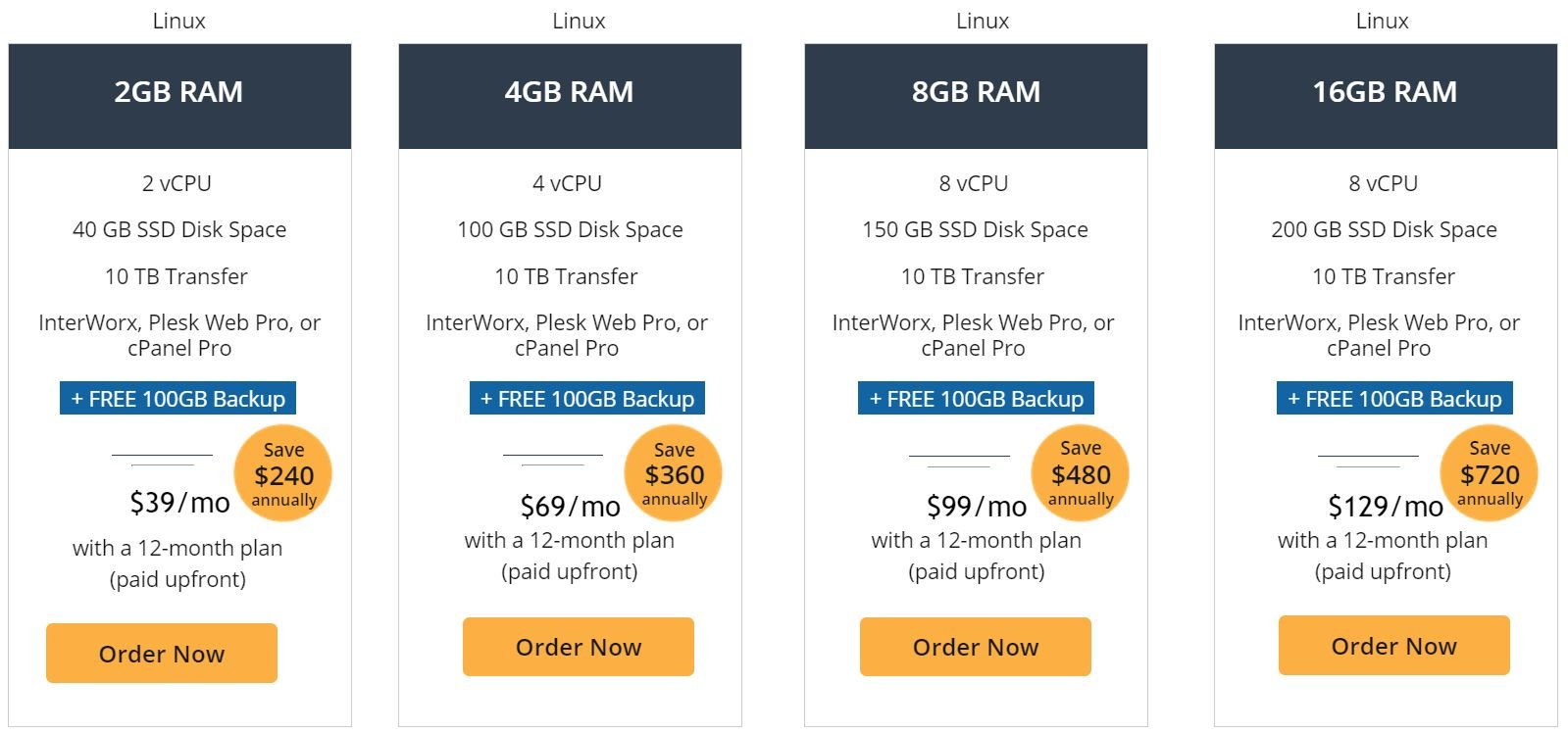
Let’s look one more time at the price tags for the four main plans (in this case, Linux, but it’s similar for Windows):

plans-annual

Those are prices if you pay up-front for a year of service.

BUT, you can still pay for plans on a monthly basis:

plans-monthly

It should go without saying that, in the long run, paying monthly is much more expensive. On every tier, you can save HUNDREDS of dollars if you pay annually instead of monthly.

But, what’s key here is that you at least have the CHOICE.

There are bound to be businesses out there that want the quality of Liquid Web, but can’t afford a year’s worth of service out of pocket. And there are going to be some people who need Liquid Web for projects that are important, but short-term.

Such people will, with this, be able to get the quality and features they want at a pace they can keep up with.

Pro #6: Choice of control panels

control panelsIt may seem minor, but it’s a pretty nice touch. Control panels make everything easier to run, even in a managed hosting environment.

And people may have a particular preference for a certain control panel, whether it’s out of familiarity (if your past experience is web hosting, you’re probably used to cPanel) or for practical reasons.

So props to Liquid Web for making sure that, even in managed VPS plans, customers can make themselves “at home” managing their sites and projects.

Liquid Web VPS: Cons

Con #1: May be pricey in general

It depends on how you look at it, and what your needs are. But, there are two things I want to make clear:

First, VPS hosting can be pricey, and managed VPS hosting is almost always pricey.

Second, when you take those things into account, and the other things Liquid Web gives you (quality support, resources, performance, etc), the prices are appropriate.

So relative to the market, Liquid Web’s prices are very reasonable.

However, that doesn’t necessarily translate to your bottom line.

Managed VPS hosting, especially at Liquid Web’s quality, is still going to be a bit expensive for a lot of smaller businesses—such businesses may need to consider what kind of hosting is best for them.

For instance, some may find that it’s better for them to figure out unmanaged VPS or cloud solutions, which can deliver similar results at lower cost. And people who just want to set up a decent site affordably can always check out higher-end shared web hosting.

But two pieces of good news:

1) You can get a lower price, and save money, if you use our special link to Liquid Web’s plans!

2) Liquid Web DOES have other plans aside from managed VPS—like managed WordPress, which is more affordable but still offers great performance.

Con #2: Specifically, Windows VPS is expensive

The previous point was intended to refer to Liquid Web’s VPS plans overall. But the Windows plans are just expensive even when you take some of the previous points into account:

plans-windows

Don’t get me wrong, it’s not insane relative to the market. Windows plans are almost always more expensive than Linux plans. But it’s still kind of high.

Con #3: Liquid Web VPS is not as flexible as self-managed VPS

This isn’t really an issue with Liquid Web specifically, but with the genre of managed hosting in general.

And it’s not inherently bad—after all, the point of managed hosting is to reduce complexities for the customer.

But it’s worth pointing out nonetheless for people who may not realize what their options really are.

Some people, and small businesses, may be better off handling the learning curve for VPS themselves, and acquiring a self-managed VPS plan.

The benefits of this would include lower costs (as I mentioned), but also a greater ability to customize a package with the right amount of resources at checkout; more flexibility in adding resources; and often, an ability to pay per use rather than a fixed price per month.

Again, it’s not really a flaw of Liquid Web’s, just a natural limitation in the overall format that may not be great for some interested readers.

Do we recommend Liquid Web VPS?

It’s actually pretty easy to answer the question you’ve all been waiting for.

There are just two conditions:

First, do you want managed VPS hosting in general? Second, would you pay those prices?

If the answer to both of those is “yes,” then Liquid Web easily gets my recommendation. It does everything else right.

More than just “right,” in fact, with performance and customer support in particular being of exceptional quality.

But hey, don’t take my word for it!

The best way to know if Liquid Web’s VPS plans are for you is to just use them. Remember—you can pay for just a month of service!

Happy hosting!

Submit review

Submit a short but detailed review and get FREE link to your website.

Review Title

Ratings

Uptime

Performance

Value for money

Customer Service


Overall Rating

Upload image (Optional)


Flywheel Review: Is It Secure & Affordable Host For You? (2025)

Flywheel exemplifies one of the best things about the hosting industry:

Its diversity.

While the most famous hosting companies have a wide range of hosting options, there are also a lot of smaller companies that fill a huge range of niches.

Flywheel is one of those smaller companies that targets one specific area. And that area?

Managed WordPress hosting. In other words, hosting made for WordPress, in which the host also manages the more frustrating ends of WordPress for you.

Flywheel may not be the biggest hosting company, but it’s got a strong reputation within its niche, with some high-profile customers:

So is Flywheel your knight and shining armor, the perfect company you’ve been waiting for?

Or is it a big fish in a small pond, or even just overhyped?

I’ll answer all those questions, and more, right now. Let’s start with Flywheel’s good points:

Flywheel: Pros

Pro #1: Great performance

Performance is essential to evaluating any hosting plan. So how does Flywheel do?

The answer, luckily, is simple: yes!

Flywheel offers a lot of features that boost speed. I’ll talk about them again later, but these include a content delivery network (CDN) and caching, which seriously boost speeds.

On top of that, Flywheel uses Google’s Cloud platform as the basis for its hosting infrastructure:Flywheel-cloud platform

Usually, Google’s Cloud Platform only serves enterprise-scale clients.

So this way, you get access to the same, super reliable infrastructure that hosts major services like Spotify and Goldman Sachs.

So it should be no surprise that Flywheel’s uptime and speeds are so good.

Pro #2: Good pricing

We all care about the price tag at some level, even if some of us are willing to invest more or less in our sites.

The thing about managed hosting is that it’s generally expensive, at least compared to shared web hosting that works with WordPress.

And it can also be pricey compared to some cloud or VPS solutions. A lot of people would be more likely to take up managed WordPress hosting if not for the price it usually costs.

So it’s with that in mind that we’re judging the pricing.

Flywheel has just four plans:Flywheel-prices

Given the context that I described, these are pretty good prices.

The overall range is normal. But the starting price specifically is notably lower than what a lot of competing managed WordPress plans offer.

A lot of rival plans will START in the $20 to $30 range.

Another great thing about Flywheel’s pricing is that the plans can be paid monthly. Frankly, paying on a monthly basis isn’t THAT much more expensive than paying for a year in bulk.

This is excellent, as there are many people who would prefer to pay on a monthly basis because they can’t afford a bulk purchase out of pocket.

So the pricing is overall pretty good—it’s at least average for the higher tiers, and has lower starting options than is common. Plus paying is flexible.

Of course, we can’t fully evaluate price without knowing what we get for the prices:

Pro #3: Strong features

First, a look at the overall features for the different plans:

Flywheel-plan features

The resources allocated to the plans may seem a bit low at first. Personally, I’d like to see more generosity when it comes to storage and bandwidth.

However, there’s a very important thing to note here:

These resources are dedicated to the account holder. In other words, it’s not basic web hosting, where your resources are less private and don’t perform as well because you share a server with other customers.

So because your server resources are of a higher quality, it’s natural (and in line with the competition) to have resource constraints on the lower side.

Anyway, aside from that, each plan comes with loads of features.

For starters, there’s a lot of great performance-related features that come with ALL plans:

Flywheel-features2

These aren’t just common features either, by the way. FlyCache is caching geared specifically for WordPress themes and plugins. The content delivery network (CDN) is provided by one of the industry’s best.

Plus, you get SSL and “auto-healing,” which auto-patches security flaws without taking the site offline.

Additionally, all plans get a great set of site creation and management features:Flywheel-features3

Of special note here:

You can make Blueprints, which let you save your theme and plugin configurations for one site to be used in future sites; staging sites let you create clones of your site to experiment with big changes; plus local environments for developing from your computer instead of just the internet.

All in all, the feature list is very impressive. It means that people buying the first or second tiers won’t lose out on too much, with resources being the main factor in Flywheel’s different plans.

Pro #4: Easy to use

Ease of use is essential to a managed hosting service, especially managed WordPress. After all, that’s the point of having a managed solution.

Luckily, Flywheel absolutely succeeds here.

As a managed service, it’s automatically easy to use by taking care of all WordPress related things.

But on top of that, Flywheel provides its own dashboard, which combines the features of a traditional hosting control panel with the features of a hosting account dashboard.

It’s also incredibly easy to add collaborators and team members from your dashboard:

Flywheel-ease of use-collaborators

Meanwhile, the advanced features related to site development that I talked about, like site staging, are also made very easy to handle through the dashboard’s simple interface.

All together, there really isn’t anything to complain about when it comes to Flywheel’s usability. It does this part flawlessly.

Of course, having good customer support helps:

Pro #5: Good customer support

As with an easy to use interface, quality customer support is one of the major advantages offered by a managed WordPress solution.

So how does Flywheel do?

Let’s start with the representatives. You can easily contact reps through ticket/email or through live chat.

In my experience, chatting with customer support is always very fast and helpful:

As you can see from the time stamps, this whole process took just a few minutes, with the representative needing little time to respond.

Flywheel also has solid informational material you can browse or search at your leisure.

This includes a solid set of video tutorials and tips:Flywheel-support-videos

As well as plenty of written articles in a variety of categories:

Flywheel-support-help articles

And that’s on top of other things, like ebooks and the company’s blog.

In fact, Flywheel has a lot more information available for customer support than most other managed WordPress-only hosts do.

A lot of these other managed hosts don’t provide extensive knowledge bases because they count on their representatives and easy interface to resolve all issues.

However, it’s always good to have information available for the customer to be informed and able to make the best choices. So here, Flywheel stands out.

Pro #6: Good security

If you’ll remember, Flywheel includes a lot of features that relate to security, like: SSL for every site; SSH gateway for managing sites; and the latest scripts (which also boosts performance).

Plus, in general, everything you do on Flywheel is encrypted, and Flywheel’s tech is regularly updated.

On top of that, Flywheel has security compliance certifications:

Flywheel-security-certifications

It might look short, since there are only two shown, but in reality they refer to a lot of certified security actions.

SOC2, for example, includes a range of practices—from network threat detection, to data protection, to reporting metrics, and so on.

Also, Flywheel uses Google’s Cloud platform, so the underlying infrastructure is definitely secure.

However, its features, digital practices, and security certifications go a long way in making it a more trustworthy provider.

Flywheel: Cons

Con #1: Updating plugins is extra

One of the biggest complaints people have about WordPress is about updating plugins.

Of course, plugins make WordPress a powerhouse CMS. But they also CONSTANTLY require updating, and when you have a lot of plugins, it can be tedious to attend to them.

So if you’re paying extra to have managed WordPress, my opinion is that the host should make some effort to offer automatic plugin updates.

There are a couple hosts that don’t include plugin or theme updates because it can risk causing issues with the site.

However, other hosts simply allow the option for automatic plugin updates, and give customers the ability to turn it off for the special cases that may require manual updating to avoid site issues.

While it’s good that Flywheel at least offers you the option, it’s unfortunate that it costs extra.addons

Proportionate to the price you pay for a given plan, it’s a bit frustrating. If you’re paying for the first tier, and you buy a year in bulk, that’s $156.

So $25 for automatic plugin updates for your single site means 16% of what you already pay for the entire managed WordPress service.

Con #2: Traffic and bandwidth limits

It’s very common for hosting companies to say how much traffic a paid plan can accommodate.

However, these are usually estimates, not hard limits.

But with Flywheel, the traffic numbers are actual limits, not simple estimates.

In fairness to Flywheel, you won’t be forced to upgrade automatically and your site won’t be shut down. Instead you’ll simply be billed overage fees for the traffic above your plan’s limit.

These fees are just $1 per extra 1,000 visitors. So it’s really not that much at all.

It’s also worth noting that the same thing is true for bandwidth and storage:

In the case of bandwidth, if you get a lot more traffic than your plan is supposed to handle, you’ll probably use a lot more bandwidth too. So you’ll have overage fees for that.

Meanwhile, storage is just an extra dollar per GB per month. So it’s not too hard at all to up your plan’s resources without upgrading.

So while this isn’t a huge deal, it is a tad frustrating.

Con #3: Flywheel is not great for customers on a tight budget

I know, I know—I already said that Flywheel has very good pricing.

And you know what?

I stand by that. It does…for a managed WordPress solution.

But, there are many people reading this who may be prioritizing price first and foremost.

If that’s you, be warned—if Flywheel looks too expensive to you, just about any other managed WordPress host will, too.

In other words, it’s not a big flaw of Flywheel itself, nor is it your fault for not wanting to drop cash on it. It’s just the nature of the niche that Flywheel is in.

Budget customers can still find hosting that’s optimized for WordPress though:

There are quite a few web hosting companies that are considerably cheaper, and provide good support or WordPress-related features despite not offering managed services.

You can check out my list of the best WordPress hosting providers here for more on that.

Flywheel Review: Do we recommend it?

After all that you’ve read so far, you deserve a straight answer.

The short version is, yes, I definitely recommend Flywheel.

The long version is:

Yes, I still recommend Flywheel, but not to people who are prioritizing overall price.

The thing about Flywheel is that, if you want a managed WordPress service, it’s excellent. It ticks off all the boxes, adds some more of its own, AND has good pricing relative to its competitors.

But if you don’t care about getting a relatively good cost, and just need a cheap host period, Flywheel is probably too pricey. It’d be worth checking out hosting that isn’t managed.

That’s the only real drawback though. Aside from that, Flywheel is good for pretty much everyone who wants WordPress hosting!

Of course, if you’re still not sure, don’t worry!

The best way to find out if Flywheel is for you…is to just try it, risk-free!

try free

MassiveGRID Review (2025): 5 Pros and 4 Cons After Using it

If you need a host that goes all-in on quality and reliability, MassiveGRID probably seems like a good option.

In the last 15 years that it’s been around, MassiveGRID has established itself as a high-end hosting provider.

It offers services to big clients, institutions that need to power large and essential projects, and so on:

massivegrid-featured clients

But believe it or not, MassiveGRID has more than just expensive, intense plans for top-dollar customers.

MassiveGRID also has options better for small-to-medium sized businesses.

So now the question is:

Is MassiveGRID good for YOU? Is it a hidden gem that can provide you top-quality hosting at a more affordable price?

Or does it neglect the things the little guy needs?

I’ll answer those questions, and more, right now.

Let’s start with the good stuff:

MassiveGRID: Pros

Pro #1: Stellar performance

Performance is a key factor to evaluating any host—many would say “the” key factor.

For MassiveGRID, high-quality hosting is everything. It’s the trait it markets itself the most on, and uses as a selling point to high-profile, sizable customers.

So it should come as no surprise that MassiveGRID has great performance:

massivegrid-performance2

This is all part of what MassiveGRID calls “high availability” hosting (the term isn’t unique to MassiveGRID, but that’s another topic).

You can read more about what their high-availability architecture actually means, but it encompasses a range of network, power, hardware, and storage practices/features that combine to offer highly reliable results.

The thing is, ALL of MassiveGRID’s hosting products are high-availability.

Meaning, while the cloud plans still have a higher degree of flexibility and performance than web hosting plans, the web hosting plans are ALSO part of the high-availability architecture.

In short, pretty much all plans are guaranteed this top-tier performance.

Pro #2: Good security

It’s not surprising when you consider what I said earlier about MassiveGRID’s high availability architecture.

But it’s not just performance that gets assured when this architecture is taken into account: it’s also the security.

There are different specifications for the various data centers, but they’re pretty much all good.

To give you an example, look at some of the security measures used in one of MassiveGRID’s London data centers:

massivegrid-security

Yes, an iris scanner! Like in action movies.

Or check out this list, for Singapore:

massivegrid-security1.5

Man traps? Guard patrols? Sounds good to me.

Now, I’ll be honest: not all the data centers have this level of security. But, they all have some great combination of security measures, architecture, and certifications.

For example, these are the certifications for the New York data center:

massivegrid-security2

These may not be comprehensible to you, but don’t worry. Many of these are in fact related to security. For example:

PCI-DSS means being properly certified to handle payment transactions—essential for companies hosting the websites of other businesses. SOC 2 Type II is a certification for storing customer data in the cloud, and so on, and so on.

All the data centers have most of these, which is great.

So all in all, despite variations among the data centers, you can be assured that MassiveGRID’s security is top-notch—and that you’ll be secure whatever location you host from.

Pro #3: Wide range of products, including high-end hosting

As I said in the introduction, MassiveGRID markets itself as very high-end, a reliable option for large institutions.

So it should come as no surprise that it’s got a solid array of products:

massivegrid-products

As you can see, most of these products are the high-end cloud variety that MassiveGRID is mostly associated with.

But it’s also got some products friendly to smaller businesses, aside from just web hosting—WordPress hosting, Magento hosting, etc.

a note on some of those—while they can still be suited for smaller businesses, they involve more customization, including just for the price. So there may be a learning curve.

Nonetheless, it’s nice to see a solid range of quality hosting.

Pro #4: Web hosting plans have good features

Let’s take a look at the overview of the features for these plans.

massivegrid-web hosting-plans1

Those are just the first three. There are three more:

massivegrid-web hosting-plans2

And there we go! It might seem like a lot to look at, but it’s actually quite simple:

Just about everything increases along the tiers. There are few constants.

BUT, probably the best point here is that the first tier alone gets 1TB of monthly bandwidth. That’s exciting, because it’s the STARTING point for all these plans, and only increases as you go up.

In contrast, typical web hosting plans will say they offer “unlimited” bandwidth but practically speaking will limit customers once traffic takes up a few hundred GBs of bandwidth.

Meanwhile, all plans also include:

massivegrid-web hosting-features

Some of these are standard for web hosting plans—for example, free SSL and cPanel.

But regular backups, free site restore, and DDoS protection are great additions and mean that even the first or second tier will be well-provided for.

We also can’t forget the point I raised earlier: performance. The performance for these web hosting plans is much better than that of typical web hosting plans.

And one of my favorite things is that each web hosting plan offers customers their choice of location for three cities:

massivegrid-web hosting-location

Sure, it may just be Europe and the east coast of the United States, but it’s something.

So all in all, the web hosting plans definitely have a solid offering of features.

Pro #5: Good customer support

MassiveGRID is a bit unique in offering premium support packages separate from default support.

But when you consider the price of this premium support ($100 a month, $300 a month, thousands a month), and who it’s intended for (major organizations), it makes sense.

Luckily, the default support that comes with each account for free is still pretty good!

We’re talking about server management (which I sort of count as a feature), and high-quality staff.

They are very knowledgeable and are able to help with most issues pretty quickly.

This customer support strategy DOES have a downside, but I’ll get to that later.

MassiveGRID: Cons

Con #1: Web hosting is pricey

Of course, “pricey” is relative. Relative to what MassiveGRID actually offers, I’d say the prices are very reasonable.

But in this instance, I mean “relative to most other web hosting solutions.” And relative to most other web hosting solutions, the price range here is steeper.

Let’s take a look:

massivegrid-web hosting price2 massivegrid-web hosting price2

Most other web hosting products, with other hosting companies, have a much smaller range as well—typically just three or four tiers.

There’s nothing wrong with having more options, of course. But:

Those extra options go upwards more than they go down. Meaning, there’s less focus on providing bottom-line affordable web hosting products.

The standard price for web hosting these days is somewhere between $2-$4 a month at the entry level, perhaps going to $12-$15 at a third-tier package.

So for people who are prioritizing price, this would likely be an issue.

Having said that, relative to what’s offered, these are still pretty good prices—the degree of quality, and especially bandwidth (which starts at 1TB a month) is noteworthy.

Con #2: Web hosting plans have low storage limits

Let’s take a look again at the storage capacities on these tiers:

massivegrid-web hosting-storage web hosting-storage

A typical web hosting plan, with another host, will usually START with 50GB of storage, often SSD (like MassiveGRID), and for a lower price point.

A typical web hosting plan on the smaller end may offer closer to 10GB or 20GB of storage—but that will still be at a much lower price point.

So compared to the norm, this means paying more for less storage.

Now, I want to be clear: the storage limits aren’t that unreasonable. They feel stingy compared to the typical storage limits on web hosting, but these plans AREN’T typical web hosting.

MassiveGRID’s web hosting plans aren’t the same as the shared web hosting that’s most common, because MassiveGRID’s web hosting plans are based primarily on a very scalable cloud infrastructure.

You can think of them as lower-end cloud plans if you want, but they’re still a tier above base shared web hosting.

So because of that—and because of generous features, like bandwidth—I say that MassiveGRID’s prices are still proportionately good and the storage is fair.

But for people who need both low-costs and generous storage, this set-up is not the best.

Con #3: WordPress plans may be too complicated for beginners

By this, I mean specifically the setup of the WordPress plans. Once WordPress is up-and-running, beginners should be as fine as they’d be with any host.

But first, let me explain how the WordPress plans work with MassiveGRID—because it’s a bit unusual.

There are two basic WordPress plans, both of which are managed.

wordpress hosting kit

As you can probably guess, the left package—the “standalone” kit—is intended for beginners, low-traffic sites, and those prioritizing cost.

The latter is for more resource-intensive sites, people who know what they’re doing, and people who are willing to invest to scale up.

But, that’s not the end of it. The pricing is, as I’ve discussed, pay-as-you-use.

wordpress pricing

Now, don’t get me wrong. I think this is great for flexibility.

But say you want to combine MassiveGRID’s quality hosting with the power of WordPress…and you’re not that experienced.

If that’s you, how much of that pricing table above makes sense to you? You might be able to figure out disk space, and external traffic, maybe the databases—but it’s a lot to throw at someone new.

Part of it is because the per-use pricing is based on the measurement of “cloudlets”:

wordpress-cloudlet

It seems simple enough with that explanation, but there’s a lot more to it in even this simple FAQ.

So you can see why I think beginners will find there’s too much pain involved in understanding how to set up and properly pay for even the “easy” WordPress plans.

Con #4: No live chat in MassiveGrid

This is mostly because MassiveGRID’s support strategy prioritizes quality far above quantity, and premium clients above all.

No hate towards that—it’s a fair approach.

However, it does mean that smaller customers don’t get live chat. In fact, even customers paying a lot of money don’t get guaranteed instant response times:

support

As you can see, a company paying $1,000 a month is guaranteed a response within an hour. But below that, it’s just “best effort.”

Again, the quality of this support is much better than that of a typical hosting company’s live chat. And it can still be speedy.

However, sometimes people have simple questions they can’t find answers to otherwise, and live chat can be a perfect tool for troubleshooting those.

Unfortunately, that’s not an option for a smaller business using MassiveGRID.

Do we recommend MassiveGRID?

Our moment of truth: is MassiveGRID something YOU should use?

Well, as always, the answer is…

“It depends.”

It depends, first on what you consider to be your priority in a hosting package.

There is basically zero doubt as to the quality and reliability of the product itself, the hosting. And the features are overall good, but they’re not jam-packed.

So the main trade offs here are the “extra” features that some hosts pack into their web hosting plans for value deals, and the very low price tags that some hosts pack in for minimal bottom lines.

If you need hosting that’s overall reliable, but doesn’t need to be perfect, and instead includes a ton of features—especially higher storage limits—at lower cost, then MassiveGRID probably isn’t worth it.

In contrast:

If your top priority is having a very stable site that can accommodate a lot of traffic, can scale up easily, and you don’t mind investing a little more…then MassiveGRID is a fantastic choice.

But if you’re still not sure, don’t worry!

You can just try MassiveGRID first, without any risk:

money back guarantee

Happy hosting!

Virusdie Review (2025): Pros and Cons after Using Virusdie

In this article, we will talk about Virusdie.
But first, hear me out:
Having good cybersecurity is more and more important these days.This is especially the case as more and more business gets conducted online: e-commerce is entering the new decade strong.So naturally, cybersecurity solutions like Virusdie are more needed than ever, and a lot are emerging to meet the challenge.

Virusdie is one of those security solutions. It’s fairly recent: the early stages of Virusdie emerged in 2012 and its first paid services launched in 2014.

So what’s unique about Virusdie?


Jul 27, 2022

Uptime

Performance

Value for money

Customer Service

Overall Rating

VirusDie is a straightforward malware scanning and monitoring tool. Having VirusDie on your websites is like having a good insurance policy. You can sleep with peace of mind. Not only does it help block and screen malware, but it also scans for problems and cleans up infected files. In my opinion, VirusDie hits the spot in terms of performance and ease of use. Everyone can and should use VirusDie on their websites. This is true for both individual business owners and agencies.

Shopify vs WordPress: Reviewed after 27 Days Testing! (2025)

Shopify vs WordPress – which one is better?

Don’t worry. I will tell you.

But first hear me out:

If you have been interested in setting up your own store online, you’ve probably come across these two heavyweights:

Shopify, and WordPress.

Shopify is one of the biggest commercial ecommerce platforms around:

shopify about

Over a MILLION business using Shopify, and $183 BILLION in economic activity.

BigScoots Review: 8 Pros and 5 Cons After Using it (2025)

BigScoots is not a major name in hosting. There’s a fair chance you haven’t heard of BigScoots, or if you have, you know very little.

Well, BigScoots has been around for a while—8 years, in fact—and during that time seems to have done quite well for itself.

It’s been generally received positively, and is one of the more niche companies: it offers only managed solutions, but with some unique plans.

The site is sleek and modern. The prices look okay at first. The company claims to perform well.


Sep 13, 2023

Uptime

Performance

Value for money

Customer Service

Overall Rating

In my journey of finding the perfect hosting service, BigScoots emerged as a clear winner. Their unbeatable uptime ensures my website remains accessible round the clock. The stellar performance they offer is simply remarkable, allowing for a seamless user experience. What strikes me the most is the value for money I get, coupled with outstanding customer service that is both responsive and efficient. I am thoroughly impressed with their dedication to ensuring customer satisfaction.
UNITED STATES
Andy
https://savingtoinvest.com/


Apr 05, 2021

Uptime

Performance

Value for money

Customer Service

Overall Rating

Thanks for the detailed review. Very helpful. Looking at them right now for Managed WP hosting and looks like a good (albeit a bit pricey) option. But peace of mind and higher security is definitely worth paying up for in today's world.
UNITED KINGDOM
Nicola Turner
https://icooktheworld.com


Mar 13, 2021

Uptime

Performance

Value for money

Customer Service

Overall Rating

Well, I can't sing Big Scoots praises high enough. I could have a much cheaper option because I have a very small blog but I wouldn't even consider changing. Big Scoots have THE BEST customer service I have ever come across (in my whole life) The help me if I am stuck with anything (even just if I'm a little slow with the "techy" stuff. They always respond quickly no matter what time you content them. I've tried 3 or 4 other small hosting companies and they don't even come close. If you are serious about your website and growing in the future Big Scoots are the company for you.
UNITED STATES
Marc
http://VitalDollar.com


Sep 09, 2020

Uptime

Performance

Value for money

Customer Service

Overall Rating

I've been using BigScoots for about two years and I've been extremely happy with them (probably the best host I've ever used, and I've used many). I'm on a WordPress hosting plan. BigScoots has been extremely reliable and I've had very few issues in the time that I've used their service. When I do have a question or need assistance, their response is very fast and they're always helpful. I wish there was an option for online chat support, but for now that is not available. However, their response time by email is so fast that it's not like I have to wait to get help.

5 Best Liquid Web Alternatives in 2025

LiquidWeb is one of the most powerful web hosting services right now. Touching shoulders with the likes of GoDaddy, Liquid Web amasses a huge number of managed hosting servers. They serve millions of clients, customers, and businesses worldwide.

BUT…

…all that flex aside, Liquid Web is primed for an update or at least a makeover because of the following issues:

  • Expensive plans (as they mostly emphasize managed & cloud VPS servers over shared)
  • If you happen to be from Asia or the Pacific, server latency will be an issue since most of their servers are located in the US or Europe
  • There are no bundled email services. If you want the service, you’ll have to pay extra for an addon

And for those reasons, you’re out. There’s nothing wrong with that. Liquid Web isn’t for everyone.

However if you’re ready to move on to something new & better, we have 5 interesting options for you to discover and try.

Let’s get to it.

Liquid Web Alternative 1: BlueHost

liquid3

We’ve been talking about Bluehost since time immemorial. Now either you can take a look at the Bluehost Review or get the short story. In short, their main game is in WordPress. The servers are super-optimized to handle WP code and they even offer managed services.

However, they indulge in Shared, VPS, and Dedicated hosting services as well. What’s worth appreciating is their emphasis on quality over quantity. Yes, you can get a dozen more features with a similar competitor.

But how often are you going to require unlimited bandwidth or SSH access to your server? The point is that Bluehost does what it says and is there for you (here’s some uptime stats) whenever you are in need of assistance through their in-house WordPress experts.

Features

  • Easy migration and 1-click WordPress Installation
  • Premium Cloudflare CDN Services and cPanel for every plan
  • 99.9% uptime numbers (backed by our stats as well)
  • SSL certificate, malware detection, and automated security updates
  • WordPress Website Builder
  • 24/7 customer support backed by WordPress experts

Liquid Web Alternative 2: MassiveGrid

liquid2

MassiveGrid is a popular name among cloud hosting enthusiasts. Since AI and cloud have been getting more & more closer to each other, your PaaS or SaaS projects can be housed here with high availability hosting.

Our MassiveGrid Review takes a pros & cons approach at the service after testing it for a few weeks. But in summary, MassiveGrid offers a stable infrastructure for your website and scalability for future expansion.

But why should MassiveGrid be on your mind? MassiveGrid is more technically oriented than a lot of other options on this list. You can get away with a shared plan here. But cloud and software enthusiasts could benefit the most from their services.

Features

  • Unlimited addon domains, subdomains, FTP accounts, MySQL DB, and email accounts
  • SSL certificates along with tier-4 data protection, and DDoS protection
  • Server hardware customization options
  • Litespeed server for high-performance
  • 24/7/365 expert customer support
  • 100% uptime SLA

Liquid Web Alternative 3: Dreamhost

liquid5

Dreamhost holds our 4th most popular choice for web hosting. But what truly makes it worth recommending is their long-time commitment to being affordable. Not cheap enough that you lose quality but a commitment to whichever plan tier you choose.

Of course, we have a Dreamhost Review that breaks down what makes Dreamhost a viable competitor to the likes of Bluehost since they both cater to the WordPress niche. As for cost, you need to understand that there is no fixed pricing with each plan. It all depends on the use.

Hence, there is a by-the-hour pricing policy which is great considering how much functionality can differ on a cloud server. Additional services include marketing, website management, custom web design, SEO marketing, and much more. Yes, that too at affordable rates.

Features

  • Let’s Encrypt SSL (for better SEO rankings)
  • Unlimited bandwidth and storage facilities
  • Free automated WordPress migrations
  • 1-click app installer for faster setup
  • Added privacy protection
  • Dreamhost control panel

Liquid Web Alternative 4: Bigscoots

liquid1

Bigscoots can help you manage your WordPress, Shared, Reseller, Cloud VPS, and Dedicated hosting servers with a team of tech experts. Their plans are short in description and fast in execution. Our Bigscoots Review expands on that firmly.

As a short verdict, Bigscoots is another one for the niche crowd that likes executing multiple projects at a pay-as-you-go cost. For example, you can pay $1/GB of storage in the total sum bill of your hosting server. This is great for enthusiasts with shifting needs.

However, there’s no lack of commitment for beginners. With shared hosting plans, you can have your service managed by an account expert. The expert will mind the entire process of migrating your site and installing any additional knick-knacks as you require.

Features

  • Enhanced security in the form of brute force protection, custom firewall, and spam-filtering
  • Proactive site monitoring and optimization
  • U.S. based management support
  • CDN for faster data loading
  • Daily backup priority
  • 99.9% uptime

Liquid Web Alternative 5: Cloudways

liquid4

Cloudways is more known as pretty much THE cloud hosting option. You can have plenty of niche choices like: WordPress, Magento, Php, and even Laravel as full-fledged hosting framework for your website. Now if you want apps, then Php is where it’s at.

Major players like DigitalOcean and Vultr provide servers through Cloudways, which means you can scale and customize your options without any issues. Plus if anything goes bad with Cloudways, you can simply take it up to the parent providers.

Our Cloudways Review has a few keen insights into their overall performance and usability. The biggest pro with Cloudways? NO CONTRACTS. That’s right. No signing up for a 2-year bonus payment schedule. You can pick it up and leave at any point.

Features

  • Unlimited cloud applications with huge support for Php apps
  • Managed security to tackle ever-changing situations
  • CloudwaysCDN for better page performance
  • 24/7/365 all-round customer support
  • 24/7 real-time monitoring
  • Custom control panel

Conclusion

By all means, Liquid Web is a great service for many people. Its huge influence and performance statistics are unmatched by many competitors. But that does not mean that you can’t go your own way.

Especially when it comes to cloud hosting, there are always areas worth exploring. Flexibility is Cloud’s prime selling point.

Look at it this way, all of the options mentioned in this list come with a 15-45 day money-back guarantee. This means that you can go on your own leisure exploring what and what does not work for your particular situations.

Now that you have viable options in your hand, why not let us know in the comments which ones interest you the most? Happy hosting!