Hosting24 Review: What I Like & Dislike Using it! [A+ server speed]

No matter how many web hosting options are available in the market, it is always great to know more. Each one has certain unique features that would fit your business requirements and budget.

A great way to hit the right hosting option is by remaining watchful about the trending hosting options and get a complete overview of it through a full hosting review.

Yet again I am here to provide you few insights and a review of different parameters for another hosting platform.

This time it is Hosting24.

Hosting24 was first officially launched in 2008 and has been around since 2004. This is headquartered in Kaunas, Lithuania.

Hosting24 is part of the Hostinger and 000webhost which has altogether 29 million users across 178 countries.

Next, let me speak out more about my review for Hosting24.

Submit review

Submit a short but detailed review and get FREE link to your website.

Review Title

Ratings

Uptime

Performance

Value for money

Customer Service


Overall Rating

Upload image (Optional)


3 Easy Steps to transfer your domain from GoDaddy to FastComet

This article will guide you to transfer your domain and files from GoDaddy to FastComet.

People usually want to switch from Godaddy due to pricing, support and/or server related issues. FastComet has cheaper pricing, better support and faster servers.

Caution: The following steps may lead to serious damage to your data if not followed carefully. If you are not familiar with the details, it may be a good choice to hire an expert.

We’ll show you the migration of your web hosting in three parts.

 If you have not purchased any FastComet package then refer my FastComet Coupon Code that saves your $82.

Part A: Relocate the domain from GoDaddy

Step 1: Open your GoDaddy hosting account.

Log in to your GoDaddy account and scroll down to the “All Products and Services” section.

all products and servicecs in godaddy

Now drop-down the Domains tab to see all your domains.

Step 2: Go to domain settings.

Choose the Manage option and go to domain settings.

godaddy domain settings

Step 3: Turn off the domain lock.

On the next page, check that you have disabled the domain lock.

godaddy domain lock

Step 4: Acquire the Authorization Code.

Note: Before asking for authorization code, make sure you have registered the correct email address with GoDaddy.

Click on the Get authorization code option.

godaddy authorization code

You will receive an email containing your domain information and authorization code. It will look similar to the following email.

authoraization code

Step 5: Select domain on FastComet

Login to fastcomet.com. Select the “Domains” option.

fastcomet domain

Click the Transfer tab on the next page. Now enter the domain name that you want to transfer and click on Check Availability.

check availability

It will show you the availability status of the domain name that you entered.

availability status

Now click on Add to Cart.

Step 6: Checking out at FastComet.

You will be redirected to the payment page where the order summary will be mentioned along with a few extensions for your domain. FastComet provides free DNS Management and Email Forwarding. You need to enter the authorization code that you received earlier.

fastcomet paymnet page

Scroll down to select the plan that suits your needs. Select the data centre location and the period for which you want to obtain the hosting services.

fastcomet hosting service

Click on the Update Cart option. Confirm your order on the next page.

After confirming your order, you will receive an email which will contain a link to authorize your transfer. Click on the link and then accept the transfer.

Step 7: Accepting domain transfer at GoDaddy.

Open your GoDaddy hosting account. In the Domain Manager, drop down the Domains option and select Pending Account Changes.

accept domain transfer at godaddy

On the next page, click on the link to accept the transfer of your domain. Wait for a few minutes to complete the transfer.

Part B: Transferring your Data Files

Step 1: Navigate to “All Products and Services” section and click on Manage All option beside Web Hosting tab.

godaddy hosting account

Now click on the cPanel Admin button. You will be redirected to your cPanel.

godaddy cpanel admin

Under the Files section, select FTP Accounts.

fastcomet FTP

Now add an FTP account and observe the FTP account settings.

ftp address

Step 2: Download the data files.

With the help of any FTP client such as FileZilla, download all the files containing your website data onto your computer.

Step 3: Upload files on FastComet servers.

Login to your FastComet account. Go to your cPanel and under the Files section, click on File Manager.

Fastcomet file manager

Now upload all the downloaded files to your FastComet servers.

Part C: Migrating your Database.

Step 1: Log in to phpMyAdmin.

Go to your GoDaddy cPanel and under the Database section, select phpMyAdmin.

godaddy-cpanel-phpmyadmin

Step 2: Export database from GoDaddy servers.

After opening the phpMyAdmin, click the Export option. You can choose the different databases that you want to transfer. You should export the databases in the SQL format.

Fastcomet phpmyadmin import

Step 3: Import databases into your FastComet account.

This procedure is almost the same as Step 2. Go to your FastComet cPanel and select phpMyAdmin option.

Fastcomet phpmyadmin

Now select the Import option on the phpMyAdmin page.

Fastcomet phpmyadmin import

Conclusion

You can easily transfer your domain from GoDaddy to FastComet by following these steps. It is always advisable to back up your data before proceeding with the transfer.

And if you are looking for some discounts on FastComet plans, you can claim your 30% OFF FastComet discount here.

How to Start My Podcast? (Complete Guide)

hostingpillBest Podcast Hosting Services
  1. Buzzsprout (My Favourite)
  2. Podbean
  3. Transistor
  4. Castos
  5. Ausha

Let’s talk about how to start a podcast.

But first, listen to this:

A piece of free advice – if you want to save the battery of your phone, listen to audio files rather than streaming videos.

Why are we telling you this?

Because what we are going to emphasize here on our topic is on PODCAST.

There are some of us who listen to radio and podcasts every day when they are at a cafe or on a train or in a car.

And there are some, who are inspired by these and want to start their own podcast. Are you one of them?

Good, we have prepared a guide for enthusiasts like you who want to start their own podcast show.

We will cover everything here right from which host you need to select till how you can monetize and grow subscribers of your podcast.

10 SEO Best Practices for Domains: How Your Domain Affects Your SEO

Besides setting up a beautiful and fast website, you need a reliable domain name. Coming up with a domain name must be one of your priorities. It sounds easy, but it isn’t.

Your domain name will serve as the foundation for your website. It will make you distinguishable from other websites. At the same time, your domain name will play an integral role in your website’s search engine optimization (SEO). No wonder a lot of experienced website owners want to find the best domain name for their sites.

To help you, I will share ten SEO best practices for domains!

1. Do a Domain Name Availability Search

Do a Domain Name Availability Search

I highly suggest doing a domain name availability search first before anything else. Here, you will have an idea of whether your chosen domain name is available or not. It will be frustrating to have a domain name in mind to find out later that it is already unavailable.

In case your domain name is already taken, you can start formulating new ones. And as you formulate a domain name, make sure to double-check the availability, so you can go back to choosing a new (and better) domain name. In the end, you want to find a domain name available for your site.

2. Pick a Reliable TLD

Pick a Reliable TLD

Most site owners will agree that a domain name that ends with “.com” is the best one. If you were able to find one that includes your preferred keyword, make sure to avail it. Why? It is the easiest and most remembered TLD by people. Since “.com” is commonly used, it also carries a better value than other TLDs.

However, using an uncommon TLD will not hurt your overall search presence. Remember that domain name is only one part that pushes your SEO boost. There are other factors to consider when aiming for the top page. You can start by checking out various tips for better website performance.

Though, “.com” still remains a desirable TLD thanks to aged brands. Most of the brands that rank higher in search pages use “.com” for their domain name. These websites have been using this TLD for a long time, cementing their reputation.

Note that “.com” is not the only TLD available. You have other choices such as “.org” and “.net.” If you want to secure the domain name for your site, the best way to do that is to register yourself as the owner.

3. Find a Domain Name That Includes Industry Keywords

Find a Domain Name That Includes Industry Keywords

No one knows all the details on how Search Engine algorithms work. These algorithms are a complicated process that seem to change every once in a while. However, one thing is for sure about the algorithm. It pays attention to the words used on your site page. And, your site’s URL weighs more in algorithm calculations.

A domain name that has the primary keyword gets a better SEO boost. For this reason, it follows that domain names with industry keywords are most likely taken. These domain names are either being used or being resold for a higher price.

However, if you are lucky enough to find a domain name with a primary keyword, make sure to take a second look before purchasing. Some of these domain names are not taken as they sound confusing or spammy.

4. Why Not Go For a Brand Name Keyword Instead

Why Not Go For a Brand Name Keyword Instead

There are few domain names with industry keywords available. However, these domains may be a bit expensive. So, instead of spending an extra hundred dollars on it, why not go for a brand keyword instead? A lot of site owners have been finding keywords with their brand names on them.

If you don’t have a brand name yet, you can find keywords related to your industry. You can start by searching synonyms or related words. However, you are free to choose the word that works for you.

5. Keywords Are King but Don’t Overdo It

Keywords Are King but Don't Overdo It

Industry keywords are not SEO shortcuts. Keywords are important, but it does not excuse you from overusing them. Some site owners want an immediate result, but this is not always the case.

As mentioned, the SEO algorithm changes from time to time. So, don’t expect your domain name “cheapshirts.com” to keep popping up every search. Google does not give a site a high ranking in the search results only because of the domain name. Sites that provide value to the visitors are ranked highest.

So, in choosing a keyword for your domain name, pick one that has SEO value. Once again, do not overdo the use of keywords. Find the keywords that will fit your brand. Look at it from the perspective of a potential audience. They want to visit a site with a respectable domain name on it. Not a website that has a sketchy-sounding domain name.

6. Create a Domain Name That Everyone Will Remember

Create a Domain Name That Everyone Will RememberRemember, the best domain name is one that your visitors can easily remember. It is something they can immediately search for when they want to visit again. Even though you might have the most keyword-focused domain name, it could be either too wordy or complicated to be remembered. So, most likely, people will forget about your domain name.

Find a perfect balance for your domain name by thinking of your audience. Will your visitors remember your site after leaving?

7. Make It Straight to the Point

Make It Straight to the PointIn connection to what was mentioned above, make your domain name straightforward. It would be better if you were able to create a simple and short one. People prefer typing short URLs to longer ones. Shorter domain names are easier to remember.

And by now, you notice that most popular sites have short domain names. When I say make it straight to the point, it does not mean your domain name is summarizing your site. It should just be sufficient that it provides an idea of what your brand is.

8. Maintain Your Site on One Domain

Maintain Your Site on One Domain

Building authority on one domain name is already difficult. So, imagine having multiple domains for your website. More likely than not, you do not need more than one. Spend your time (and money) building value on your website.

Pick the best domain name for your website, and be consistent in using it. You could use another domain when you are planning to introduce another set of products. Just remember, having multiple domain names doing the same thing can confuse visitors.

9. Avoid using Hyphens

Avoid using Hyphens

As a fast rule, avoid using hyphens for your domain name. Your returning visitors may remember your domain but forget about the hyphens. It can lead them to visit another site with a similar name as yours.

At the same time, hyphens tend to correlate with spammy behaviors. However, if you really want to use a hyphen, then limit it to one.

10. Don’t Overthink Your Domain Name

Don't Overthink Your Domain Name

Lastly, do not overthink your domain name. Assuming you were not able to come up with a name immediately, that is okay. Most hosting sites offer free domain names. You can change it anytime afterward.

Sometimes, site owners change their domain name. Some of them do it as they want to rebrand their site. As for the age of your domain, it does not really affect your SEO. Regardless if your domain name is a six-month or ten-year domain name, it does not matter.

Conclusion

Your domain name will serve as the main face of your site. At the same time, it can affect your site’s overall SEO success. And, if you’re struggling with coming up with one, just follow our tips.

Remember, a great domain name must have the following: memorability, simplicity and brand. In the end, you wanted visitors to remember your site. And as mentioned, you cannot have the best domain name immediately. So take your time, and learn what will work for you.

3 Easy Steps To Transfer Domain from Godaddy to Namecheap

Here is an article to help you transfer your website from GoDaddy to Namecheap.

GoDaddy to Namecheap Transfer Steps:

diagran

Below steps are Technical in nature. Any incorrect changes done to the server may result in serious data loss and more.

So, if you would rather have an Expert migrate it for you, you can hire them

How to Fix SSL Connection Errors (7 Easy Fixes Explained)

A standard security solution for encrypting information between a visitor’s browser and your website is an SSL certificate. Visitors feel safer on SSL-encrypted sites because it helps keep sensitive information like passwords and payment information secure. In addition, the HTTPS in the URL and the padlock icon in the address bar are indicators that the site is encrypted.

While browsing the internet, you may face a variety of SSL connection issues. Some of these errors are caused by server-side issues, while issues with local setup cause others.

ssl error

Broadly specifying, the SSL connection errors will prevent you from browsing a website securely over the Hypertext Transfer Protocol Secure (HTTPS). Your browser may allow proceeding with the connection, but in most of the cases, it’ll tell you that you’re doing so at your own risk. Without a valid SSL certificate, hostile parties can intercept any data you exchange with the website you’re trying to view.

How to Resolve SSL Connection Issues

When you receive an SSL Certificate error notification, there are numerous options for resolving the problem. If the first fix fails, move on to the next. You’ll eventually be able to solve the issue. Here is a list of the seven best fixes that you must try to resolve the SSL connection error.

Fix 1: Correcting the device’s data and time settings.

This may appear to be the most straightforward and most obvious remedy, but customers commonly encounter this issue because their date and time settings are incorrect. So, make sure that the data and time options are configured to update automatically. This will keep your date and time settings up to date at all times.

You can also manually correct the date and time settings in your desktop by following the given steps:

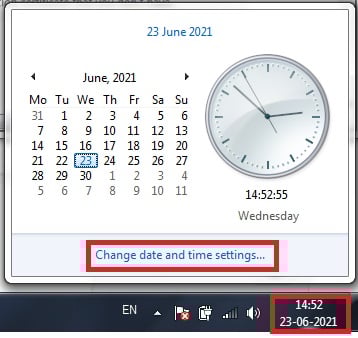
Step 1: Click on the bottom right side of the PC, where the date and time are visible.

ssl fix1

Step 2: Click on “Change date and time settings” and then click on the button to “Change date and time.”

ssl fix11

Step 3: Set date and time and click on “Ok.”

ssl fix111

Fix 2: Checking the internet connection.

An SSL error can also occur as a result of a problem with your internet connection. Follow the steps below to get started:

Step 1: Attempt to connect to SSL-protected websites via a different internet connection (i.e. other cellular data connection, another Wi-Fi network, etc.). If the error disappears, there’s most likely a problem with your online connection or internet settings.

Step 2: To see if the problem is with your internet connection or your device’s internet settings, test the connection with a few additional devices. If the SSL error does not occur on other devices, the issue is with your previous device’s internet settings. If it occurs on other devices as well, then something is wrong with the internet connection.

Fix 3: Clearing the browser’s data and history.

This SSL problem could be the result of your browsing history and cache. The only method to get around this is to remove your internet history. Here’s how to go about it:

Step 1: Click on three vertical dots at the top right corner of the browser and then click on “Settings” from the drop-down menu.

Step 2: Next, select the option stating “Privacy and Settings” and then click on “Clear Browsing Data”.

ssl clear browser step1

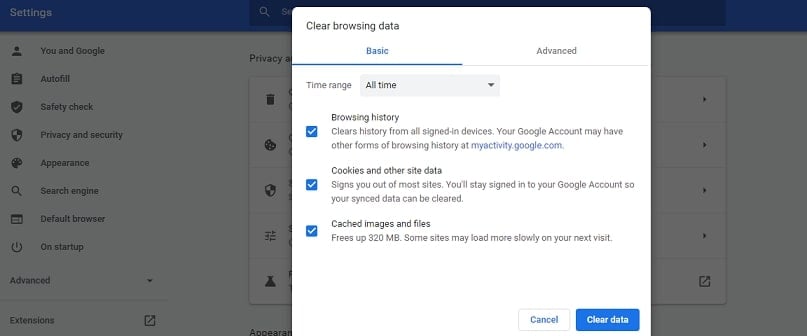
Step 3: Check all the three boxes available, select the time as “All time”, and then click on “Clear data.”

ssl clear browsing data and cookies

Fix 4: Disabling the antivirus.

One of the most prevalent causes of SSL errors is antivirus software. Unfortunately, there is only one remedy to this problem, and it is only temporary. First, disable your antivirus software before attempting to access your website.

If you have an antivirus or a security app installed on your device, it may be interfering with the browser. SSL connection errors can be caused by any antivirus tool that has a feature to block unsecured or dangerous websites. Please disable it and try using the browser again.

Please keep in mind that disabling your antivirus solution is never a good idea because it leaves you open to threats.

Fix 5: Visiting the website in Incognito mode.

If nothing else has worked thus far, there is this remedy that you should attempt. Although it is only a temporary solution, you should open the page in your browser’s private/incognito window. Here is how to do it:

Step 1: Click on three vertical dots from the browser’s top right corner.

Step 2: Click on the option stating “New Incognito Window” and try revisiting the website from here.

ssl black

Fix 6: Updating the browser or application.

This is another basic solution that is easy to ignore, yet it could be just what you’re looking for. Update your app/browser first, and then try revisiting the website. Here is how you can check and update the browser manually:

Step 1: Step 1: Click on three vertical dots from the browser’s top right corner and click on the “Settings” option.

check now

Step 2: Now, type updates in the search bar and click on “Check now” to check whether the browser is updated or not.

ssl update

Fix 7: Resetting the device.

This is the absolute last resort. So think long and hard about whether you genuinely want to go for it. If you reset your device, you will lose all of your data, so make sure you back it up before you slam the hammer down!

Conclusion

Several factors could cause an SSL certificate that does not operate. Unfortunately, the final result is the same for visitors: a warning will appear in their browser window informing them that the website they are going to visit is not safe. However, it’s not the end of the world if your website receives an SSL connection problem. Although various circumstances can cause it, there are several things you can do to alleviate the pain.

GoDaddy Promo Code

PROMO
CODE
Code
WordPress Hosting for only $1* a month!
515 uses today
30%
OFF
Code
Save 30%* on New Products
420 uses today
PROMO
CODE
Code
Web Hosting for only $1* a month!
415 uses today
PROMO
CODE
Code
Super Savings! .COM just $.99*!
530 uses today
30%
OFF
Code
30% off on Domain Privacy
530 uses today
50%
OFF
Code
50% off on 12-month Economy plan
203 uses today

3 Easy Steps To Transfer Domain from GoDaddy to BlueHost

Here’s an article to help you transfer domain from GoDaddy to BlueHost.

We will also show you how to transfer website from GoDaddy to BlueHost.

In my previous article, I had touched upon few GoDaddy Alternatives if you are fed up with GoDaddy.

One of the alternatives that I recommended was BlueHost.

For all those who are convinced, I will show you how to transfer domain from GoDaddy to BlueHost. But if you want to transfer your website from Godaddy to Bluehost, I will show you that as well.

9 Email Marketing Secrets for Getting 3x More Subscribers

Every email marketing genius keeps a few secrets under their sleeve. From reducing bounce rates to increasing conversion rates, everything can be worked around as long as you have the right knowledge which can take a long time to master.

Email Marketing Secrets

If you’re only starting out, you will learn more along the way but if you’re stuck at the moment then you’ll need a few tips or tricks for an effective solution.

One great way is email marketing services that could reduce your workload without comprising productivity. If you have limited time on your hands then there’s nothing better.

But the secrets we intend to discuss today are gathered with much research and overall experience lent by many many folks in the industry. We decided to spill these so you can get in the rhythm of the rest of the community and be with the ‘pros’.

So keep reading to find out…

Create a Relevant Content Offer

Relevant Content Offer

Now what does relevant really mean? You see, your email can’t just be about 7 useful shopping habits for this summer. You have to have an agenda with it, something to commit to, something that has relevance to your target user’s interest.

For example, this same sentence can be rephrased as: 7 shopping mistakes to avoid this summer and then model your content after that. People are statistically more attracted towards precautionary titles and subjects.

And no, this isn’t cheating. You’re only making your content plausible to your audience. The offer here is to shape your content in a way that convinces a user into subscribing.

For example, your customers are stock traders. They don’t have a lot of time on their hands, so your content needs have simple vocabulary and a tight structure. Similarly, if your readers are travellers and have sufficient time so you can get as creative and whippy as you want.

Another thing is to understand your customer base’s consumption preferences and how they line up with what you’re offering. For example, you wrote a lengthy email on a monday and hardly anybody saw it due to being busy.

In which case, a friday should make more sense or a copy relevant to any upcoming holiday could be great too.

Put your opt-in form in the right place

right place

Opt-in forms form a direct connection between a subscriber and your website. You can track your subscription rate, bounce rate, and email list growth just with this one aspect alone.

The basic requirements being great content and the right opt-in form at the right place. The ‘right’ place is a tough subject because a viewer could come to your site for the first time looking to subscribe or the 100th time forgetting to subscribe.

Your sweet spot should be somewhere in the middle. It can’t be too obtrusive to give the impression of a try-hard but it should make your motive clear is the secret.

There are 2 ways to go about it:

  • Place the form at a cliffhanger statement
  • Place it in conjunction with some sort of incentive

A cliffhanger statement like: subscribe to our newsletter to see the rest of the story is an appropriate call-to-action for any kind of content and an incentive could be an exclusive sale, exclusive content, free shipping, ebooks, email courses, etc.

Convince Readers to Subscribe

email Subscribe

This is what the entire game is about. Getting someone to click on the subscribe button is the task of sheer intellect. It takes a combination of proper structure, quality copy, and strategic placement of an opt-in form to get a subscriber.

Regardless of how hyped up it is, here are a few things you can try:

  • Mention the number of your existing subscribers in the opt-in form as a popularity proof
  • Source some of your knowledge into an ebook that works as an incentive
  • Create a social group of like-minded individuals on any social media site or forum
  • Create anticipation but do not clickbait

Lastly, do not come off as a try-hard and put an opt-in form 6 times on your website.

Use Guest Posts in a Better Way

Guest Posts

Guest posts can give you the much-needed attention and traffic, once you tap into the right ecosphere. You can get exposure, create backlinks, and even authorize yourself as an expert.

A good strategy is first to observe other articles on your target blog and find out what they get right, how they place their keywords, what their bio gets right, and whether their tone is too informal. These figures can give you a clear idea for a better structure.

Here a few basic tips for your Guest Posting:

  • Use formal language only where necessary
  • Do not promote yourself and be compliant to the guidelines
  • Include all the internal and source links
  • Include a CTA at the end for comments

Use Better Opt-in Forms

Better Opt-in Forms

By better we mean, use a good combination of colors, themes, feel-good phrases, ask for a name within the form so that the reader feels more comfortable clicking the subscribe button.

If your website is about Yoga & Lifestyle then you can make the form with a mixture of greens and whites and ask a small trivial question about their diet meal preference. Now, simplicity is important too because you can overdo it so use as few words as you can.

Another way to make your forms better is double opt-ins. Single opt-ins get the job done but double ones make the guy remember you and you get a more engaged audience overall.

Create a Resource Hub

Resource Hub

Your target audience might need more than one reason to stick around. A resource hub can not only grow your subscribership but it can also grow your traffic with a good SEO strategy.

A good way to make your site resourceful is through pooling tons of guest posts. You can research topics that your audience might like and then create article posts catered to that.

Another great way would be to hire experts or professionals in a specific field for authentic content. Once, your website is populated with enough content, you can create an intuitive search bar for looking up any topic.

Use Contests and Giveaways

Contests and Giveaways

Contests and Giveaways are probably the best kinds of marketing in the way that it both creates anticipation and engagement at the same time. They are incredibly popular on Youtube and Facebook for tech-related channels.

A good contest or giveaway pitch starts with laying out parameters. You can ask for your users to submit something in the contest or simply layout certain actions to follow like sharing your post with a certain number of people or leaving a comment.

The second thing is promoting your contest itself so enough people know and talk about it. The more engagement and anticipation you create, the more traffic you can bring to your site.

Lastly, declaring a winner and promoting him/her on your website and social media to create more buzz around your website.

Create an Email Course

Email Course

Do you have something interesting to share with your experience in email marketing? Great! Put it in a course. Do you have extensive knowledge about email metrics and the science behind them? Put it in a course.

Email marketing is still quite in its infancy and millions of people like to try their hand in this trade but lack proper training. If you can offer an informative outlet for them to subscribe to, then you can create a loyal following of dedicated readers.

Once someone successfully subscribes to you, you can purpose your email course into a singular lengthy PDF or string of weekly emails.

A rather popular strategy is to offer a free course that covers a marginal but relevant subject that you can later hunch on to spring people into a more detailed, paid course.

Use Two-Button Pop-ups

Two-Button Pop-ups

Two-button pop-ups present a choice to the user: Are you sure you want to leave the site? Are you over the age of 18? Do you want to learn niche marketing secrets?

The most popular ones are the Yes or No prompts that force the user into a definite choice. You haven’t asked for an email yet which makes it interesting because you’re leading them with anticipation and then offer a destination for their email.

These can also be used to do affiliate product marketing, make splash pages, offer a different option, display a sale timer, a short FAQ section, and much more.

Conclusion

We hope you find these tips useful and grow your email marketing prowess. Indeed, some of these could take some effort to pull off but you’ll get there. Another thing to look out for is to implement each strategy with the correct time and patience.

Do not take things too seriously and tackle everything one at a time. Who knows, you might discover your own secrets. Let us know what you think down in the comments.

12 Best Unknown Web Hosting Companies You Haven’t Heard Till Now

Whether you are a business owner, who wants to set up his online presence, or you are an individual who is looking to start a personal blog, either the reason, you need to do your research to find the right web hosting companies.

And you really thought that choosing a web hosting is a no hassle event? Rethink! There are various instances where small and mid-sized groups retain their own web server.

Result?

Most of them just fail, because upholding and maintaining a web server turns out to be very expensive and highly time-consuming.

Solution? Look for the right web hosting companies.

They will manage the rest while you focus on other important tasks.

hostingpill12 Best Unknown Web Hosting Companies
  1. WebHostFace
  2. Fast Web Host
  3. SSD Cloud
  4. Sky Net Hosting
  5. Hostimul
  6. Yourlasthost.com
  7. Hostarmada
  8. HostItBro
  9. Host IT Smart
  10. A Small Orange
  11. 34sp
  12. LCN

Look beyond the likes of BlueHost and HostGator as we bring to you a well-researched list of top 12 web hosting companies about which you haven’t heard till now!